
Mobile Application Security
Introduction
Mobile devices are everywhere. We use them to bank, communicate, shop, and store some of our most sensitive personal data. For a red teamer, mobile applications are among the most interesting and rewarding targets to assess. Yet mobile security is often treated as a niche skill, something to pick up later, after web applications and network testing. This room is here to change that.
In this room, we will walk through the fundamentals of mobile application penetration testing together. We will look at how mobile applications are built, how testers approach them, and what kinds of vulnerabilities they look for. Rather than focusing on a single platform, we will keep things broad so that the skills and knowledge you build here apply regardless of the device you use.
Mobile application testing is not the same as web application testing, even though the two share some common ground. A mobile application has its own package format, its own permission model, and its own set of components that interact with the operating system and with each other. Understanding these differences is what separates a tester who can find surface-level issues from one who can properly pull a mobile application apart.
By the end of this room, you will have a solid foundation to build on, whether that means moving into platform-specific testing, picking up dedicated tooling, or tackling mobile security challenges on TryHackMe.
Learning Objectives
- Understand what mobile application penetration testing is and why it matters from a red team perspective
- Know how mobile applications are structured and what is inside a package
- Follow a clear methodology when approaching a mobile application test
- Perform static analysis on a mobile application package to find vulnerabilities
- Understand how dynamic analysis works and what techniques it involves
- Recognise the most common vulnerability categories found in mobile applications
- Apply static analysis skills in a practical CTF-style challenge
Prerequisites
Before starting this room, we recommend completing the following:
Some familiarity with how web applications communicate over HTTP and HTTPS will help you get the most out of the dynamic analysis task. If you have not used Burp Suite before, do not worry: this task is conceptual and no hands-on proxy work is required.
?Answer the questions below
- Ready to start learning about Mobile Security!
How Mobile Applications Work
Before we start looking for vulnerabilities in a mobile application, we need to understand what we are actually working with. A mobile application is not just a single file. It is a structured package containing everything the application needs to run: compiled code, configuration files, resources, and assets. Knowing what lives where inside that package is what makes a tester effective.
The Application Package
When a developer builds a mobile application, the output is a package file. This package bundles the application binary, a configuration file that tells the operating system how the application should behave, and all supporting files the application needs, such as images, fonts, local databases, and stored strings.
From a tester's perspective, this package is the starting point. If we can get hold of it, we can start pulling it apart before we ever run a single line of code.
The Manifest and Configuration File
One of the most important files inside any mobile application package is the manifest or configuration file. This file is the application's declaration to the operating system. It lists the application's name, version, requested permissions, and how its internal components are configured and whether they are accessible to other applications on the device.
For a tester, this file is a goldmine. Misconfigurations here are common findings on real engagements. These often include components that are unnecessarily exposed or permissions that are far broader than the application needs.
The Sandbox Model
Mobile operating systems use a sandbox to isolate applications from one another. Each application runs in its own container and, by default, cannot read another application's files or interact directly with its processes. This is a deliberate security control designed to limit the damage a malicious or compromised application can do.
As a tester, we need to understand the sandbox because it shapes the attack surface. If we find a way to break out of it, or if an application has been configured in a way that weakens its own isolation, that is a notable finding. Equally, understanding what the sandbox prevents helps us focus our attention on the areas where real vulnerabilities are likely to exist.
Application Components
Mobile applications are not monolithic. They are composed of distinct components that each serve a purpose and can interact with the operating system and other applications in different ways. Some components handle what the user sees on screen. Others run in the background, respond to system-wide events, or provide data to other applications.
What matters for a tester is that each of these components can be configured to be either internal (accessible only within the application) or exported (accessible to other applications on the device). An exported component that was not meant to be exposed is an attack surface. We will return to this in Task 6, when we look at common vulnerabilities.
Why Package Structure Matters
Understanding the package structure means that when we start analysing an application, we know exactly where to look. We know that configuration and permission information live in the manifest. We know that application logic lives in the compiled code. We know that strings, keys, and other hardcoded values often end up in resource files. This knowledge is what makes static analysis, which we will cover in Task 4, both systematic and repeatable.
?Answer the questions below
- What is the generic term for the file inside a mobile application package that declares the application's permissions and component configuration?
- What security model does a mobile operating system use to isolate applications from one another?
The Mobile Pentesting Methodology
Good penetration testing is not about running tools and hoping something interesting turns up. It is about following a repeatable process that gives you confidence that you have thoroughly covered the application. Mobile application testing follows the same principles, broken into four phases, with findings categorised according to the OWASP Mobile Top 10.
The Phases of a Mobile Penetration Test
A mobile application penetration test typically follows four phases:
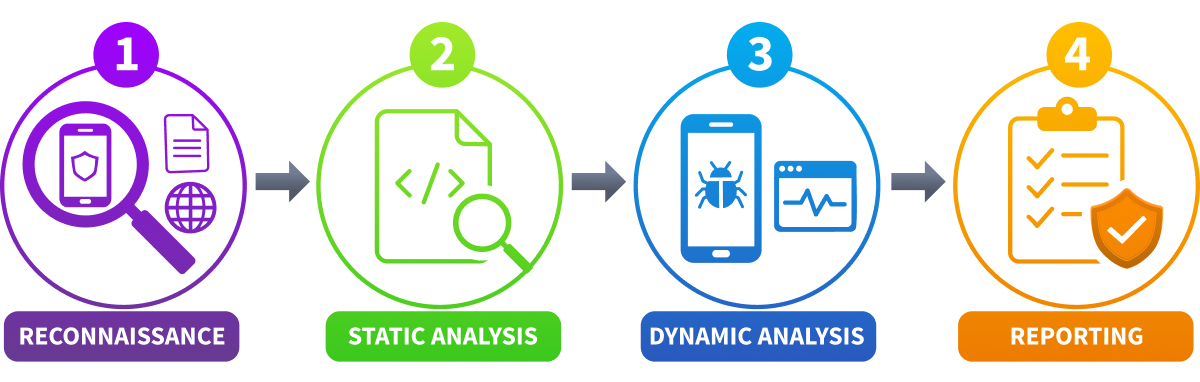
- Reconnaissance: The process of gathering information about the target application before we start testing. This includes understanding what the application does, who uses it, which backend services it interacts with, and where we can obtain the application package. The more context we have going in, the more focused and effective our testing will be.
- Static analysis: The examination of the application without running it. We unpack the package, read the configuration, inspect the compiled code, and look for visible issues without executing a single instruction. This phase is often where the quickest and most impactful findings come from.
- Dynamic analysis: Involves running the application and observing its behaviour in real time. We intercept the traffic it sends, watch how it handles data at runtime, and interact with its components to see whether they behave securely. This phase surfaces vulnerabilities that are only visible when the application is actually operating.
- Reporting: Where we document what we found, explain the risk each finding poses, and provide the development team with clear, actionable guidance on how to fix it. A finding that cannot be understood or reproduced is not useful to anyone.
The OWASP Mobile Top 10
The Open Web Application Security Project (OWASP) maintains a list of the 10 most critical security risks in mobile applications. This list is the closest thing the industry has to a universal checklist for mobile application testing, and we will use it throughout this room to categorise findings.
The current categories include improper credential use, inadequate supply chain security, insecure authentication, insufficient input and output validation, insecure communication, and insufficient binary protections, among others. You do not need to memorise the complete list right now. What matters is understanding that this framework exists, that it is widely recognised, and that mapping your findings to it helps communicate risk clearly to developers and stakeholders alike.
Testing Approaches
Not all mobile assessments are the same. The amount of information and access a tester has going in shapes the approach:
- Black-box testing: Starting with no prior knowledge of the application, as an external attacker would. You have the application itself and nothing else.
- Grey box testing: The most common approach in professional engagements. The tester has some information, perhaps credentials to test authenticated functionality or access to portions of the source code, but not full visibility.
- White-box testing: Gives the tester full access to the source code, documentation, and architectural details. This allows for the most thorough assessment but requires more time and context to do well.
Scope and Reporting
Before any engagement begins, the scope should be clearly defined. This means agreeing on which application versions will be tested, which backend environments are in scope, and what actions the tester is permitted to take. Testing outside of scope, even accidentally, can have real consequences.
When it comes to reporting, findings are typically prioritised by severity: critical, high, medium, and low. Each finding should include a clear description of the issue, the steps to reproduce it, the potential impact if exploited, and a recommended fix.
?Answer the questions below
- How many phases does a mobile application penetration test have?
- What testing approach gives the tester full access to source code and documentation?
Static Analysis
Static analysis is the process of examining a mobile application without running it. It is almost always the first technical step in a mobile engagement because it requires nothing more than the application package itself, and it often yields notable findings before a single line of code is executed. The steps below cover what we look for and how tooling makes the process faster and more reliable.
Obtaining and Unpacking the Package
The first step is getting hold of the application package. This might come directly from the client as part of a grey-box or white-box engagement, be pulled from the device itself, or be sourced from an application store. Once we have the package, we unpack it.
A decompiler is the tool we use to unpack the binary and convert it back into something human-readable. The output will not be identical to the source code. Still, it will be close enough to read the application logic, follow the data flow, and identify issues in how the application handles sensitive information.
Reading the Manifest: Android
With the package unpacked, the manifest file is the first place we look. As we covered in Task 2, this file documents the application's configuration. When reviewing it during static analysis, we are looking for:
- Over-requested permissions: Does the application ask for access it does not appear to need? Broad permissions increase the potential damage if the application is compromised.
- Exported components: Are any activities, services, or data providers marked as accessible to other applications when they should not be? An exported component that handles sensitive data or privileged actions is a direct attack surface.
- Insecure configuration flags: Some settings in the manifest can weaken the security posture of the application if left at insecure defaults.
Reading the Manifest: iOS
On iOS, the equivalent of the Android manifest is Info.plist. This property list file serves the same purpose: it declares the application's permissions, configuration settings, and behaviour to the operating system. When reviewing an iOS application, we look for the same categories of issues.
Insecure configuration flags are particularly worth noting on iOS. One of the most common is the NSAllowsArbitraryLoads key within the NSAppTransportSecurity dictionary. When set to true, this flag disables Apple's App Transport Security, which normally enforces HTTPS for all outbound network connections. An application with this flag enabled can communicate over unencrypted HTTP, which directly maps to OWASP M5: Insecure Communication and M8: Security Misconfiguration.
Hunting for Hardcoded Secrets
One of the most common findings in mobile static analysis is the presence of hardcoded sensitive data. Developers sometimes leave API keys, passwords, encryption keys, or internal URLs directly in the application code or resource files. Once an attacker has the application package, extracting it is trivial.
We look for hardcoded secrets in several places: in the compiled application code after decompilation, in string resource files, in configuration files bundled with the package, and in any local database files included in the assets.
On iOS, .plist property list files are a common location for sensitive data. These files are included directly in the application bundle and are fully readable once the IPA has been unpacked, making them just as risky as any other hardcoded secret.
A simple search for common patterns, such as strings that appear to be API keys, tokens, or passwords, is often enough to quickly surface these issues.
Using MobSF for Automated Scanning
Manual static analysis is thorough but time-consuming. Mobile Security Framework (MobSF) is an open-source automated tool that performs static analysis of a mobile application package and produces a detailed report covering permissions, hardcoded secrets, insecure configurations, and more. It works across both major mobile platforms, making it a strong starting point for any mobile engagement, regardless of the device type being tested.
We use MobSF to get a quick overview of the application's security posture before we dive into manual analysis. It will surface the obvious issues quickly, letting us spend our manual effort on what an automated tool might miss, such as business logic flaws or subtle data-handling issues in the application code.
Mapping to OWASP Mobile Top 10
The findings from static analysis typically map to the following OWASP Mobile Top 10 categories:
- M1: Improper Credential Usage, hardcoded credentials, API keys, and tokens found in the application code or resources.
- M8: Security Misconfiguration, over-requested permissions, exported components that should be internal, and insecure configuration flags in the manifest.
We will see these categories come up again in Task 6 when we walk through the full vulnerability picture.
?Answer the questions below
- What is the name of the open-source automated tool introduced in this task for mobile static analysis?
- What OWASP Mobile Top 10 category covers hardcoded credentials found in application code?
Dynamic Analysis
Static analysis tells us a great deal about a mobile application before we ever run it. But some vulnerabilities only appear when the application is actually operating. That is where dynamic analysis comes in. This task is conceptual. You will not need a lab or any tooling to follow along, but you will come away with a clear picture of what happens during this phase of a mobile engagement.
Dynamic analysis means observing and interacting with a running application. Instead of reading the code, we watch what the application actually does: what data it sends over the network, how it stores information on the device, what it writes to logs, and how it responds when we probe its components directly.
The key difference from static analysis is that dynamic analysis deals with behaviour rather than code. An application might look secure on paper, but handle data insecurely at runtime. Equally, something that looks suspicious in the code may be harmless in practice. Both phases are needed for a thorough assessment.
Traffic Interception
One of the first steps a tester takes during dynamic analysis is intercepting the application's network traffic. By routing the application's communications through a proxy tool, we can see every request the application sends and every response it receives. This reveals a great deal: what data the application sends to its backend, whether that data is transmitted over a secure channel (e.g., HTTPS/TLS), whether authentication tokens are handled securely, and whether the application communicates with any unexpected third-party services.
Unencrypted traffic is an immediate finding. Sensitive data sent over HTTP rather than HTTPS, or transmitted in a way that can be read in plain text, maps directly to the OWASP Mobile Top 10 category M5: Insecure Communication.
SSL Pinning
Many applications implement SSL pinning as a defence against traffic interception. SSL pinning means the application has been told to trust only a specific certificate or a specific set of certificates, rather than any certificate signed by a recognised authority. When a tester sets up a proxy, the proxy presents its own certificate, and an application with SSL pinning enabled will refuse to communicate, show an error, or stop working.
SSL pinning is not a vulnerability in itself; it is a security control. But testers need to work around it to assess the application's traffic. The tool most commonly associated with this is Objection, a runtime mobile exploration toolkit that can disable SSL pinning on a running application without requiring access to the source code. Objection also allows testers to interact with exported components and inspect application data at runtime. A full walkthrough of Objection is outside the scope of this room, but it is worth knowing it exists and what it is used for as you progress into more advanced mobile testing.
Runtime Instrumentation
Runtime instrumentation is the technique of attaching to a running application and observing or modifying its behaviour from the outside. Think of it like a debugger, but one that is specifically designed for security testing rather than development.
Frida is the most widely used runtime instrumentation framework for mobile security testing. Using Frida, a tester can list the classes and methods in a running application, hook into specific functions to see what data is passed through them, bypass authentication checks, and extract data the application holds in memory. This is a powerful technique, and it is how testers find vulnerabilities that would never show up in static analysis alone. Objection, which we covered in the SSL pinning section, is built on top of Frida. When Objection's built-in commands do not cover a specific hook you need, writing a custom Frida script directly is the next step.
Insecure Logging
Applications frequently write information to a system log for debugging purposes. In a production application, this logging should be minimal and should never include sensitive data. In practice, developers sometimes forget to strip debug logging before release, resulting in an application that writes usernames, tokens, API responses, or even passwords to a log that any other application on the device can read.
During dynamic analysis, reviewing the application's log output while using it is a quick and often rewarding step. Sensitive data appearing in logs maps to OWASP Mobile Top 10 category M9: Insecure Data Storage.
?Answer the questions below
- What tool is commonly used to bypass SSL pinning during a mobile application assessment?
- What technique involves attaching to a running application to observe or modify its behaviour?
Common Mobile Vulnerabilities
With the methodology and analysis techniques in place, we can now look at the vulnerability categories themselves. Each one is grounded in the OWASP Mobile Top 10 and explained with examples to make them as concrete as possible. Think of this task as a reference you can return to during the challenge in Task 7 and on future engagements.
Insecure Data Storage
Mobile applications store data on the device for all sorts of reasons: caching user preferences, saving session tokens, and keeping a local copy of account information. The problem arises when sensitive data is stored in a location or format that makes it easy to read without authorisation.
Common examples include storing credentials or tokens in plain-text configuration files, keeping sensitive information in a local database without encryption, writing private data to shared storage that other applications can access, and caching responses from backend APIs without considering what those responses contain.
A tester looks for insecure data storage by examining the files the application creates on the device, the databases it maintains, and the locations where it writes data during normal use. This maps to OWASP M9: Insecure Data Storage.
Improper Platform Usage
Mobile operating systems provide developers with a set of features and controls designed to keep applications and their data secure. Improper platform usage means an application has either misused these features or failed to use them at all.
The most common example is permissions. An application that requests access to the device's camera, contacts, location, and microphone when it only needs one of those things is requesting far more access than it needs. If that application is ever compromised, the attacker inherits all the permissions it was granted. Another example is using platform features in an insecure way, such as passing sensitive data between application components in a manner that other applications on the device can intercept. This maps to OWASP M1: Improper Credential Usage and M8: Security Misconfiguration.
Insecure Authentication and Session Management
Authentication vulnerabilities in mobile applications often mirror those found in web applications, but with a few nuances specific to the mobile context. Weak session tokens that do not expire, tokens stored insecurely on the device, missing re-authentication for sensitive actions, and biometric authentication implementations that can be bypassed are all common findings.
Biometric bypass is worth a specific mention here. Some applications use biometric checks, such as fingerprint or face recognition, as a gate for sensitive functionality. If the check is implemented by simply asking the operating system whether the biometric was accepted and trusting the response without any server-side verification, it can often be bypassed at runtime using instrumentation tools. This maps to OWASP M3: Insecure Authentication and Authorisation.
Exposed Application Components
As we covered in Tasks 2 and 4, mobile applications are composed of components, and those components can be configured to be exported, allowing other applications on the device to interact with them directly. When a component that handles sensitive data or privileged actions is exposed without proper access controls, it becomes an attack surface.
A real-world example would be an application component that displays a user's account details and is accessible to any other application on the device. A malicious application installed alongside it could call that component directly and retrieve the account data without needing the user's credentials. This maps to OWASP M8: Security Misconfiguration.
Insufficient Binary Protections
Binary protections are controls that make a compiled mobile application harder to reverse-engineer, tamper with, or run in an unauthorised environment. When these protections are absent or weak, an attacker can decompile the application, understand its logic, modify its behaviour, and repackage it.
The key binary protection checks on a standard mobile application penetration test checklist include:
- Obfuscation: Has the code been obfuscated to make it harder to read after decompilation?
- Tamper detection: Does the application check whether it has been modified before running?
- Root and jailbreak detection: Does the application detect whether it is running on a rooted or jailbroken device and respond accordingly?
Root and jailbreak detection is a particularly standard checklist item. A rooted or jailbroken device gives an attacker far greater access to the application's data and runtime behaviour. Applications handling sensitive information, such as banking or healthcare apps, are generally expected to detect this condition and either warn the user or refuse to operate. The absence of this check is a finding in its own right. This maps to OWASP M7: Insufficient Binary Protections.
?Answer the questions below
- What OWASP Mobile Top 10 category covers sensitive data being stored in plain text on a device?
- What binary protection check specifically looks at whether an application detects that it is running on a modified device?
Practical Challenge: Leaky Package
Scenario
A tip-off has come in about Helix Solutions, a mid-sized technology company that recently shipped an update to its internal employee portal application. The source of the tip claims the development team was under pressure to release quickly and that corners were cut on the security side. Sensitive configuration data, credentials, and internal service details may have been left inside the application packages themselves.
You have been brought in as a red team consultant to pull both applications apart using static analysis and find out exactly what was left behind. Two packages are provided for this task: an Android APK and an iOS IPA, both built from the same Helix Solutions codebase. In this walkthrough, we will upload each to MobSF, systematically review the findings, and show exactly where each piece of sensitive data is hiding.
Setup
Start the MobSF instance attached to Task 4. Once deployed, MobSF is reachable over the TryHackMe VPN at http://MACHINE_IP:8000 in your browser. For the Android APK and iOS IPA, you have two options:
- Your own machine: Click the Download Task Files button above to grab both binaries.
- TryHackMe AttackBox (Pending, available soon): The same binaries will be pre-staged at
/root/Rooms/MobileSecurity/LeakyPackage-1773714002799.
Part 1: Analysing the Android APK
Step 1: Uploading to MobSF and Reading the Overview
Open the MobSF instance in your browser. The login page is the first thing you will see. Log in with the default credentials ( mobsf /mobsf). Once inside, you are presented with the upload area.
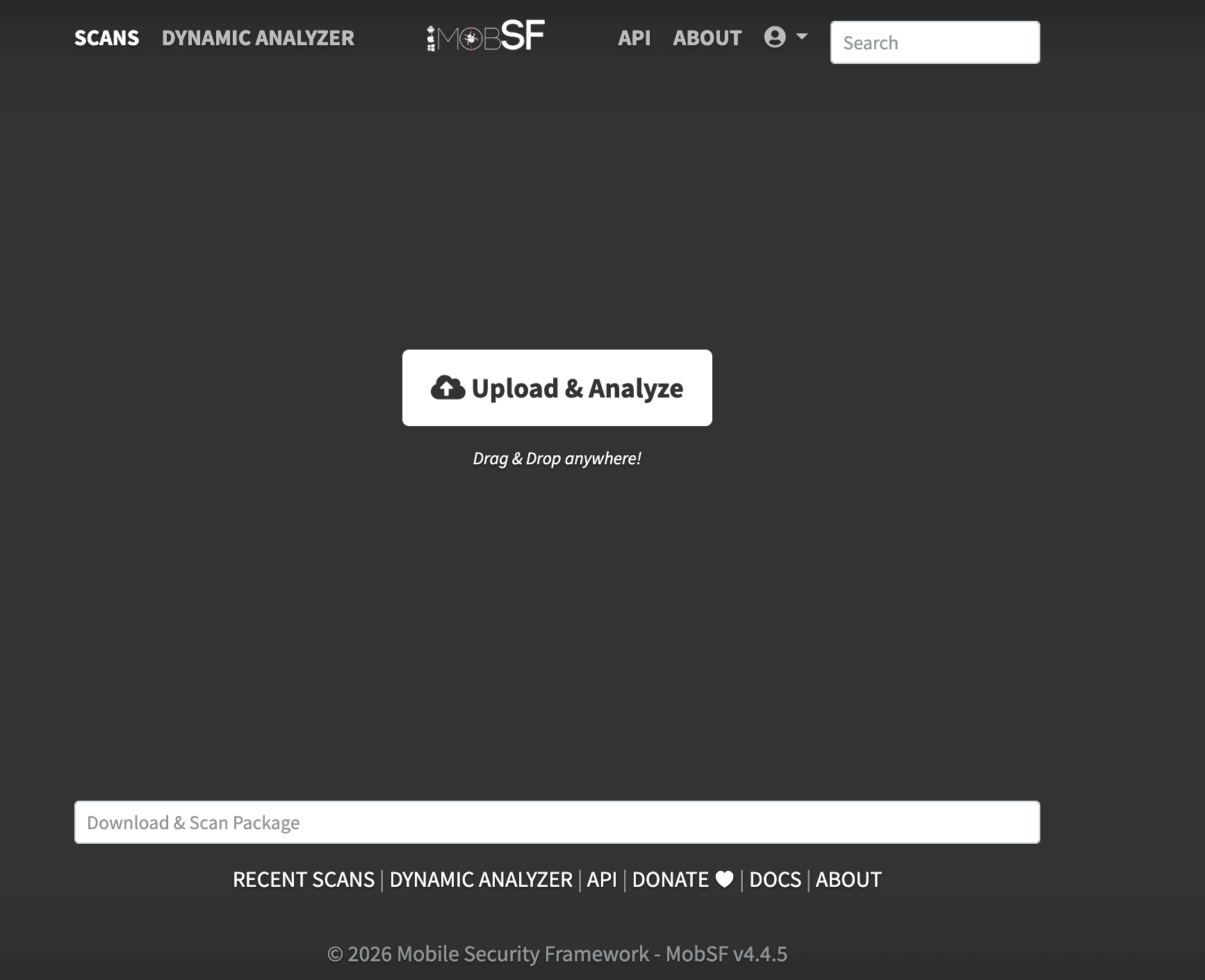
Drag and drop the LeakyPackage.apk file onto it, or use the file selector. MobSF will begin scanning immediately. Scan time varies depending on the size of the binary and the machine's resources, so give it a few minutes to finish.
Once the scan finishes, MobSF redirects you to the Static Analysis report. The top of the report gives you an immediate sense of the application's security posture.
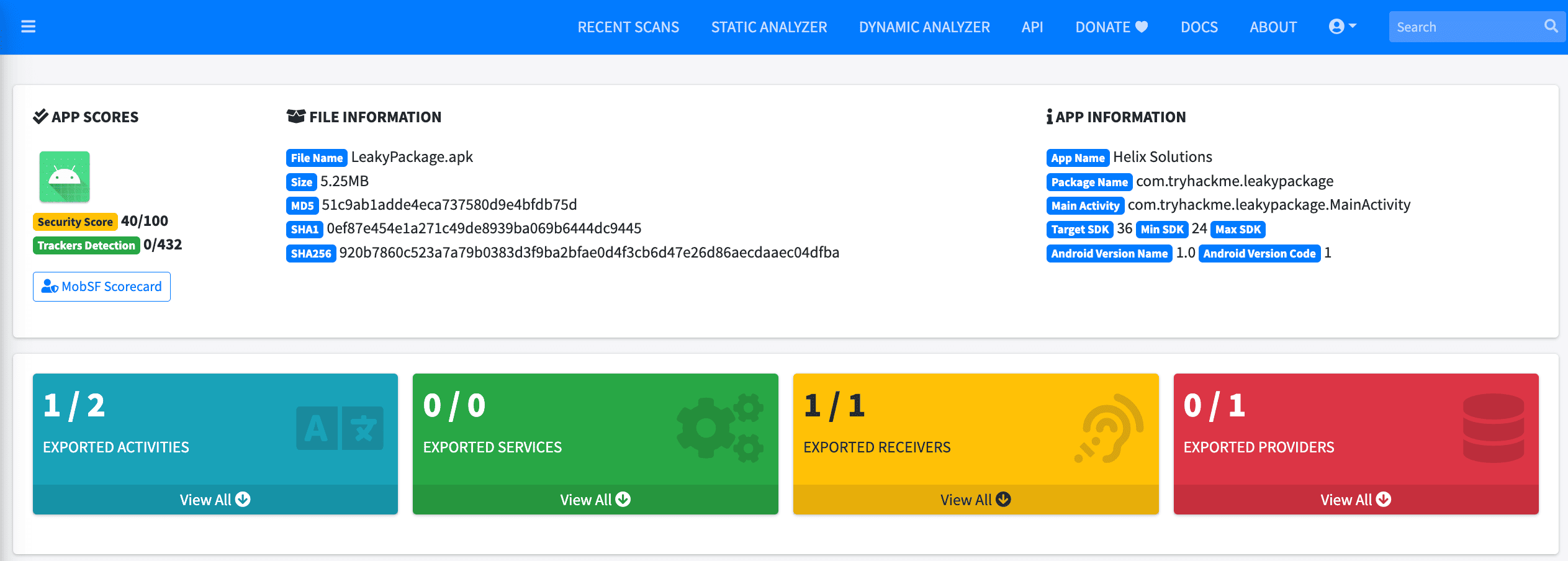
Several things stand out straight away:
- Security Score: 40/100, a low score that signals multiple findings
- App Name: Helix Solutions, confirming this is the right application
- Package Name: com.tryhackme.leakypackage
- 1 / 2 Exported Activities, meaning one activity is exported and accessible to other apps on the device, which we will investigate shortly
- The Decompiled Code section provides buttons to view the AndroidManifest.xml, decompiled Java source, and Smali bytecode directly in the browser
Step 2: Permissions
Click Permissions in the left sidebar.
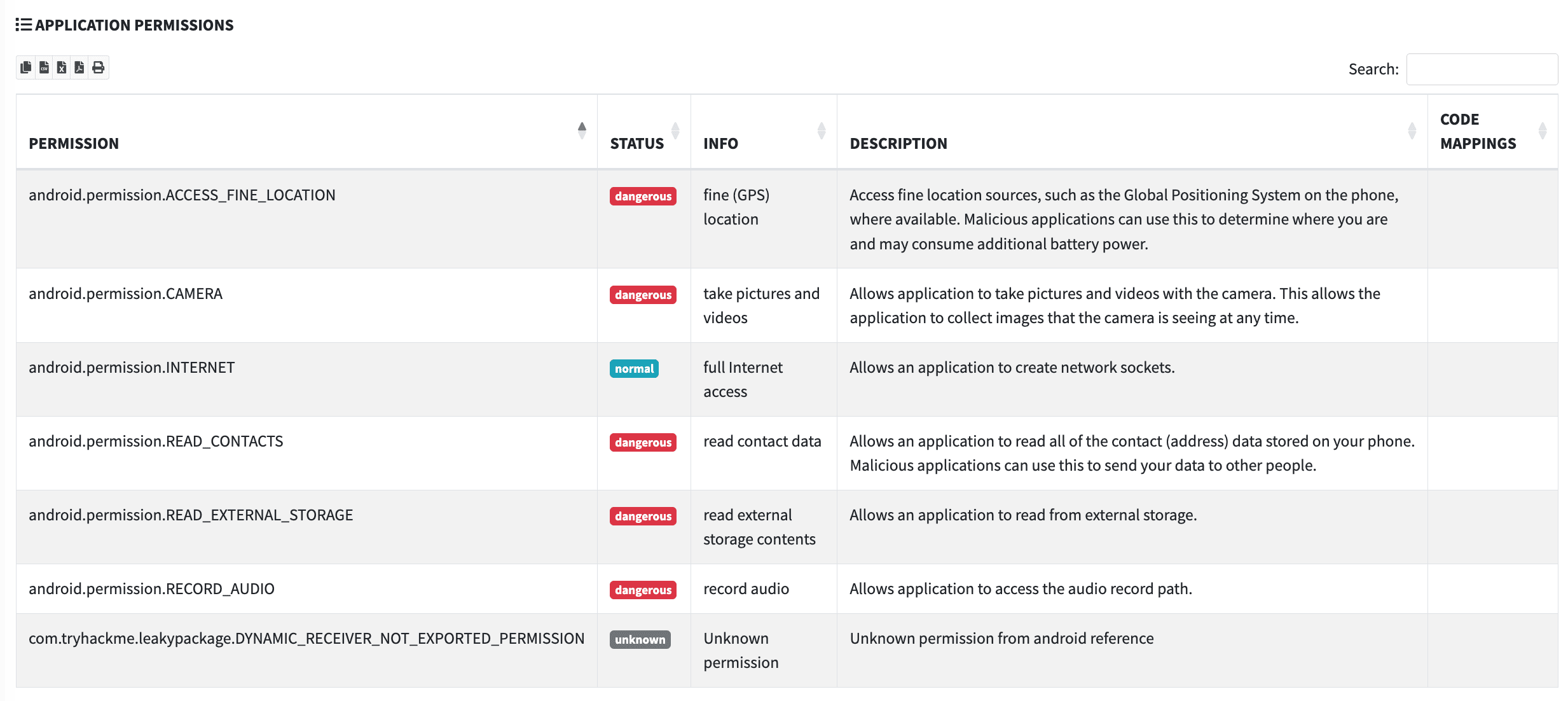
The permissions table shows seven entries. Five of them are marked dangerous in red: ACCESS_FINE_LOCATION, CAMERA, READ_CONTACTS, READ_EXTERNAL_STORAGE, and RECORD_AUDIO. An internal employee portal application has no legitimate reason to access the camera, microphone, contacts, or location data. This is a textbook example of over-requested permissions, mapped to OWASP M8: Security Misconfiguration.
Step 3: Manifest Analysis
Click Security Analysis in the left sidebar to expand the sub-menu, then click Manifest Analysis.
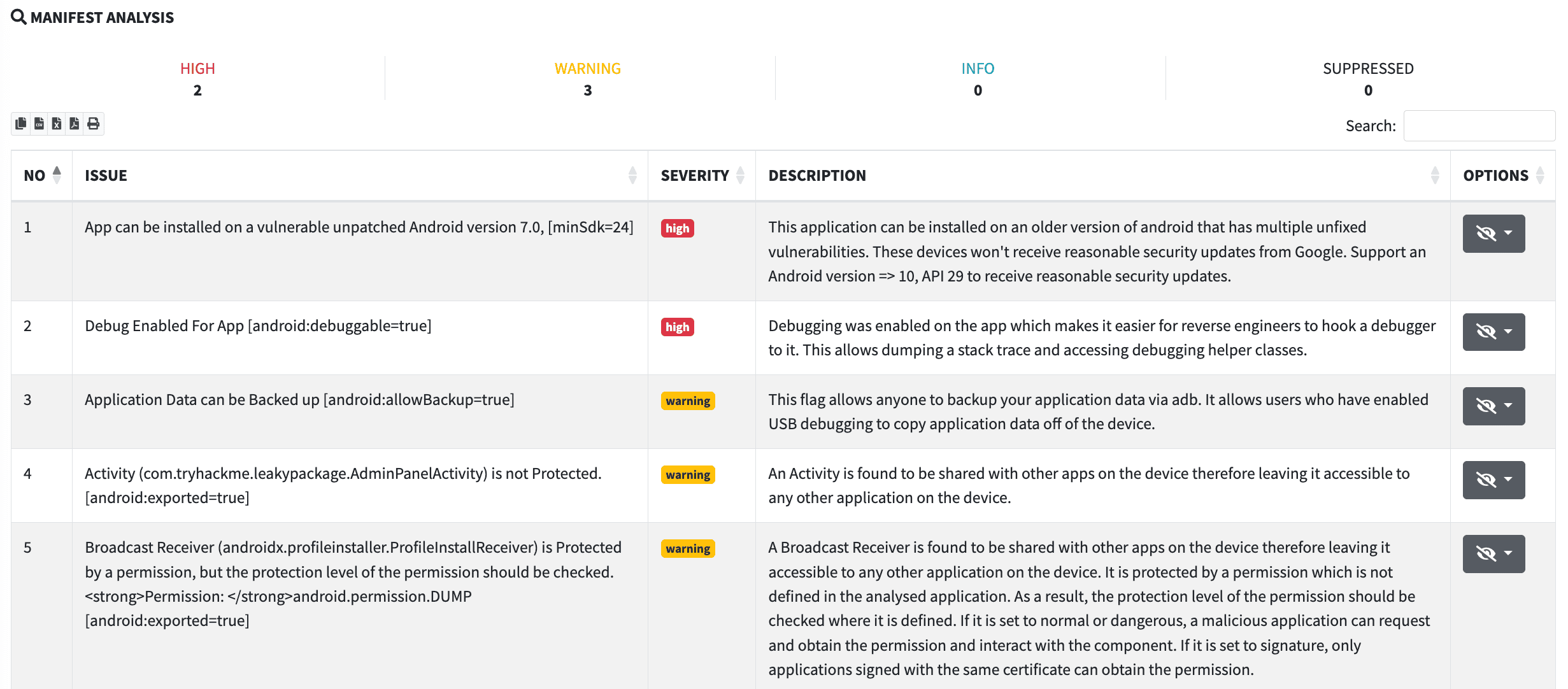
MobSF has flagged five issues. The two most important for this investigation are:
- Row 2: Debug Enabled For App [android:debuggable=true], severity HIGH. A debuggable application allows an attacker with physical or ADB access to attach a debugger, dump the heap, and intercept method calls at runtime. This flag must never be present in a production release.
- Row 4: Activity (com.tryhackme.leakypackage.AdminPanelActivity) is not Protected [android:exported=true], severity WARNING. The
AdminPanelActivitycomponent is marked as exported with no permission requirement, meaning any application installed on the same device can launch it directly via an explicit intent, bypassing any authentication the main application flow might enforce.
To see the raw manifest, go back to the main scan page and click View AndroidManifest.xml in the Decompiled Code section.
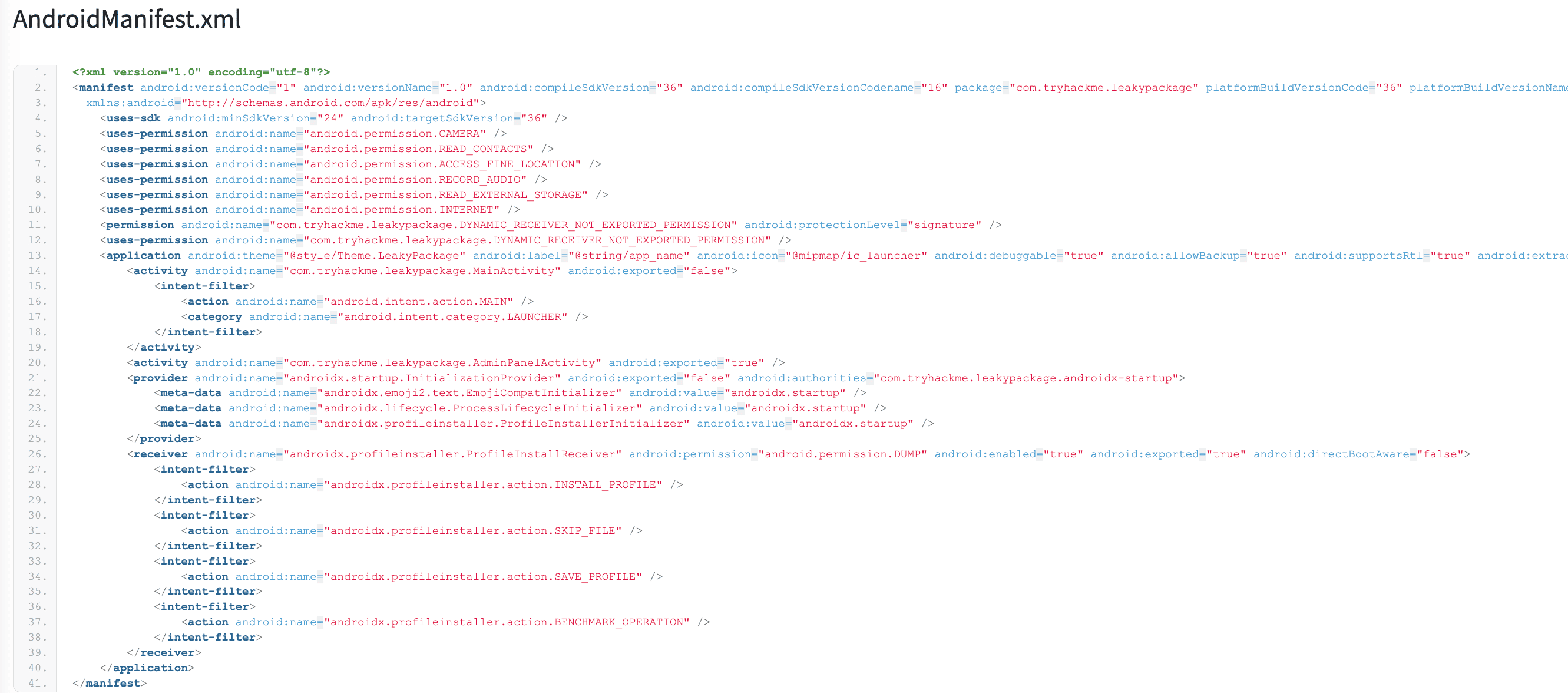
The decoded manifest confirms everything MobSF flagged. Line 13 shows android:debuggable="true" and android:allowBackup="true" on the <application> element. Line 20 shows < activity android:name="com.tryhackme.leakypackage.AdminPanelActivity" android:exported="true" /> with no android: permission attribute to restrict who can launch it. Look at the exported activity that has no permission attribute restricting access. In a pentest report, you'd flag this component by its full name and note it.
Step 4: Hardcoded Secrets in Decompiled Java
Click Code Analysis in the Security Analysis sub-menu.
MobSF has raised one warning: "Files may contain hardcoded sensitive information like usernames, passwords, keys, etc." It identifies two files: DatabaseHelper.java and HelixConfig.java. Click the HelixConfig.java link in the FILES column.
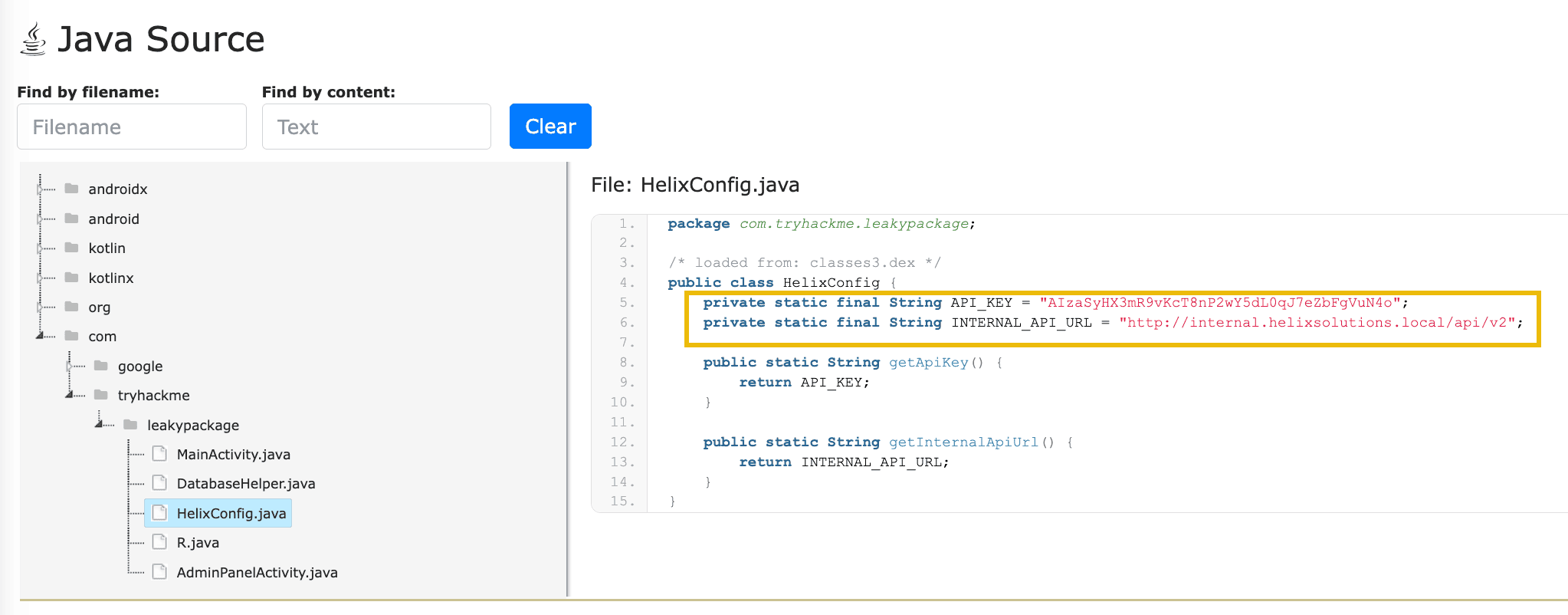
This is a hardcoded API key stored directly in the application's source code. Once the APK is distributed, any user can decompile it and extract this key with freely available tools such as jadx or apktool in under a minute. This is OWASP M1: Improper Credential Usage. Pay close attention to line 5; in a real engagement, this is exactly the kind of sensitive data you'd extract and include in your report. Can you identify what it is?
Now navigate back and click the DatabaseHelper.java link.
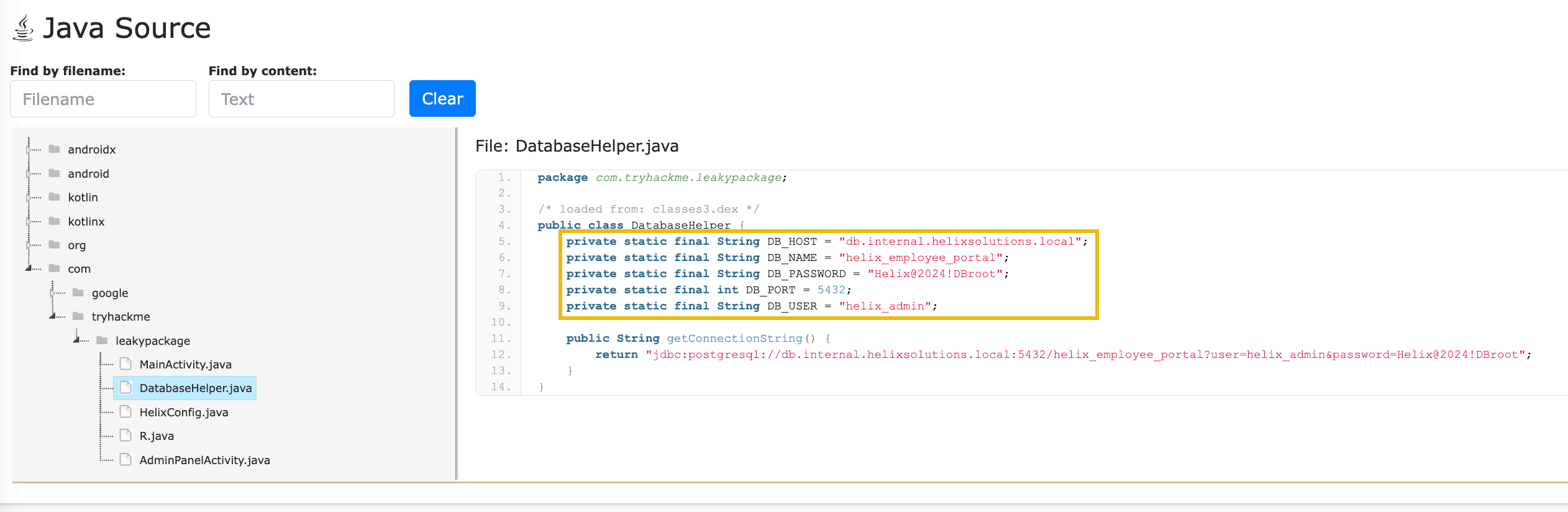
The root password for the production database has been hard-coded into the application source code. Combined with the DB_HOST and DB_NAME constants visible on lines 5 and 6, an attacker has everything they need to attempt a direct connection to the backend database. Consider the impact of what's on line 7 alongside the connection details visible on lines 5 and 6. What has the developer inadvertently exposed, and what could an attacker do with it?
Part 2: Analysing the iOS IPA
Step 5: Uploading the IPA and Reading the Overview
Return to the MobSF home page and upload the LeakyPackage.ipa file. The iOS scan runs through a different analysis pipeline from the Android one, but produces a comparable report.
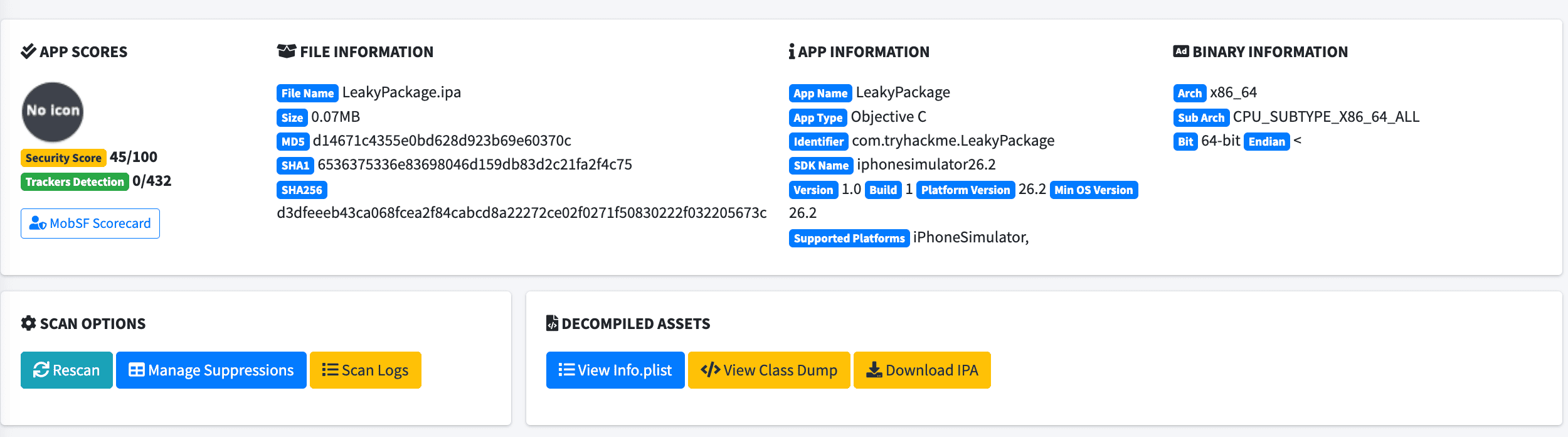
The overview confirms the application details:
- App Name: LeakyPackage Identifier: com. tryhackme.LeakyPackage
- Security Score: 45/100
- The Decompiled Assets section provides three buttons: View Info.plist, View Class Dump, and Download IPA
Step 6: App Transport Security in Info.plist
Click View Info.plist in the Decompiled Assets section. A modal opens that shows the full contents of the application's Info.plist file.
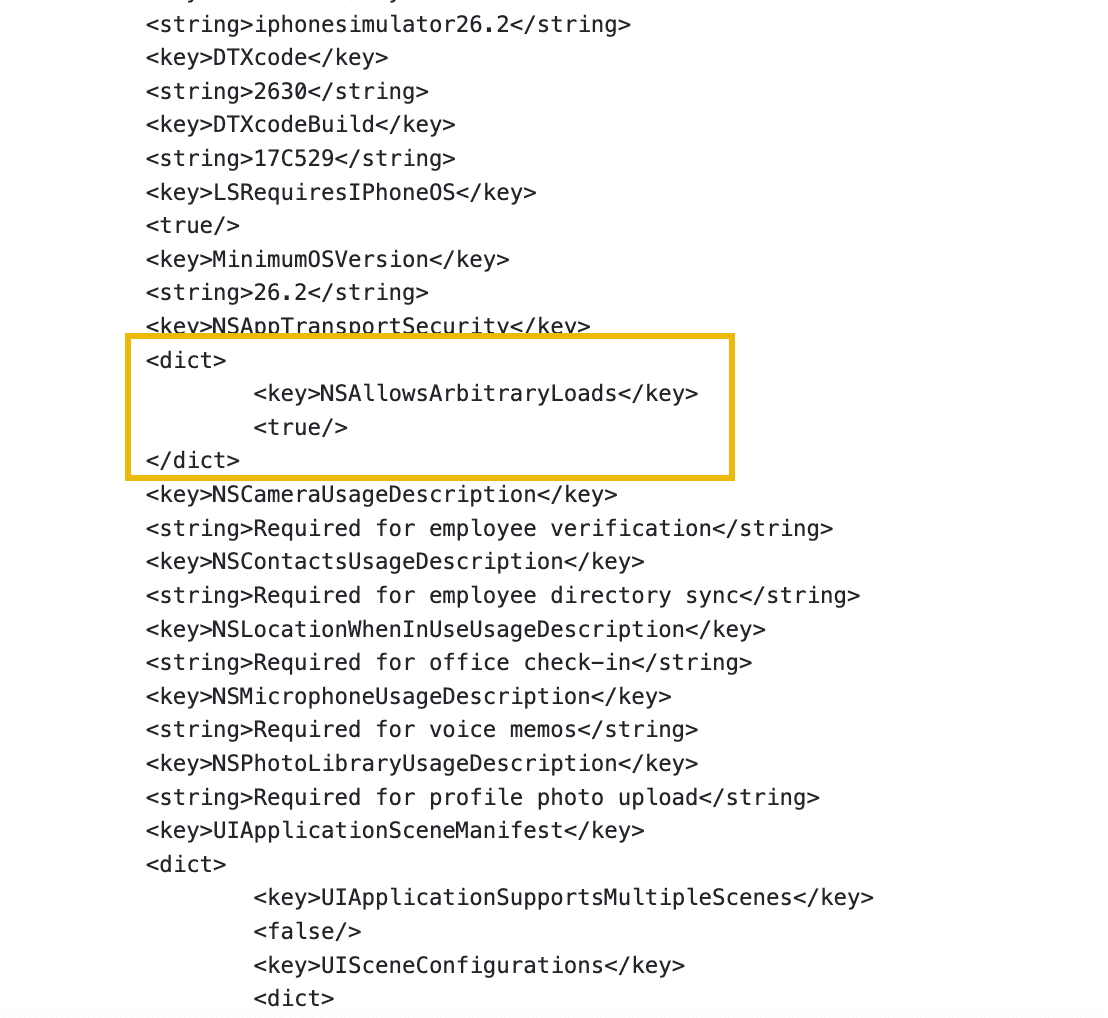
Scroll through the plist until you reach the NSAppTransportSecurity dictionary entry. Inside it, you will find:
<key>NSAllowsArbitraryLoads</key>
<true/>
This single entry disables App Transport Security (ATS) entirely for the application. With ATS disabled, the application can send data over unencrypted HTTP connections to any server without the operating system blocking it. This maps to OWASP M5: Insecure Communication and M8: Security Misconfiguration. Within the NSAppTransportSecurity dictionary, identify the specific key that has been set to true. This is the setting responsible for disabling ATS, and it's what you'd reference when documenting this finding.
For additional confirmation, close the modal and click Transport Security under Security Analysis in the left sidebar.
MobSF surfaces this directly as a HIGH severity finding: "App Transport Security AllowsArbitraryLoads is allowed", with a detailed description of exactly why this is dangerous.
Step 7: Sensitive Data in a Bundled Property List
Scroll down to the Reconnaissance section of the iOS report, or click Files in the left sidebar.
Under Possible Hardcoded Secrets, MobSF has automatically parsed all bundled.plist files and surfaced their key-value pairs. One entry stands out immediately:
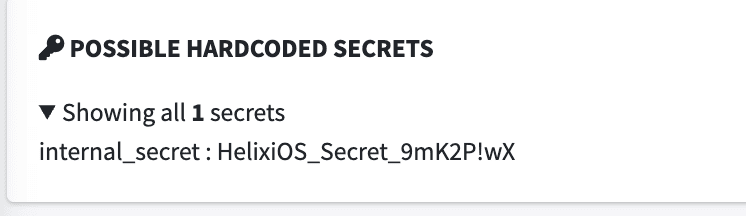
This value comes from internal_config.plist, a property list file bundled directly inside the IPA. You can verify this by scrolling down to the Files section, where LeakyPackage.app/internal_config.plist appears in the file listing.
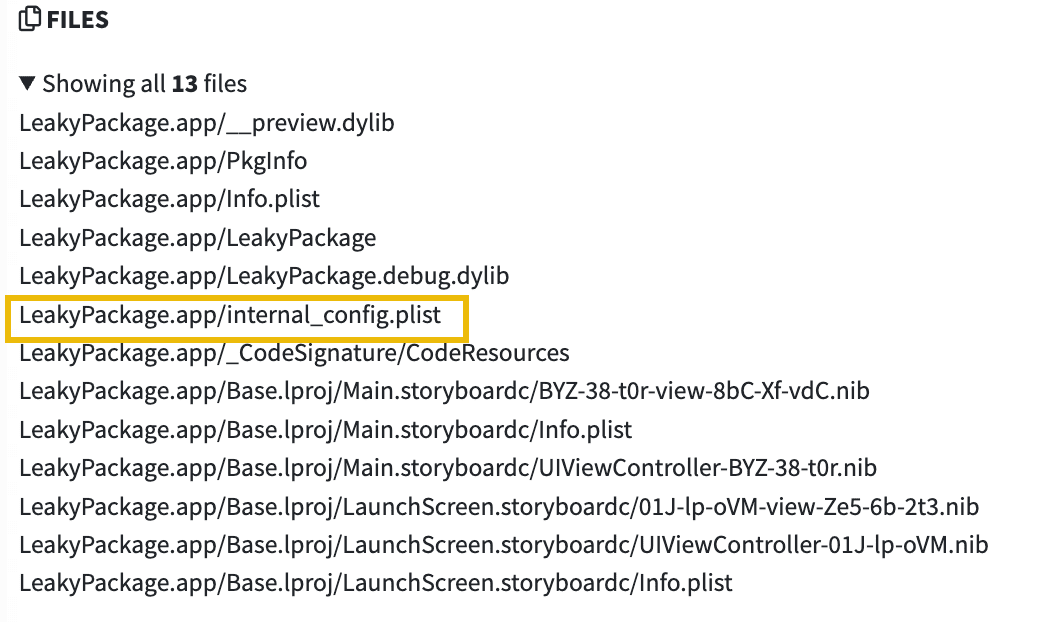
No application shipped to end users should contain an internal secret token. A developer has left what is likely an internal authentication or signing secret inside the production bundle. This is OWASP M9: Insecure Data Storage. Examine the key-value pairs surfaced from internal_config.plist. One of them clearly stands out as a sensitive internal token that should never be bundled in a production release. What value did the developer leave behind?
?Answer the questions below
- What is the hardcoded API key found in the Java source?
- What database password was hardcoded in DatabaseHelper.java ?
- What is the name of the exported Activity that is not protected?
- What Info.plist key was set to true , disabling App Transport Security?
- What sensitive value was found in the bundled internal_config.plist file?
Conclusion
In this room, we have covered the fundamentals of mobile application penetration testing from the ground up. We started by understanding how mobile applications are structured and what lives inside a package, then moved through a clear testing methodology grounded in the OWASP Mobile Top 10. We covered static analysis in depth, using MobSF alongside manual techniques to examine an application without running it, and we covered the concepts behind dynamic analysis: traffic interception, SSL pinning, runtime instrumentation, and insecure logging. We then brought it all together by walking through the most common vulnerability categories a tester encounters on a real mobile engagement, before applying those static analysis skills in a hands-on CTF-style challenge against the Helix Solutions application.
What We Learnt
- Mobile applications are structured packages containing a binary, a manifest or configuration file, resources, and assets, and understanding that structure is the foundation of effective testing
- A mobile penetration test follows four phases: reconnaissance, static analysis, dynamic analysis, and reporting
- The OWASP Mobile Top 10 is the industry-standard framework for categorising and communicating mobile application findings
- Static analysis involves unpacking an application package, reading its manifest or
Info.plist, searching for hardcoded secrets, and using automated tools such as MobSF to surface common issues across both Android and iOS - Dynamic analysis involves intercepting network traffic, working around SSL pinning, using runtime instrumentation, and reviewing application logs for sensitive data leakage
- The most common vulnerability categories in mobile applications include insecure data storage, improper platform usage, insecure authentication, exposed components, and insufficient binary protections, including the absence of root and jailbreak detection
- Static analysis techniques can be applied practically to find real findings inside a mobile application package
What Is Next
This room is the first step in a broader mobile security learning path. If you want to go deeper, the following are good next steps:
- Mobile Malware Analysis on TryHackMe, covering static analysis of malicious Android applications using MobSF
- The OWASP Mobile Security Testing Guide is the most thorough free resource for mobile application security testing
- Stay tuned for follow-up rooms on TryHackMe covering Android and iOS in depth, where we will get hands-on with the tools and techniques introduced conceptually in this room
?Answer the questions below
- I understand mobile application security fundamentals!
 Wireless Security
 Cloud Security Fundamentals