Intro to SSRF
Introduction
What is SSRF?
Server-Side Request Forgery (SSRF) is a vulnerability that allows an attacker to cause the server-side application to make HTTP requests to a destination of the attacker's choosing. In a typical SSRF attack, the attacker manipulates a parameter that the application uses to construct a server-side request, redirecting it to an internal service, a cloud metadata endpoint, or an external server under their control.
SSRF exploits the trust that internal systems place in the application server. Backend services, databases, and cloud infrastructure often accept requests from the server without additional authentication, because they assume any request arriving from a trusted internal IP address is legitimate. An attacker who can control where the server sends its requests effectively inherits that trust.
Types of SSRF
There are two categories of SSRF vulnerability, and the distinction affects how exploitation is approached.
| Type | Response Visible? | Description |
|---|---|---|
| Regular SSRF | Yes | The response from the back-end request is returned in the application's front-end response. The attacker can directly read the output. |
| Blind SSRF | No | The application makes the back-end request but does not return the response. The attacker must use indirect methods to confirm exploitation. |
With a regular SSRF, if an attacker forces the server to fetch an internal admin page, the contents of that page appear directly in the HTTP response. This provides immediate, readable output.
With a Blind SSRF, the application may display a fixed success message regardless of the back-end outcome. However, blind SSRF can still be exploited. An attacker can confirm the vulnerability by directing the request to a server they control (using a tool such as Burp Collaborator) and observing whether a callback arrives. Differences in response time or error messages between reachable and unreachable hosts can also reveal information about internal infrastructure.
Impact
The impact of SSRF depends on what internal services are reachable from the application server.
| Impact | Description |
|---|---|
| Access to internal endpoints | Admin panels, configuration interfaces, and monitoring dashboards that are not exposed to the internet become reachable. IP-based access controls are bypassed because the request originates from the server itself. |
| Sensitive data exposure | Backend databases, private APIs, and internal tooling that trust the server's network position may return customer data, organisational records, or application secrets. |
| Internal network reconnaissance | By sending requests to different IP addresses and ports, an attacker can map internal hosts and services using variations in response time, status codes, and error messages. |
| Cloud metadata theft | Cloud providers such as AWS, GCP, and Azure expose instance metadata at 169.254.169.254. An attacker who reaches this endpoint can retrieve temporary credentials, IAM role details, and instance configuration data. |
| Credential and token leakage | Authentication tokens and secrets passed between internal services can be intercepted, particularly where back-end communication runs over unencrypted HTTP. |
In the following tasks, we will examine how SSRF manifests in different application features, how to identify it, and how to bypass common defences.
?Answer the questions below
- What does SSRF stand for?
- As opposed to a regular SSRF, what is the other type?
SSRF Examples
SSRF does not always present itself as a full URL in a query parameter. The way user input is incorporated into a server-side request varies across applications, and recognising these patterns is essential for identifying the vulnerability. In this task, we will examine four common SSRF vectors.
Full URL in a Parameter
This is the most direct form of SSRF. The application accepts a complete URL as input and uses it to make a server-side request. Features such as URL previews, webhook configurations, and PDF generators commonly follow this pattern.
Consider an application with the following stock-checking endpoint:
https://website.thm/item/2?server=apiThe application takes the value of the server parameter and constructs a request to https://server.website.thm/api/item?id=2. An attacker can replace this value to redirect the request:
| Input | Resulting Server-Side Request |
|---|---|
server=api |
https://server.website.thm/api/item?id=2 |
server=server.website.thm/flag?id=9&x= |
https://server.website.thm/flag?id=9&x=/api/item?id=2 |
In the second case, the &x= at the end causes whatever the application appends to the URL to be treated as an unused parameter, neutralising it.
Partial URL (Hostname or Path Only)
Some applications accept only a hostname or path segment and construct the rest of the URL on the server side. Developers sometimes assume this limits the attack surface. However, an attacker can still supply a hostname they control.
For example, given a request like:
https://website.thm/stock?server=api.internalThe application builds https://api.internal/stock/item. If the server parameter is not validated against an allow list, an attacker can replace it:
https://website.thm/stock?server=attacker.comThe server will make a request to the attacker's domain. If the response is reflected, data from internal services can be exfiltrated. If the SSRF is blind, the attacker can at least confirm the vulnerability by checking whether their server received a connection.
Path Traversal in the URL
When an attacker controls only a path segment, directory traversal sequences can be used to reach endpoints outside the intended directory.
For example, if the application constructs requests as follows:
https://website.thm/stock?url=/item/123/detailsAn attacker can supply /../admin, causing the server to request:
https://website.thm/adminThis is the same traversal technique found in file inclusion vulnerabilities, applied to URL paths rather than file system paths.
Hidden Form Fields
Not all SSRF vectors are visible in the URL bar. Some are embedded in the page's HTML source and are only discoverable through manual inspection or request interception.
A common example is a profile avatar feature where the image path is stored in a hidden form field:
<input type="hidden" name="avatar" value="/images/avatars/default.png">If the server fetches the resource at whatever path this field contains, an attacker can modify the value (using browser developer tools or a proxy such as Burp Suite) to point at an internal resource. This is why thorough testing requires inspecting form fields, API requests, and any parameter that feeds into a server-side request.
Try It Yourself
Click the View Site button to access an interactive exercise. You are given a URL in the form https://website.thm/item/2?server=api. Your objective is to manipulate the server parameter so that the back-end request fetches the flag stored at /flag?id=9 on server.website.thm. Apply the techniques covered in this task to construct the correct payload.
?Answer the questions below
- What is the flag from the SSRF Examples site?
Finding an SSRF
Identifying SSRF during an engagement requires knowing where applications accept input that influences server-side requests. In this task, we will cover the most common indicators and how to confirm the vulnerability when the response is not directly visible.
Common Indicators
The following patterns are strong signals that an application may be vulnerable to SSRF.
Full URL in a parameter. When a complete URL appears as a query parameter in the address bar, the application is almost certainly using it to make a server-side request:
Hidden form fields. These are not visible on the rendered page. Inspecting the page source or intercepting requests with a proxy reveals fields whose values control server-side resource fetching:
Partial URL (hostname only). The application accepts a hostname and constructs the full URL on the server side:
Path only. Only the path portion of the URL is user-controlled. The application prepends the scheme and hostname:
Beyond these four patterns, the following application features frequently contain SSRF vectors:
| Feature | Why It's Relevant |
|---|---|
| Webhook configuration | The application makes a request to a user-supplied URL to verify the endpoint. |
| PDF/report generation | The server fetches content from a supplied URL to render it into a document. |
| URL preview/unfurling | The application retrieves metadata (title, thumbnail) from a user-provided link. |
| File import by URL | The server downloads a file from a remote location specified by the user. |
| Integration settings | Third-party service URLs are stored and queried by the server. |
Some of these cases are easier to exploit than others. A full URL in a query parameter is straightforward to test, while a partial path segment may require considerable trial and error to produce a working payload. The important step is recognising the pattern first, then experimenting with different inputs.
Confirming Blind SSRF
When the server makes the request but does not reflect the response, you need an alternative method to confirm the vulnerability.
| Method | How It Works |
|---|---|
| External HTTP logger (e.g. requestbin.com) | Supply the logger's URL as the SSRF payload. Check the dashboard for incoming requests from the target server. |
| Burp Collaborator | Generates a unique domain that logs HTTP and DNS callbacks. Useful when HTTP is blocked but DNS resolution still occurs. |
Self-hosted listener (python3 -m http.server) |
Run a simple HTTP server on your own machine and monitor for incoming connections from the target. |
| Timing analysis | Compare response times for requests to internal hosts that exist versus hosts that do not. Consistent differences indicate the server is resolving and connecting to the supplied address. |
| Error-based inference | Different error messages for reachable versus unreachable hosts reveal information about the internal network, even when the actual response body is hidden. |
These techniques are covered in more depth in later rooms. For now, confirming that the server is making outbound requests based on your input is sufficient to establish the vulnerability.
?Answer the questions below
- Based on simple observation, which of the following URLs is more likely to be vulnerable to SSRF? https://website.thm/index.php https://website.thm/list-products.php?categoryId=5325 https://website.thm/fetch-file.php?fname=242533.pdf&srv=filestorage.cloud.thm&port=8001 https://website.thm/buy-item.php?itemId=213&price=100&q=2
Defeating Common SSRF Defenses
Developers who are aware of SSRF risks often implement input validation to restrict where the server can send requests. These controls typically fall into one of three categories: deny lists, allow lists, and open redirect abuse. In this task, we will examine each defence and the techniques used to bypass it.
Deny Lists
A deny list blocks requests to specific addresses or patterns while permitting everything else. The goal is to prevent access to known-sensitive destinations such as localhost, 127.0.0.1, and cloud metadata endpoints.
However, deny lists are inherently fragile. The IPv4 loopback address 127.0.0.1 has numerous alternative representations, and a deny list that only blocks the most common forms can be bypassed.
| Representation | Value |
|---|---|
| Standard | 127.0.0.1 |
| Decimal | 2130706433 |
| Octal | 017700000001 |
| Shorthand | 127.1 or 0 or 0.0.0.0 |
| Wildcard | 127.*.*.* |
| IPv6 | [::1] |
| DNS-based | 127.0.0.1.nip.io |
The DNS-based approach is particularly effective. Services like nip.io allow an attacker to create subdomains that resolve to any IP address. A hostname such as 127.0.0.1.nip.io resolves to 127.0.0.1, but a string-based deny list sees a normal domain name and lets it through.
In cloud environments, the deny list should also block 169.254.169.254 (the metadata endpoint used by AWS, GCP, and Azure). However, an attacker can register their own domain with a DNS record pointing to 169.254.169.254. The deny list checks the hostname string, finds no match, and permits the request. The server then resolves the hostname and sends the request directly to the metadata service.
Allow Lists
An allow list denies all requests by default unless the destination matches an approved entry or pattern. For example, the application might require that URLs begin with https://website.thm. This is a stronger control than a deny list. However, implementation weaknesses can still allow bypasses.
| Bypass Technique | Example | Why It Works |
|---|---|---|
| Subdomain matching | https://website.thm.attackers-domain.thm |
The URL string begins with the expected prefix, but the actual hostname is attacker-controlled. |
| URL credential abuse | https://website.thm@attacker.com/ |
Some HTTP libraries treat the portion before @ as credentials and the portion after as the hostname. The allow list sees website.thm; the request goes to attacker.com. |
In both cases, the root cause is the same: the application validates the URL string using simple pattern matching rather than properly parsing it into its component parts.
Open Redirects
When deny list and allow list bypasses both fail, an attacker may be able to exploit an open redirect on the target domain. An open redirect is an endpoint that forwards visitors to a URL specified in a parameter. These are commonly used for tracking outbound link clicks.
For example, consider the following endpoint:
https://website.thm/link?url=https://tryhackme.comThis endpoint records the click and redirects the visitor to https://tryhackme.com. If the application's SSRF protections only allow URLs beginning with https://website.thm/, the attacker can chain the open redirect with the SSRF:
https://website.thm/link?url=http://169.254.169.254/latest/meta-data/The allow list is satisfied because the URL begins with the trusted domain. However, when the server follows the request, it hits the open redirect endpoint, which forwards it to the cloud metadata service. The application's own feature has been used to circumvent its own protections.
This bypass is effective because it chains two behaviours that appear harmless in isolation. It demonstrates why security controls must account for interactions between features, not just the behaviour of each feature individually.
?Answer the questions below
- What method can be used to bypass strict rules?
- What IP address may contain sensitive data in a cloud environment?
- What type of list is used to permit only certain input?
- What type of list is used to stop certain input?
SSRF Practical
In this task, you will exploit an SSRF vulnerability on the Acme IT Support website. The attack combines a hidden form field vector with a deny list bypass using directory traversal.
Scenario
During a content discovery exercise against the Acme IT Support website, two endpoints have been identified:
| Endpoint | Behaviour |
|---|---|
/private |
Returns an error stating the contents cannot be viewed from your IP address. Access is restricted based on the source IP of the request. |
/customers/new-account-page |
A newer version of the customer account page. Includes a feature for selecting a profile avatar. |
The /private endpoint is the target. It contains restricted content that is only accessible to requests originating from the server itself. The avatar feature on /customers/new-account-page is the attack vector.
Click the Start Lab Machine button to launch the Acme IT Support website. Once running, visit it at https://LAB_WEB_URL.p.thmlabs.com and follow the steps below.
Step 1: Locate the Avatar Feature
- Create a customer account on the site and sign in.
- Navigate to
https://LAB_WEB_URL.p.thmlabs.com/customers/new-account-page. - Right-click the page and select View Page Source (or press
Ctrl+U).
In the source, each avatar option is a radio button whose value attribute contains the path to an image file. The background-image CSS property on the surrounding <div> element confirms this:

The server uses the value from this form field to fetch the resource. If the value is not validated, it can be redirected to any path on the server.
Step 2: Observe How the Server Handles the Request
Select one of the avatars and click Update Avatar. The page updates to display the selected avatar:
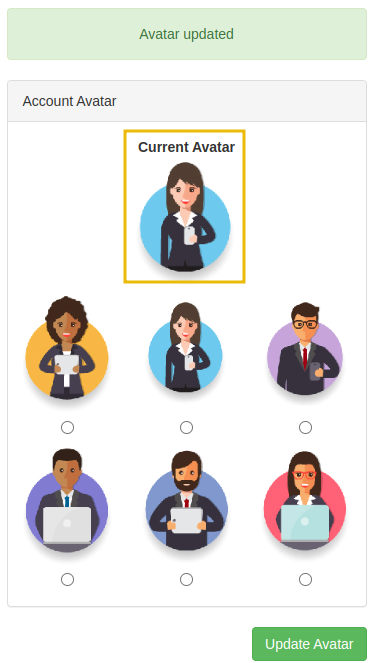
Inspect the page source again. The avatar is now rendered using the data URI scheme, with the image content base64-encoded in the src attribute:

This behaviour is significant. The server fetches the resource at the path specified in the form field, reads the response, and encodes it into the page. If the server can be directed to fetch /private instead of an image, its contents will appear as base64-encoded data in the page source.
Step 3: Attempt Direct Access to /private
1. Right-click one of the avatar radio buttons and select Inspect:
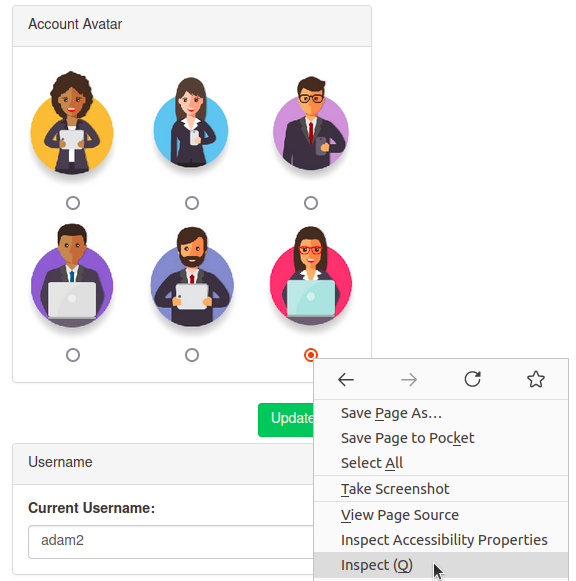
2. Change the value attribute from the image path to private:

3. Select the modified radio button and click Update Avatar.
The application returns an error indicating the path cannot start with /private:
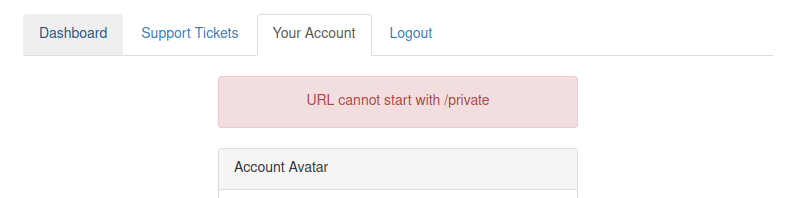
The application has a deny list that blocks requests where the path begins with /private.
Step 4: Bypass the Deny List
The deny list performs a string match against the start of the path. However, as covered in Task 4, deny lists that only check the raw input can be bypassed using directory traversal.
Change the radio button's value attribute to:
x/../private
The following table shows why this works:
| Stage | Path | Explanation |
|---|---|---|
| Input validation | x/../private |
The deny list checks the raw string. It does not begin with /private, so the check passes. |
| Path normalisation | /private |
The web server resolves x/../private by entering directory x, then moving up one level with ../, arriving at /private. |
The deny list and the web server interpret the path at different stages. In this case, the validation checks the string before normalisation occurs, allowing the traversal to bypass the restriction.
Select the modified radio button and click Update Avatar. The request succeeds.
Step 5: Decode the Flag
View the page source. The avatar <img> tag now contains base64-encoded data representing the contents of /private rather than an image file.
Copy the base64 string and decode it:
echo "PASTE_BASE64_STRING_HERE" | base64 -dThe decoded output contains the flag.
?Answer the questions below
- What is the flag from the /private directory?
 XSS Introduction
 IDOR
IDOR