
Nmap Post Port Scans
Introduction
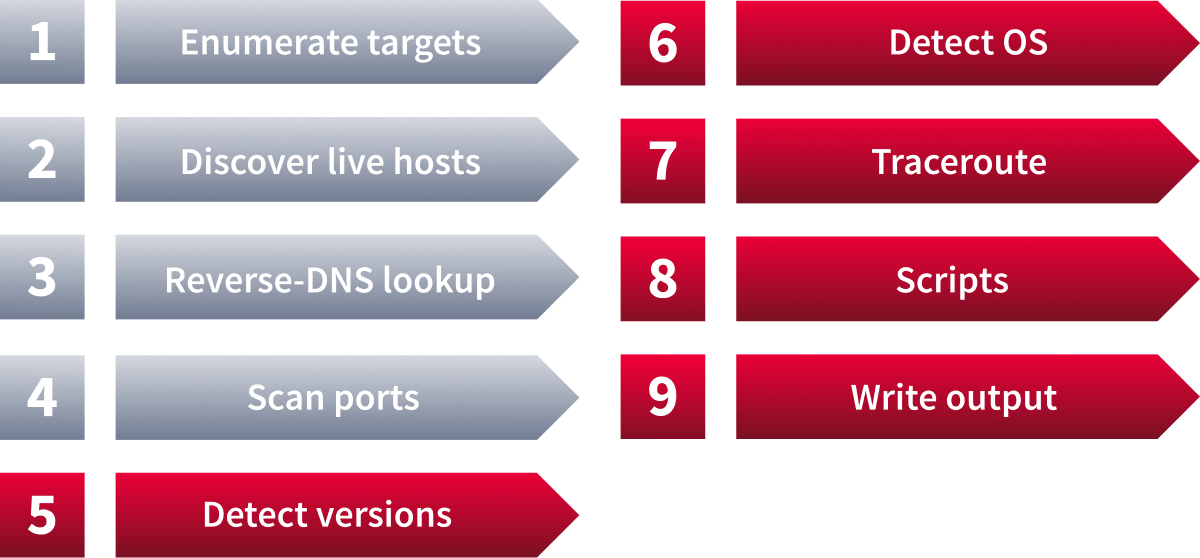
This room is the last in the Nmap series (part of the Introduction to Network Security module). In this room, we focus on the steps that follow port scanning: in particular, service detection, OS detection, the Nmap scripting engine, and saving the scan results.
In the first room of this series, we learned how Nmap can enumerate targets, discover live hosts, and use reverse DNS to find interesting names. The second and third rooms in the series focused on the basic and advanced types of network port scans.
Learning Objectives
By the end of this room, you will be able to:
- Extract service and version information from discovered open ports
- Fingerprint the target operating system and map the network path to it
- Extend scan capabilities using the Nmap Scripting Engine (NSE)
- Save and document scan results in multiple formats for reporting
Learning Prerequisites
Machine Access
Launch the AttackBox using the Start AttackBox button, and launch the Target machine using the Start Machine button. Get ready to experiment with different Nmap scan types against various virtual machines.
?Answer the questions below
- I have started the machine successfully.
Service Detection
Once Nmap discovers open ports, you can probe each port to identify the service running on it. Further investigation of open ports is essential, as the pentester can use this information to determine whether the service has known vulnerabilities. Join Vulnerabilities 101 to learn more about searching for vulnerable services.
Adding -sV to your Nmap command will collect and determine service and version information for the open ports. You can control the intensity with --version-intensity LEVEL where the level ranges from 0(the lightest) to 9(the most complete). -sV --version-light has an intensity of 2, while -sV --version-all has an intensity of 9.
It is important to note that using -sV will force Nmap to proceed with the TCP 3-way handshake and establish the connection. The connection establishment is necessary because Nmap cannot discover the version without establishing a connection fully and communicating with the listening service. In other words, a stealth SYN scan -sS is not possible when the -sV option is chosen.
In the attached AB, enter the following command:
           root@ip-10-10-166-81:~# sudo nmap -sV --version-light 10.201.118.127
sudo: unable to resolve host ip-10-10-166-81: Name or service not known
Starting Nmap 7.80 ( https://nmap.org ) at 2026-02-18 07:35 GMT
mass_dns: warning: Unable to open /etc/resolv.conf. Try using --system-dns or specify valid servers with --dns-servers
mass_dns: warning: Unable to determine any DNS servers. Reverse DNS is disabled. Try using --system-dns or specify valid servers with --dns-servers
Nmap scan report for 10.201.118.127
Host is up (0.071s latency).
Not shown: 992 closed ports
PORT    STATE SERVICE  VERSION
22/tcp  open  ssh      OpenSSH 9.2p1 Debian 2+deb12u3 (protocol 2.0)
25/tcp  open  smtp     Postfix smtpd
80/tcp  open  http     nginx 1.22.1
110/tcp open  pop3     Dovecot pop3d
111/tcp open  rpcbind
143/tcp open  imap     Dovecot imapd
993/tcp open  ssl/imap Dovecot imapd
995/tcp open  ssl/pop3 Dovecot pop3d
Service Info: Host:  debra2.thm.local; OS: Linux; CPE: cpe:/o:linux:linux_kernel

Service detection performed. Please report any incorrect results at https://nmap.org/submit/ .
Nmap done: 1 IP address (1 host up) scanned in 14.49 seconds
The console output above shows a simple Nmap stealth SYN scan with the -sV option. Adding the -sV option leads to a new column in the output showing the version for each detected service. For instance, in the case of TCP port 22 being open, instead of 22/tcp open ssh, we obtain 22/tcp open ssh OpenSSH 6.7p1 Debian 5+deb8u8 (protocol 2.0). Notice that the SSH protocol is guessed as the service because TCP port 22 is open; Nmap didn’t need to connect to port 22 to confirm. However, -sV required connecting to this open port to grab the service banner and any version information it can get, such as nginx 1.6.2. Hence, unlike the service column, the version column is not a guess.
Note that many Nmap options require root privileges. Unless you are running Nmap as root, you need to use sudo as in the example above.
?Answer the questions below
- What is the detected version for port 143?
- Which service did not have a version detected with --version-light ?
OS Detection and Traceroute
OS Detection
Nmap can detect the Operating System (OS) of a target based on its behaviour and any telltale signs in its network responses. OS detection can be enabled using -O; this is an uppercase O as in OS. In this example, we will run nmap -sS -O MACHINE_IP on the AttackBox.
           root@ip-10-10-166-81:~# sudo nmap -sS -O MACHINE_IP
sudo: unable to resolve host ip-10-10-166-81: Name or service not known
Starting Nmap 7.98 ( https://nmap.org ) at 2026-02-18 08:47 +0000
mass_dns: warning: Unable to open /etc/resolv.conf. Try using --system-dns or specify valid servers with --dns-servers: No such file or directory (2)
mass_dns: warning: Unable to determine any DNS servers. Reverse DNS is disabled. Try using --system-dns or specify valid servers with --dns-servers
Nmap scan report for 10.201.118.127
Host is up (0.070s latency).
Not shown: 992 closed tcp ports (reset)
PORT    STATE SERVICE
22/tcp  open  ssh
25/tcp  open  smtp
80/tcp  open  http
110/tcp open  pop3
111/tcp open  rpcbind
143/tcp open  imap
993/tcp open  imaps
995/tcp open  pop3s
No exact OS matches for host (If you know what OS is running on it, see https://nmap.org/submit/ ).
TCP/IP fingerprint:
OS:SCAN(V=7.98%E=4%D=2/18%OT=22%CT=1%CU=40131%PV=Y%DS=3%DC=I%G=Y%TM=69957C9
OS:D%P=x86_64-unknown-linux-gnu)SEQ(SP=103%GCD=1%ISR=10B%TI=Z%CI=Z%II=I%TS=
OS:A)SEQ(SP=103%GCD=1%ISR=10C%TI=Z%CI=Z%II=I%TS=A)SEQ(SP=105%GCD=1%ISR=10D%
OS:TI=Z%CI=Z%II=I%TS=A)SEQ(SP=106%GCD=1%ISR=108%TI=Z%CI=Z%II=I%TS=A)SEQ(SP=
OS:106%GCD=2%ISR=109%TI=Z%CI=Z%II=I%TS=A)OPS(O1=M210CST11NW7%O2=M210CST11NW
OS:7%O3=M210CNNT11NW7%O4=M210CST11NW7%O5=M210CST11NW7%O6=M210CST11)WIN(W1=F
OS:4B3%W2=F4B3%W3=F4B3%W4=F4B3%W5=F4B3%W6=F4B3)ECN(R=Y%DF=Y%T=40%W=F507%O=M
OS:210CNNSNW7%CC=Y%Q=)T1(R=Y%DF=Y%T=40%S=O%A=S+%F=AS%RD=0%Q=)T2(R=N)T3(R=N)
OS:T4(R=Y%DF=Y%T=40%W=0%S=A%A=Z%F=R%O=%RD=0%Q=)T5(R=Y%DF=Y%T=40%W=0%S=Z%A=S
OS:+%F=AR%O=%RD=0%Q=)T6(R=Y%DF=Y%T=40%W=0%S=A%A=Z%F=R%O=%RD=0%Q=)T7(R=Y%DF=
OS:Y%T=40%W=0%S=Z%A=S+%F=AR%O=%RD=0%Q=)U1(R=Y%DF=N%T=40%IPL=164%UN=0%RIPL=G
OS:%RID=G%RIPCK=G%RUCK=G%RUD=G)IE(R=Y%DFI=N%T=40%CD=S)

Network Distance: 3 hops

OS detection performed. Please report any incorrect results at https://nmap.org/submit/ .
Nmap done: 1 IP address (1 host up) scanned in 12.99 seconds
In this case, Nmap was unable to determine an exact operating system match for the target host. Although OS detection was performed successfully, the collected TCP/IP fingerprint did not closely match any known signatures in Nmap’s database. As a result, Nmap returned the message "No exact OS matches for host."
Despite the lack of a precise match, the fingerprint data still provides useful clues. For example, TTL (Time to Live) refers to a value in each network packet that decrements as it passes through routers. Linux systems typically respond with a TTL of 64, while Windows systems commonly use 128. TCP sequence behaviour refers to how a system generates and increments TCP sequence numbers, which vary between operating systems and kernel versions. Service responses, such as the banners and protocol quirks observed on open ports, also differ between OS families. Together, these signals strongly indicate that the target is running a 64-bit Linux operating system. For a deeper understanding of how Nmap builds and matches OS fingerprints, refer to the official Nmap OS detection documentation.
The absence of an exact match may be due to factors such as virtualisation, firewall filtering, cloud networking layers, kernel customisation, or network middleboxes that modify packet characteristics.
This result highlights an important limitation of OS fingerprinting: while it is a powerful technique, it does not always produce definitive results. Modern systems and virtualised environments often alter TCP/IP stack behaviour, making exact identification more difficult. Therefore, OS detection results should always be interpreted carefully and supported with additional reconnaissance techniques when necessary.
Traceroute
If you want Nmap to find the routers between you and the target, just add --traceroute. In the following example, Nmap appended a traceroute to its scan results. Note that Nmap’s traceroute works slightly differently from the traceroute command found on Linux and macOS or tracert found on MS Windows. Standard traceroute starts with a packet with a low TTL (Time to Live) and increases it until it reaches the target. Nmap’s traceroute starts with a packet with a high TTL and keeps decrementing it.
In the following example, we will execute nmap -sS --traceroute MACHINE_IP on the AttackBox. We can see that the hop count is 3.
           root@ip-10-10-166-81:~# nmap -sS --traceroute 10.201.118.127
Starting Nmap 7.98 ( https://nmap.org ) at 2026-02-18 08:50 +0000
mass_dns: warning: Unable to open /etc/resolv.conf. Try using --system-dns or specify valid servers with --dns-servers: No such file or directory (2)
mass_dns: warning: Unable to determine any DNS servers. Reverse DNS is disabled. Try using --system-dns or specify valid servers with --dns-servers
Nmap scan report for 10.201.118.127
Host is up (0.071s latency).
Not shown: 992 closed tcp ports (reset)
PORT    STATE SERVICE
22/tcp  open  ssh
25/tcp  open  smtp
80/tcp  open  http
110/tcp open  pop3
111/tcp open  rpcbind
143/tcp open  imap
993/tcp open  imaps
995/tcp open  pop3s

TRACEROUTE (using port 554/tcp)
HOP RTT      ADDRESS
1   ... 2
3   69.89 ms 10.201.118.127

Nmap done: 1 IP address (1 host up) scanned in 4.44 seconds
It is worth noting that many routers are configured not to send ICMP Time-to-Live exceeded messages, which would prevent us from discovering their IP addresses. For more information, visit the Active Reconnaissance room.
?Answer the questions below
- Per nmap, which one is the closest OS match after running with the nmap with -O option against MACHINE_IP ? (Windows/Linux)
Nmap Scripting Engine (NSE)
A script is a piece of code that does not need to be compiled. In other words, it remains in its original human-readable form and does not need to be converted to machine language. Many programs provide additional functionality via scripts; moreover, scripts enable adding custom functionality that was not available via built-in commands. Similarly, Nmap supports scripts written in Lua. A part of Nmap, the Nmap Scripting Engine (NSE) is a Lua interpreter that allows Nmap to execute Nmap scripts written in Lua. However, we don’t need to learn Lua to make use of Nmap scripts.
Your Nmap default installation can easily contain close to 600 scripts. Take a look at your Nmap installation folder. On the AttackBox, navigate to the directory at /usr/share/nmap/scripts, and you will notice that there are hundreds of scripts conveniently named starting with the protocol they target. We listed all the scripts starting with HTTP in the AttackBox console output below; we found more than 130. With future updates, you can only expect the number of installed scripts to increase. In the AB, enter the following command:
           root@ip-10-10-166-81:/usr/share/nmap/scripts# ls http*
http-adobe-coldfusion-apsa1301.nse      http-passwd.nse
http-affiliate-id.nse                   http-phpmyadmin-dir-traversal.nse
http-apache-negotiation.nse             http-phpself-xss.nse
http-apache-server-status.nse           http-php-version.nse
http-aspnet-debug.nse                   http-proxy-brute.nse
http-auth-finder.nse                    http-put.nse
http-auth.nse                           http-qnap-nas-info.nse
http-avaya-ipoffice-users.nse           http-referer-checker.nse
http-awstatstotals-exec.nse             http-rfi-spider.nse
http-axis2-dir-traversal.nse            http-robots.txt.nse
http-backup-finder.nse                  http-robtex-reverse-ip.nse
http-barracuda-dir-traversal.nse        http-robtex-shared-ns.nse
http-bigip-cookie.nse                   http-sap-netweaver-leak.nse
http-brute.nse                          http-security-headers.nse
http-cakephp-version.nse                http-server-header.nse
http-chrono.nse                         http-shellshock.nse
http-cisco-anyconnect.nse               http-sitemap-generator.nse
http-coldfusion-subzero.nse             http-slowloris-check.nse
http-comments-displayer.nse             http-slowloris.nse
http-config-backup.nse                  http-sql-injection.nse
http-cookie-flags.nse                   https-redirect.nse
http-cors.nse                           http-stored-xss.nse
http-cross-domain-policy.nse            http-svn-enum.nse
http-csrf.nse                           http-svn-info.nse
http-date.nse                           http-title.nse
http-default-accounts.nse               http-tplink-dir-traversal.nse
http-devframework.nse                   http-trace.nse
http-dlink-backdoor.nse                 http-traceroute.nse
http-dombased-xss.nse                   http-trane-info.nse
http-domino-enum-passwords.nse          http-unsafe-output-escaping.nse
http-drupal-enum.nse                    http-useragent-tester.nse
http-drupal-enum-users.nse              http-userdir-enum.nse
http-enum.nse                           http-vhosts.nse
http-errors.nse                         http-virustotal.nse
http-exif-spider.nse                    http-vlcstreamer-ls.nse
http-favicon.nse                        http-vmware-path-vuln.nse
http-feed.nse                           http-vuln-cve2006-3392.nse
http-fetch.nse                          http-vuln-cve2009-3960.nse
http-fileupload-exploiter.nse           http-vuln-cve2010-0738.nse
http-form-brute.nse                     http-vuln-cve2010-2861.nse
http-form-fuzzer.nse                    http-vuln-cve2011-3192.nse
http-frontpage-login.nse                http-vuln-cve2011-3368.nse
http-generator.nse                      http-vuln-cve2012-1823.nse
http-git.nse                            http-vuln-cve2013-0156.nse
http-gitweb-projects-enum.nse           http-vuln-cve2013-6786.nse
http-google-malware.nse                 http-vuln-cve2013-7091.nse
http-grep.nse                           http-vuln-cve2014-2126.nse
http-headers.nse                        http-vuln-cve2014-2127.nse
http-hp-ilo-info.nse                    http-vuln-cve2014-2128.nse
http-huawei-hg5xx-vuln.nse              http-vuln-cve2014-2129.nse
http-icloud-findmyiphone.nse            http-vuln-cve2014-3704.nse
http-icloud-sendmsg.nse                 http-vuln-cve2014-8877.nse
http-iis-short-name-brute.nse           http-vuln-cve2015-1427.nse
http-iis-webdav-vuln.nse                http-vuln-cve2015-1635.nse
http-internal-ip-disclosure.nse         http-vuln-cve2017-1001000.nse
http-joomla-brute.nse                   http-vuln-cve2017-5638.nse
http-jsonp-detection.nse                http-vuln-cve2017-5689.nse
http-litespeed-sourcecode-download.nse  http-vuln-cve2017-8917.nse
http-ls.nse                             http-vuln-misfortune-cookie.nse
http-majordomo2-dir-traversal.nse       http-vuln-wnr1000-creds.nse
http-malware-host.nse                   http-waf-detect.nse
http-mcmp.nse                           http-waf-fingerprint.nse
http-methods.nse                        http-webdav-scan.nse
http-method-tamper.nse                  http-wordpress-brute.nse
http-mobileversion-checker.nse          http-wordpress-enum.nse
http-ntlm-info.nse                      http-wordpress-users.nse
http-open-proxy.nse                     http-xssed.nse
http-open-redirect.nse
You can specify to use any or a group of these installed scripts; moreover, you can install other users’ scripts and use them for your scans. Let’s begin with the default scripts. You can choose to run the scripts in the default category using --script=default or simply adding -sC. In addition to default, categories include auth, broadcast, brute, default, discovery, dos, exploit, external, fuzzer, intrusive, malware, safe, version, and vuln. A brief description is shown in the following table.
| Script Category | Description |
|---|---|
auth |
Runs authentication-related scripts |
broadcast |
Discovers hosts by sending broadcast messages |
brute |
Performs brute-force password auditing against logins |
default |
Runs default scripts (same as |
discovery |
Retrieves accessible information, such as database tables and DNS names |
dos |
Detects servers vulnerable to Denial of Service (DoS) |
exploit |
Attempts to exploit various vulnerable services |
external |
Checks using a third-party service, such as Geoplugin and Virustotal |
fuzzer |
Launches fuzzing attacks |
intrusive |
Runs intrusive scripts such as brute-force attacks and exploitation |
malware |
Scans for backdoors |
safe |
Runs safe scripts that won't crash the target |
version |
Retrieves service versions |
vuln |
Checks for vulnerabilities or exploits in a vulnerable service |
Some scripts belong to more than one category. Moreover, some scripts launch brute-force attacks against services, while others launch DoS attacks and exploit systems. Hence, it is crucial to be careful when selecting scripts to run to avoid crashing services or exploiting them.
We will use Nmap to run a SYN scan against MACHINE_IP and execute the default scripts in the console shown below. The command is sudo nmap -sS -sC MACHINE_IP, where -sC will ensure that Nmap will execute the default scripts following the SYN scan. New details appear below. Take a look at the SSH service on port 22; Nmap identified all public keys associated with the running server. Consider another example, the HTTP service at port 80; Nmap retrieved the default page title. We can see that the page has been left as the default.
           root@ip-10-10-166-81:/usr/share/nmap/scripts# sudo nmap -sS -sC 10.201.118.127
sudo: unable to resolve host ip-10-10-166-81: Name or service not known
Starting Nmap 7.98 ( https://nmap.org ) at 2026-02-18 09:44 +0000
mass_dns: warning: Unable to open /etc/resolv.conf. Try using --system-dns or specify valid servers with --dns-servers: No such file or directory (2)
mass_dns: warning: Unable to determine any DNS servers. Reverse DNS is disabled. Try using --system-dns or specify valid servers with --dns-servers
Nmap scan report for 10.201.118.127
Host is up (0.070s latency).
Not shown: 992 closed tcp ports (reset)
PORT    STATE SERVICE
22/tcp  open  ssh
| ssh-hostkey:
|   256 a3:dc:d7:6b:7e:a4:4e:fa:af:60:f6:24:78:38:16:9e (ECDSA)
|_  256 3c:e4:c0:5e:03:cb:65:aa:00:ed:29:fd:f1:d3:e6:a2 (ED25519)
25/tcp  open  smtp
|_ssl-date: TLS randomness does not represent time
|_smtp-commands: debra2.thm.local, PIPELINING, SIZE 10240000, VRFY, ETRN, STARTTLS, ENHANCEDSTATUSCODES, 8BITMIME, DSN, CHUNKING
| ssl-cert: Subject: commonName=debra2.thm.local
| Not valid before: 2021-08-10T12:10:58
|_Not valid after:  2031-08-08T12:10:58
80/tcp  open  http
|_http-title: Welcome to nginx on Debian!
110/tcp open  pop3
|_ssl-date: TLS randomness does not represent time
|_pop3-capabilities: PIPELINING SASL RESP-CODES AUTH-RESP-CODE CAPA STLS TOP UIDL
| ssl-cert: Subject: commonName=debra2.thm.local
| Not valid before: 2021-08-10T12:10:58
|_Not valid after:  2031-08-08T12:10:58
111/tcp open  rpcbind
| rpcinfo:
|   program version    port/proto  service
|   100000  2,3,4        111/tcp   rpcbind
|   100000  2,3,4        111/udp   rpcbind
|   100000  3,4          111/tcp6  rpcbind
|_  100000  3,4          111/udp6  rpcbind
143/tcp open  imap
| ssl-cert: Subject: commonName=debra2.thm.local
| Not valid before: 2021-08-10T12:10:58
|_Not valid after:  2031-08-08T12:10:58
|_imap-capabilities: IMAP4rev1 SASL-IR ID more have post-login LITERAL+ STARTTLS OK Pre-login capabilities listed LOGINDISABLEDA0001 LOGIN-REFERRALS IDLE ENABLE
|_ssl-date: TLS randomness does not represent time
993/tcp open  imaps
|_imap-capabilities: IMAP4rev1 SASL-IR ID OK have LITERAL+ post-login Pre-login AUTH=PLAINA0001 capabilities listed more LOGIN-REFERRALS IDLE ENABLE
|_ssl-date: TLS randomness does not represent time
| ssl-cert: Subject: commonName=debra2.thm.local
| Not valid before: 2021-08-10T12:10:58
|_Not valid after:  2031-08-08T12:10:58
995/tcp open  pop3s
|_ssl-date: TLS randomness does not represent time
|_pop3-capabilities: PIPELINING SASL(PLAIN) RESP-CODES AUTH-RESP-CODE CAPA USER TOP UIDL
| ssl-cert: Subject: commonName=debra2.thm.local
| Not valid before: 2021-08-10T12:10:58
|_Not valid after:  2031-08-08T12:10:58

Nmap done: 1 IP address (1 host up) scanned in 7.55 seconds
You can also specify the script by name using --script "SCRIPT-NAME" or a pattern such as --script "ftp*", which would include ftp-brute. If you are unsure what a script does, you can open the script file with a text reader, such as less, or a text editor. In the case of ftp-brute, it states: “Performs brute force password auditing against FTP servers.” You have to be careful as some scripts are pretty intrusive. Moreover, some scripts might be for a specific server and, if chosen at random, will waste your time with no benefit. As usual, make sure that you are authorised to launch such tests on the target server.
Let’s consider a benign script, http-date, which we guess would retrieve the HTTP server date and time, and this is indeed confirmed in its description: “Gets the date from HTTP-like services. Also, it prints how much the date differs from local time…” On the AttackBox, we execute sudo nmap -sS -n --script "http-date" MACHINE_IP as shown in the console below.
           root@ip-10-10-166-81:/usr/share/nmap/scripts#  sudo nmap -sS -n --script "http-date" 10.201.118.127
sudo: unable to resolve host ip-10-10-166-81: Name or service not known
Starting Nmap 7.98 ( https://nmap.org ) at 2026-02-18 09:46 +0000
Nmap scan report for 10.201.118.127
Host is up (0.077s latency).
Not shown: 992 closed tcp ports (reset)
PORT    STATE SERVICE
22/tcp  open  ssh
25/tcp  open  smtp
80/tcp  open  http
|_http-date: Wed, 18 Feb 2026 09:46:15 GMT; +1h00m00s from local time.
110/tcp open  pop3
111/tcp open  rpcbind
143/tcp open  imap
993/tcp open  imaps
995/tcp open  pop3s

Nmap done: 1 IP address (1 host up) scanned in 1.80 seconds
Finally, you might expand the functionality of Nmap beyond the official Nmap scripts; you can write your own script or download Nmap scripts from the Internet. Downloading and using a Nmap script from the Internet holds a certain level of risk. So it is a good idea not to run a script from an author you don’t trust.
?Answer the questions below
- Knowing that Nmap scripts are saved in /usr/share/nmap/scripts on the AttackBox. What does the script http-robots.txt check for?
- Can you figure out the name for the script that checks for the remote code execution vulnerability MS15-034 (CVE-2015-1635)?
- On the AttackBox, run Nmap with the default scripts -sC against MACHINE_IP . You will notice that a page is hosted on port 80. What is the http-title value?
- Based on its description, the script ssh2-enum-algos “reports the number of algorithms (for encryption, compression, etc.) that the target SSH2 server offers.” What is the name of the server host key algorithm that relies on SHA2-512 and is supported by MACHINE_IP ?
Saving the Output
Whenever you run a Nmap scan, it is only reasonable to save the results in a file. Selecting and adopting a good naming convention for your filenames is also crucial.

The number of files can grow quickly, hindering your ability to find previous scan results. The three main formats are:
- Normal
- Grepable (
grepable) - XML
There is a fourth one that we don't recommend:
- Script Kiddie
Normal
As the name implies, the normal format is similar to the output you get on the screen when scanning a target. You can save your scan in normal format by using -oN FILENAME; N stands for normal. In the AB, first enter the command nmap -oN scan.nmap MACHINE_IP and then issue the following command:
           root@ip-10-10-166-81:/usr/share/nmap/scripts# cat scan.nmap
# Nmap 7.98 scan initiated Wed Feb 18 09:56:51 2026 as: nmap -oN scan.nmap 10.201.118.127
mass_dns: warning: Unable to open /etc/resolv.conf. Try using --system-dns or specify valid servers with --dns-servers: No such file or directory (2)
mass_dns: warning: Unable to determine any DNS servers. Reverse DNS is disabled. Try using --system-dns or specify valid servers with --dns-servers
Nmap scan report for 10.201.118.127
Host is up (0.070s latency).
Not shown: 992 closed tcp ports (reset)
PORT    STATE SERVICE
22/tcp  open  ssh
25/tcp  open  smtp
80/tcp  open  http
110/tcp open  pop3
111/tcp open  rpcbind
143/tcp open  imap
993/tcp open  imaps
995/tcp open  pop3s

# Nmap done at Wed Feb 18 09:56:52 2026 -- 1 IP address (1 host up) scanned in 1.36 seconds
Grepable
The grepable format has its name from the command grep; grep stands for Global Regular Expression Printer. In simple terms, it makes filtering the scan output for specific keywords or terms efficient. You can save the scan result in a grepable format using -oG FILENAME. The scan output, displayed above in normal format, is shown in the console below using grepable format. The normal output is 21 lines; however, the grepable output is only 4 lines. The main reason is that Nmap wants to make each line meaningful and complete when the user applies grep. As a result, the lines in the grepable output are so long that they are not convenient to read compared to the normal output. A sample response is shown below:
           pentester@TryHackMe$ cat MACHINE_IP_scan.gnmap
# Nmap 7.60 scan initiated Fri Sep 10 05:14:19 2021 as: nmap -sS -sV -O -oG MACHINE_IP_scan MACHINE_IP
Host: MACHINE_IP	Status: Up
Host: MACHINE_IP	Ports: 22/open/tcp//ssh//OpenSSH 6.7p1 Debian 5+deb8u8 (protocol 2.0)/, 25/open/tcp//smtp//Postfix smtpd/, 80/open/tcp//http//nginx 1.6.2/, 110/open/tcp//pop3//Dovecot pop3d/, 111/open/tcp//rpcbind//2-4 (RPC #100000)/, 143/open/tcp//imap//Dovecot imapd/	Ignored State: closed (994)	OS: Linux 3.13	Seq Index: 257	IP ID Seq: All zeros
# Nmap done at Fri Sep 10 05:14:28 2021 -- 1 IP address (1 host up) scanned in 9.99 seconds
An example use of grep is grep KEYWORD TEXT_FILE; this command displays all lines containing the provided keyword. Let’s compare the output of using grep on normal output and grepable output. You will notice that the former does not include the host's IP address. Instead, it returned 80/tcp open http nginx 1.6.2, making it very inconvenient when sifting through the scan results of multiple systems. However, the latter provides enough information, such as the host’s IP address, in each line to make it complete.
           pentester@TryHackMe$ grep http MACHINE_IP_scan.nmap
80/tcp  open  http    nginx 1.6.2
OS and Service detection performed. Please report any incorrect results at https://nmap.org/submit/ .
           pentester@TryHackMe$ grep http MACHINE_IP_scan.gnmap
Host: MACHINE_IP	Ports: 22/open/tcp//ssh//OpenSSH 6.7p1 Debian 5+deb8u8 (protocol 2.0)/, 25/open/tcp//smtp//Postfix smtpd/, 80/open/tcp//http//nginx 1.6.2/, 110/open/tcp//pop3//Dovecot pop3d/, 111/open/tcp//rpcbind//2-4 (RPC #100000)/, 143/open/tcp//imap//Dovecot imapd/	Ignored State: closed (994)	OS: Linux 3.13	Seq Index: 257	IP ID Seq: All zeros
XML
The third format is XML. You can save the scan results in XML format using -oX FILENAME. The XML format would be most convenient for processing the output in other programs. Conveniently enough, you can save the scan output in all three formats using -oA FILENAME to combine -oN, -oG, and -oX for normal, grepable, and XML.
Script Kiddie
A fourth format is script kiddie. You can see that this format is useless if you want to search the output for any interesting keywords or keep the results for future reference. However, you can use it to save the output of the scan nmap -sS 127.0.0.1 -oS FILENAME, display the output filename, and look 31337 in front of friends who are not tech-savvy.
           pentester@TryHackMe$ cat MACHINE_IP_scan.kiddie

$tart!ng nMaP 7.60 ( httpz://nMap.0rG ) at 2021-09-10 05:17 B$T
Nmap scan rEp0rt f0r |p-10-10-161-170.EU-w3$t-1.C0mputE.intErnaL (10.10.161.170)
HOSt !s uP (0.00095s LatEncy).
N0T $H0wn: 994 closed pOrtS
PoRT    st4Te SeRViC3 VERS1on
22/tcp  Open  ssH     Op3n$$H 6.7p1 Deb|an 5+dEb8u8 (pr0t0COl 2.0)
25/tCp  Op3n  SmTp    P0$Tf!x Smtpd
80/tcp  0p3n  http    Ng1nx 1.6.2
110/tCP 0pen  pOP3    d0v3coT P0p3D
111/TcP op3n  RpcbInd 2-4 (RPC #100000)
143/Tcp opEn  Imap    Dovecot 1mApd
mAC 4Ddr3sz: 02:40:e7:B5:B6:c5 (Unknown)
Netw0rk d!stanc3: 1 h0p
$3rv1c3 InFO: Ho$t:  dEBra2.thM.lOcal; 0s: Linux; cPe: cP3:/0:linux:l|nux_k3rnel

0S and servIc3 D3tEcti0n pErf0rm3d. Plea$e r3p0rt any !nc0RrecT rE$ultz at hTtpz://nmap.0rg/$ubmit/ .
Nmap d0nE: 1 |P addr3SS (1 hoSt up) $CaNnEd !n 21.80 s3c0Ndz
?Answer the questions below
- What parameter is used to save the output in a greppable format? Write with a dash (-).
- Is it possible to save Nmap output in XML format (yea/nay)?
Summary
In this room, we learned how to detect running services, their versions, and the host operating system. We learned how to enable traceroute and how to select one or more scripts to aid in penetration testing. Finally, we covered the different formats for saving scan results for future reference. The table below summarises the most important options we covered in this room.
| Option | Meaning |
|---|---|
-sV |
Determine service/version info on open ports |
-sV --version-light |
Try the most likely probes (2) |
-sV --version-all |
Try all available probes (9) |
-O |
Detect OS |
--traceroute |
Run traceroute to the target |
--script=SCRIPTS |
Nmap scripts to run |
-sC or --script=default |
Run default scripts |
-A |
Equivalent to -sV -O -sC --traceroute |
-oN |
Save output in normal format |
-oG |
Save output in a grepable format |
-oX |
Save output in XML format |
-oA |
Save output in normal, XML and Grepable formats |
?Answer the questions below
- I have successfully completed the room.
 Nmap Advanced Port Scans
 Walking An Application