
Command Injection
Introduction
Introduction
Web applications frequently execute commands on the underlying operating system as part of their normal functionality. When a developer builds an application that takes user input and passes it into a system command without proper checks, an attacker can inject additional commands alongside the legitimate ones. This is command injection, a vulnerability that allows arbitrary OS-level commands to be executed through a vulnerable application.
The injected commands run with the same privileges as the application itself. If a web server runs as a user called joe, every injected command executes as joe and inherits whatever permissions that account holds. If the application runs with elevated privileges, the impact scales accordingly.
You may hear command injection referred to as "Remote Code Execution" (RCE). The two concepts are related but distinct. RCE describes the broader outcome where an attacker gains the ability to execute code on a remote system. Command injection is one specific technique for achieving that outcome. Other techniques such as insecure deserialization or memory corruption can also lead to RCE.
In the OWASP Top 10:2025, this vulnerability falls under A05: Injection. OS command injection specifically maps to CWE-78 (Improper Neutralization of Special Elements used in an OS Command). Even though injection has dropped a couple of positions compared to earlier editions of the list, it remains one of the most widely tested and exploited vulnerability classes.
In this room, we cover what command injection is, how it arises in application code, how to detect and exploit it, and how to prevent it. The final task provides a hands-on practical where you will exploit a vulnerable application to retrieve a flag.
Learning Objectives
By the end of this room, you will be able to:
- Explain what command injection is and why it poses a critical risk to applications
- Understand how unsafe use of system calls in application code introduces this vulnerability
- Distinguish between blind and verbose command injection and know how to detect each
- Exploit command injection using shell operators and common payloads on both Linux and Windows
- Apply remediation techniques such as input sanitisation and the use of safe APIs
- Perform command injection against a live target to retrieve sensitive data
Prerequisites
This room assumes familiarity with basic Linux commands and shell operators. If you are not comfortable with these yet, complete the Linux Fundamentals module first. The room also includes code examples in PHP and Python. You do not need to be proficient in either language, but a basic understanding of how web applications handle user input will help. The Web Fundamentals path is a useful starting point if you need to brush up.
?Answer the questions below
- Click me to proceed to the next tasks.
Discovering Command Injection
Command injection exists because many programming languages provide built-in functions that allow application code to execute commands directly on the underlying operating system. PHP has exec(), system(), shell_exec(), and passthru(). Python has the subprocess module. Node.js has child_process.exec(). These functions are not dangerous by themselves. However, they become a serious problem when user-supplied input is passed into them without any validation or sanitisation.
A PHP Example
The following PHP application allows a user to search for a song title within a text file stored on the server.
<?php
$songs = "/var/www/html/songs";                                    // 1

if (isset($_GET["title"])) {
    $title = $_GET["title"];                                       // 2

    $command = "grep $title /var/www/html/songtitle.txt";          // 3

    $search = exec($command);                                      // 4
    if ($search == "") {
        $return = "<p>The requested song</p><p> $title does </p><b>not</b><p> exist!</p>";
    } else {
        $return = "<p>The requested song</p><p> $title does </p><b>exist!</b>";
    }

    echo $return;
}
?>
There are four things to note in this code.
- The
$songsvariable defines the directory where MP3 files are stored on the operating system. - The user's input is pulled from the URL query string using the
$_GETsuperglobal and stored in the$titlevariable. - That variable is concatenated directly into a
grepcommand that searches throughsongtitle.txt. No sanitisation or validation is applied. - The command is executed with
exec(), and the application checks the result to tell the user whether the song exists or not.
A normal search like ?title=Yesterday produces the command grep Yesterday /var/www/html/songtitle.txt, which is perfectly harmless. However, an attacker could submit ?title=; cat /etc/passwd instead. The resulting command becomes:
grep ; cat /etc/passwd /var/www/html/songtitle.txtThe shell interprets the semicolon as a command separator and treats this as two distinct commands. First, it runs grep with no meaningful arguments, which fails silently. Then it runs cat /etc/passwd /var/www/html/songtitle.txt, outputting the contents of both files, including the sensitive /etc/passwd file. The attacker has successfully used command injection to read data they were never meant to access.
The root cause is straightforward. The developer trusted user input and concatenated it directly into a shell command with nothing in between to validate or sanitise it.
This sort of data would typically be stored in a database rather than searched via grep on the filesystem. This is an illustrative example. The important thing is the pattern: user input flows into a system call with no validation in between.
A Python Example
This problem is not specific to PHP. It can occur in any language that allows applications to make system calls. The following example uses the Python Flask web framework.
import subprocess
from flask import Flask                                            # 1
app = Flask(__name__)

def execute_command(shell):                                        # 2
    return subprocess.Popen(shell, shell=True, stdout=subprocess.PIPE).stdout.read()

@app.route('/<shell>')                                             # 3
def command_server(shell):
    return execute_command(shell)
You are not expected to fully understand every line of this code. What matters is the overall behaviour.
- At (1), the
flaskpackage sets up a web server. - At (2), the
execute_commandfunction uses thesubprocessmodule to run whatever string is passed to it as a system command. - At (3), a route is defined so that whatever value appears in the URL path is handed directly to that function and executed. Visiting
http://flaskapp.thm/whoamiwould run thewhoamicommand on the server and return the result.
This is an extreme example because the application is essentially a web-based terminal. However, it demonstrates the core principle clearly. As long as an application takes user input and passes it to a system call without proper checks, command injection is possible, regardless of the language or framework in use.
?Answer the questions below
- What variable stores the user's input in the PHP code snippet in this task?
- What HTTP method is used to retrieve data submitted by a user in the PHP code snippet?
- If I wanted to execute the id command in the Python code snippet, what route would I need to visit?
Exploiting Command Injection
You can often determine whether command injection is possible by observing how an application behaves. Applications that take user input and use it to build system commands can frequently be manipulated into executing unintended operations. The key tools here are shell operators such as ;, &, and &&, which allow multiple commands to be chained together and executed by the system. If you are unfamiliar with how these operators work, the Linux Fundamentals module covers them in detail.
Command injection can generally be detected in one of two ways: verbose command injection and blind command injection.
With verbose command injection, the application displays the output of the injected command directly in its response. If an attacker injects ; whoami into a vulnerable input field, the username the application is running as might appear on the page alongside the normal output. This is the easier of the two to work with because the result of the injection is immediately visible.
Blind command injection is more difficult to detect. The command still executes on the server, but the application does not return any output from it. The page might look identical regardless of whether the injection succeeded or failed. In this case, you need to rely on indirect signals to confirm that the command ran.
Detecting Blind Command Injection
Since the output of injected commands is not visible, you must rely on observable side effects. The most common approach is to use payloads that cause a time delay.
The ping and sleep commands are particularly useful for this purpose. Injecting ; ping -c 10 127.0.0.1 into a vulnerable input field should cause the application to take roughly 10 seconds longer to respond. If the response time increases in proportion to the number of pings specified, that is a strong indicator of successful command injection.
Another technique involves forcing output into a file using redirection operators like >. An attacker could inject ; whoami > /var/www/html/output.txt to write the result of whoami into a file within the web root, then navigate to http://target.thm/output.txt in a browser to read the result. If you are unfamiliar with redirection operators, the Linux Fundamentals module covers them.
The curl command is another useful tool for testing command injection. It allows you to craft and send requests to the vulnerable application with injected payloads embedded in the URL. The following payload appends ; whoami to the search parameter of a vulnerable application:
curl http://vulnerable.app/process.php%3Fsearch%3DThe%20Beatles%3B%20whoamiIf the application is vulnerable, the server executes the injected command as part of processing the request.
Testing for blind command injection often requires experimentation. The syntax for commands varies between Linux and Windows, and you may need to try several approaches before finding one that works.
Detecting Verbose Command Injection
Verbose command injection is more straightforward. The application returns the output of the injected command directly in its response. Injecting ; whoami into a ping utility might display the username right below the ping results. Commands like ping and whoami are good starting points because their output is immediately recognisable.
Useful Payloads
Once you have confirmed that command injection is possible, the following payloads are commonly used to gather information about the target and expand access.
Linux
| Payload | Description |
|---|---|
whoami |
Displays what user the application is running as. |
ls |
Lists the contents of the current directory. Configuration files, environment files containing tokens or API keys, and other sensitive data may be present. |
ping |
Causes the application to hang for a measurable period. Useful for confirming blind command injection. |
sleep |
Another time-based payload for blind injection testing, useful when ping is not installed on the target. |
nc |
Netcat can be used to spawn a reverse shell on the vulnerable application, providing an interactive foothold to explore the system and look for privilege escalation paths. |
Windows
| Payload | Description |
|---|---|
whoami |
Displays what user the application is running as. |
dir |
Lists the contents of the current directory. Configuration files, environment files containing tokens or API keys, and other sensitive data may be present. |
ping |
Causes the application to hang for a measurable period. Useful for confirming blind command injection. |
timeout |
Another time-based payload for blind injection testing, useful when ping is not installed on the target. |
?Answer the questions below
- What payload would I use if I wanted to determine what user the application is running as?
- What popular network tool would I use to test for blind command injection on a Linux machine?
- What payload would I use to test a Windows machine for blind command injection?
Practical
Practical
Now it's time to put everything we've covered into practice. Deploy the machine attached to this task and wait for it to appear in the split-screen view.
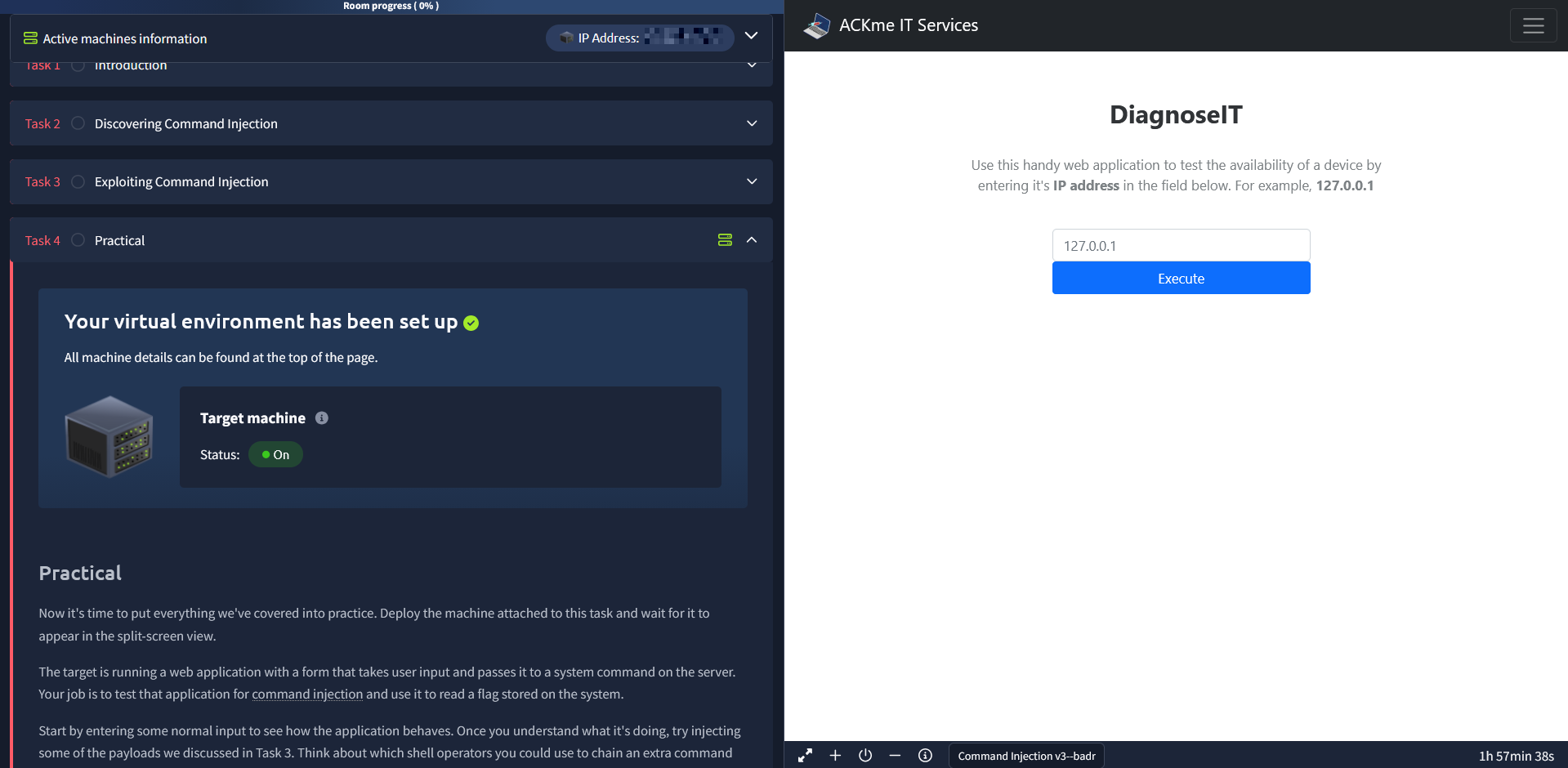
The target is running a web application with a form that takes user input and passes it to a system command on the server. Your job is to test that application for command injection and use it to read a flag stored on the system.
Start by entering some normal input to see how the application behaves. Once you understand what it's doing, try injecting some of the payloads we discussed in Task 3. Think about which shell operators you could use to chain an extra command onto the application's normal behaviour, and experiment with different approaches.
If you get stuck or want to explore more advanced payloads, this cheat sheet is a useful reference.
Your goal is to find the contents of the flag located at /home/tryhackme/flag.txt. There are multiple ways to retrieve it, so I'd encourage you to try more than one.
?Answer the questions below
- What user is this application running as?
- What are the contents of the flag located in /home/tryhackme/flag.txt ?
Remediation
Remediating Command Injection
Command injection can be prevented in a number of ways, ranging from avoiding dangerous functions entirely to carefully filtering and validating user input before it ever reaches a system call. The examples below use PHP, but the same principles apply across virtually every programming language.
Vulnerable Functions
In PHP, several functions interact with the operating system to execute commands via the shell. These include exec(), passthru(), and system(). These functions take input such as a string or user data and will execute whatever is provided on the system. Any application that uses these functions without proper checks will be vulnerable to command injection.
One way to reduce the risk is to restrict what kind of data the application accepts in the first place. Take the following snippet as an example:
<input type="text" id="ping" name="ping" pattern="[0-9]+"> <!-- 1 --><?php
echo passthru("/bin/ping -c 4 " . $_GET["ping"]); // 2
?>At (1), the HTML input field uses the pattern attribute with a regex of [0-9]+, meaning the form will only accept digits. At (2), the value from the ping parameter is passed to passthru() to execute the ping command. Because the input is constrained to numerical characters only, any attempt to inject commands like whoami or shell operators like ; would be rejected by the form before the request is even sent.
This is a good first line of defence, but it shouldn't be your only one. Client-side validation like HTML patterns can be bypassed by an attacker who sends requests directly (for example, using curl or Burp Suite), so server-side validation is essential.
Input Sanitisation
Sanitising user input on the server side is one of the most effective ways to prevent command injection. This means specifying the exact formats or types of data that a user is allowed to submit and rejecting everything else. For example, an input field might only accept numerical data, or the application might strip out special characters like >, &, and / before processing the input.
In the snippet below, the filter_input PHP function is used to check whether the data submitted via the URL query string is a valid number. If it isn't, the application treats it as invalid input and does not process it further.
<?php

if (!filter_input(INPUT_GET, "number", FILTER_VALIDATE_NUMBER)) {

}
This approach ensures that even if an attacker bypasses client-side controls, the server will still reject anything that doesn't match the expected format. The PHP documentation for filter_input covers additional filters and options you can use depending on the type of data your application expects.
Bypassing Filters
It's worth understanding that filters are not always bulletproof. Applications will employ various techniques to sanitise user input, and these filters may restrict you to certain payloads. However, an attacker can sometimes abuse the underlying logic of the application to get around them.
For example, an application might strip out quotation marks or certain characters from user input. In that case, an attacker could represent the same string using its hexadecimal encoding instead:
$payload = "\x2f\x65\x74\x63\x2f\x70\x61\x73\x73\x77\x64"This hex-encoded string decodes to /etc/passwd. When the application processes it, the data arrives in a different format than what the filter expects, but the system still interprets it correctly and produces the same result. The filter sees hex values and lets them through, but the operating system reads /etc/passwd and acts accordingly.
This is why defence in depth matters. No single layer of protection is guaranteed to catch everything. Combining input validation, sanitisation, allowlisting, and the principle of least privilege gives you the best chance of preventing command injection even if one layer is bypassed.
?Answer the questions below
- What is the term for the process of "cleaning" user input that is provided to an application?
Conclusion
Conclusion
Well done for making it to the end of this room. Let's recap what we've covered.
We started by looking at what command injection is and why it's such a high-impact vulnerability. From there, we explored how it happens in real application code by examining PHP and Python examples where user input flows directly into system calls. We then walked through how to detect both blind and verbose command injection, and looked at useful payloads for exploiting it on Linux and Windows systems. On the defensive side, we covered remediation techniques including input validation, sanitisation, and why defence in depth matters when filters can be bypassed. Finally, you put all of that into practice by exploiting a live vulnerable application to retrieve a flag.
As you probably noticed during the practical, there are multiple payloads that can achieve the same result. If you only used one approach to grab the flag, I'd encourage you to go back to Task 4 and try some alternatives. Experimenting with different operators and techniques will build the kind of flexibility you'll need when facing command injection in real-world engagements.
?Answer the questions below
- I can now exploit OS command injection vulnerabilities!
 File Inclusion
 API Pentesting